radio control system
EN
5.1 Transmitter Gimbals with Switch or Button .7
Installation
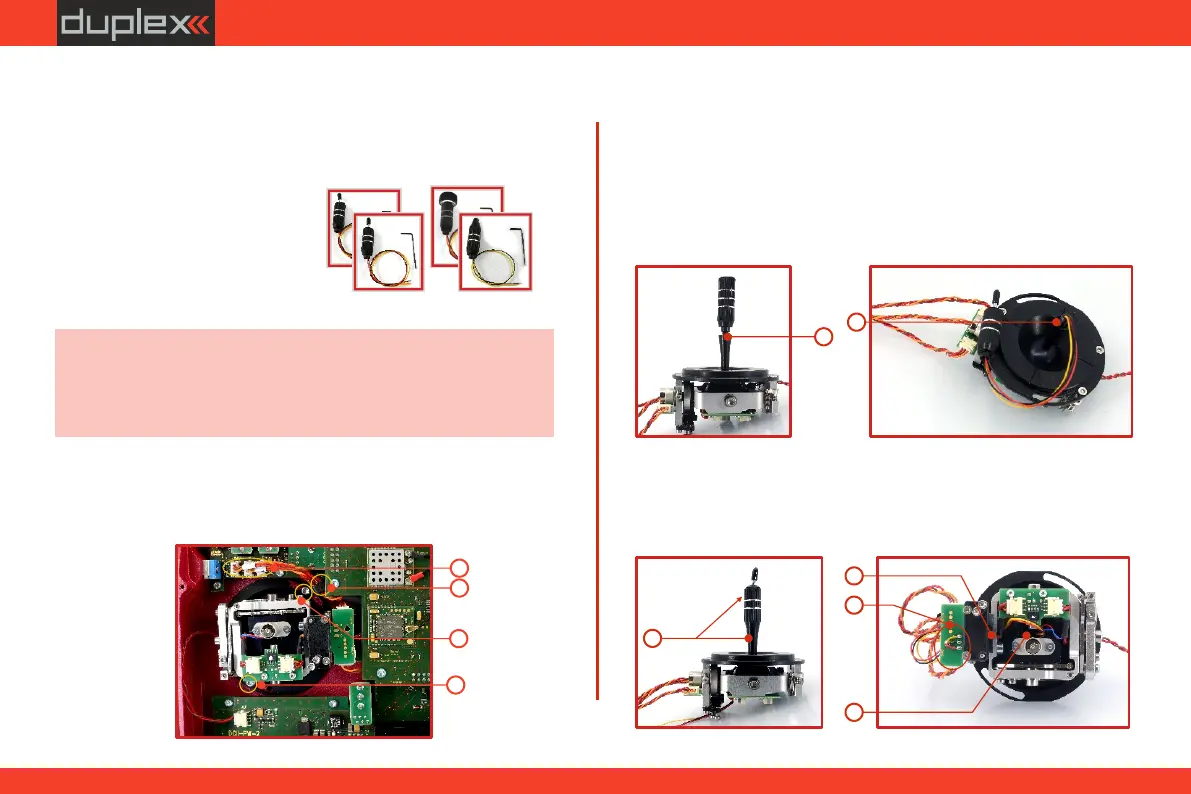
• Stick with 3-position switch
• Stick with push-button
If you want to operate the DC-24 II transmitter using the optional
stick end switch or button functions, you must purchase one or more
of these separately:
• Stick with 2-position switch
• Stick with potenciometer
Advice: For installation of the optional gimbal stick ends with
switches/buttons we recommend that you send your transmitter to
one of the factory authorized service centers or to your authorized
dealer.
1. Switch off the transmitter and remove the 10 screws that secure
the radio back cover. Next, remove the radio back cover.
Be sure to disconnect the transmitter battery pack
connector.
2
XXX
YYY
SSS
3
4
4
8
9
10
11
7
6
4. Remove both machine installation screws for each of the control
stick assemblies.
5. Carefully remove both control stick assemblies. Gently pull in
your direction (toward the transmitter back side). This upgrade
will be done outside of the transmitter case.
2. Disconnect the control stick assembly wires from the Tx board (3
wires ). X, Y, S
3. Remove the stick assembly connecting wires from their holders.
7. Insert the connecting wires through the hollow opening of the
transmitter stick.
6. Unscrew the upper part of the stick assembly (anticlockwise).
8. Adjust length of the stick to suit your flying style.
39



 To Next Page