radio control system
EN
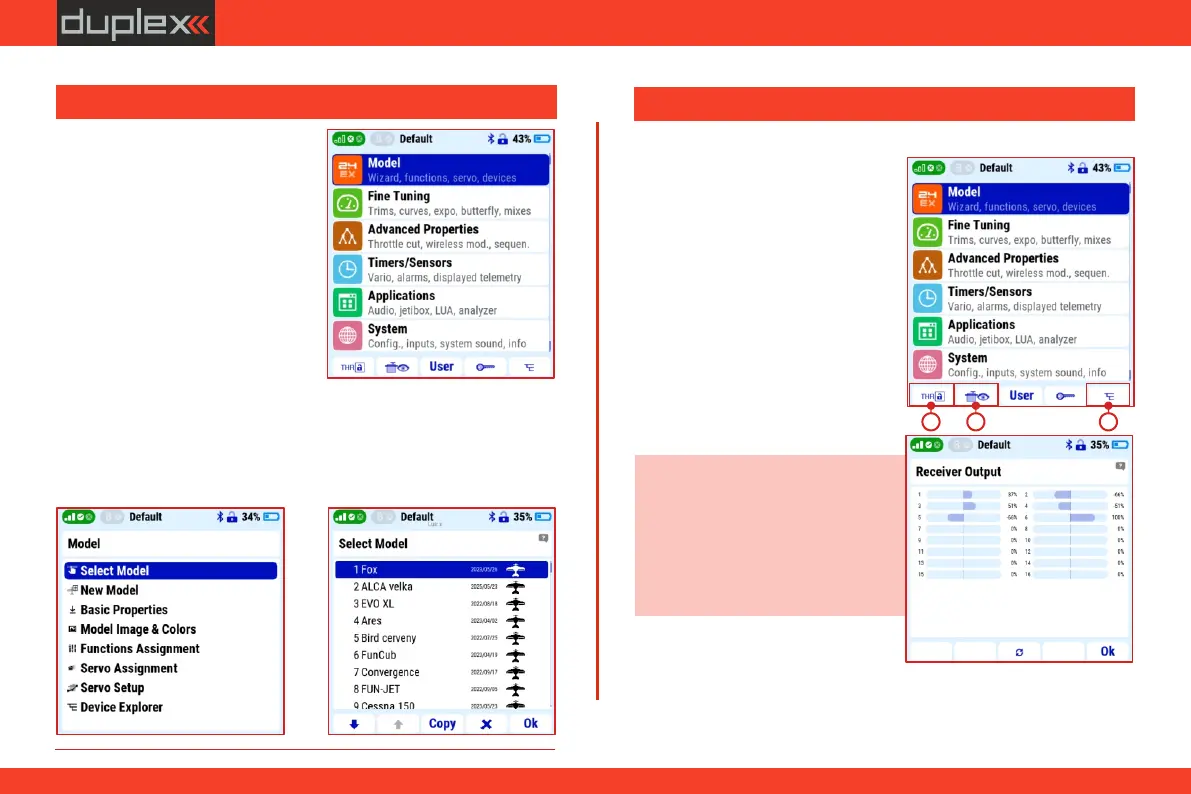
1. The icon with the lock symbol
and the „F1" button is used to
block the throttle controller (see
chapter 3.5). You can also find
safety functions that prevent the
motor from spinning in another
menu of the transmitter (e.g.
" M a i n m e n u / A d v a n c e d
s e t t i n g s / O t h e r m o d e l
options/Motor stop switch").
Note: it is possible to change the
display of values with the „F3"
button under the circular arrows
icon. Deflection can be displayed as
a graph, a table with function
names, percent (%), or as a value in
ms.
Description of the icons of the bottom bar of the main menu:
2. Icon with servo and eye symbol
(„F2" button) opens the server
monitor function.
2. Press the "MENU" button to
enter the main menu of the
transmitter.
The main menu is divided into six
basic groups. These groups branch
in a logical sequence. For example,
the first line is the "Model" option. If
you select this line with the „3D”
controller and press to confirm the
selection, another layer under the
"Model" menu will open. The first
line now has "Model Selection". By
selecting it, the third menu layer opens, in which we can select a
specific model from the transmitter's memory. The architecture of
the transmitter's entire menu is created on the same principle of
vertically and horizontally logically assembled groups.
1. Turn on the transmitter.
3.6 Main menu
3.7 Home screen bottom bar icon features
1
3
2
17



 To Next Page