radio control system
EN
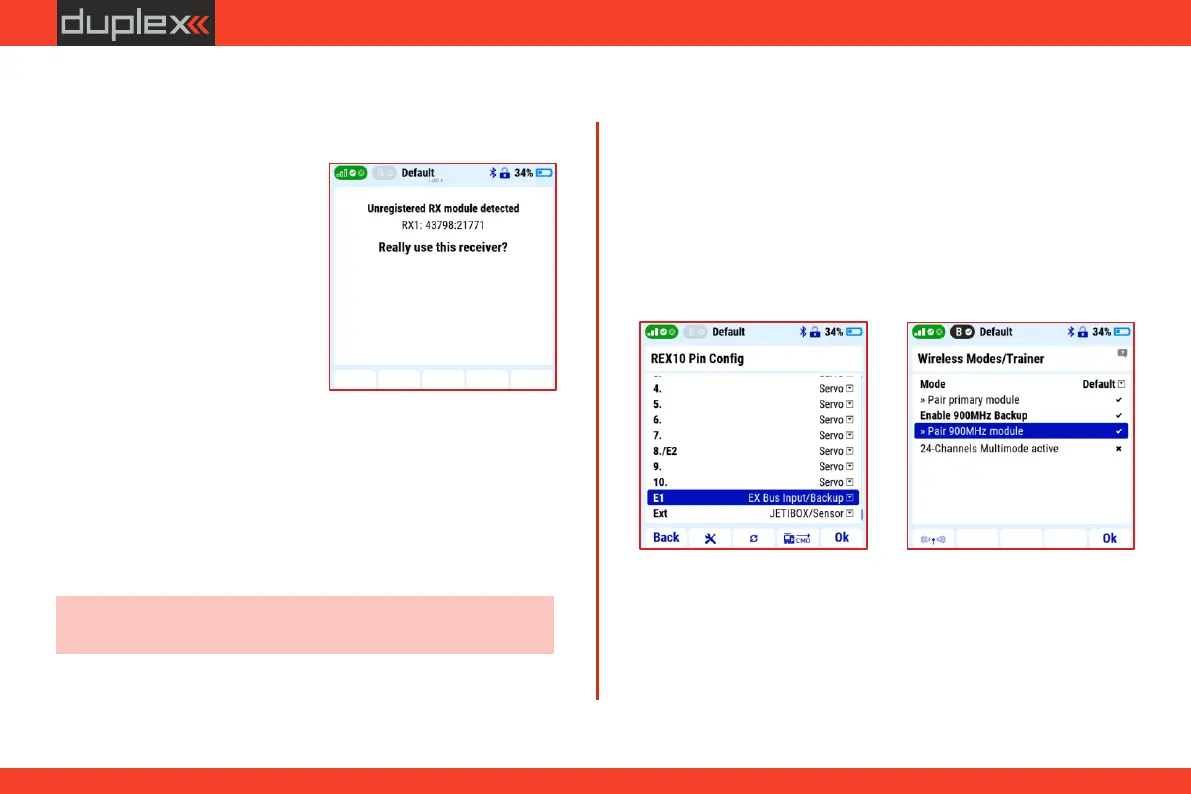
4. Connect the output "1" of the satellite receiver (900MHzNG) by a
three-wire JR cable to the input "E1" of the REX10 receiver.
Verification of the functionality of the dual-band connection
and receiver settings
2. Turn off the transmitter and the receiver.
8. Remove the binding plug from the satellite 900Mhz receiver.
3. Insert the binding plug into the "Ext." output of the Duplex Rsat
900NG satellite receiver.
6. In "Main Menu/Advanced properties/Wireless Modes-Trainer"
select the option "Enable 900MHz backup".
7. Activate the "Pair 900MHz module" option.
1. Choose the option "Disable all except 900MHz backup" and
confirm the choice. Data transmission is now active only in the
900MHz band.
5. Turn on the transmitter and receiver.
With the button "F1 (antenna icon)" in on the same screen
("Wireless Modes"), open a window with options for verifying the
functionality of individual HF modules.
3.11.5 Using a satellite receiver for the 900 Mhz band
The Duplex DC 24II transmitter uses the 2.4GHz band and the
900MHz band. The possibility of using data transmission in two
bands significantly increases the safety of the model's operation.
Therefore, we recommend using dual-band transmission
whenever possible.
3. Connect the power supply to
the receiver.
2. Insert the binding plug into the
"Ext." output of the receiver
( i n c l u d e d i n t h e re c e i v e r
package).
3.11.4 Pairing (Binding) receiver with transmitter
4. Turn on the transmitter and
confirm the binding of the
receiver by the "F5" button.
The basic procedure of binding the receiver with the transmitter.
1. Select the correct model in the
transmitter menu, turn off the
receiver and transmitter.
5. Remove the binding plug from the receiver.
Note: Duplex DC-24II transmitter supports Rsat 900NG backup
receiver.
1. In the transmitter "Main menu/ Model/Device explorer/REX
10/Alternative pin configuration" set the receiver output "E1"
option "EX Bus input/backup".
25



 To Next Page