70 www.jouleuk.co.uk | www.joule.ie
Using the Modul-AIR unit’s display
The Modul-AIR Units Main Menus
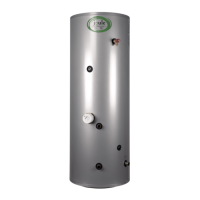
Aer switching on the display, you will be shown the start screen of the Modul-AIR’s user interface. On this
start screen you can choose from four main menus:
The flowchart on the following page shows the contents of the four main menus. The contents of the installer
menu are also highlighted in this flowchart.
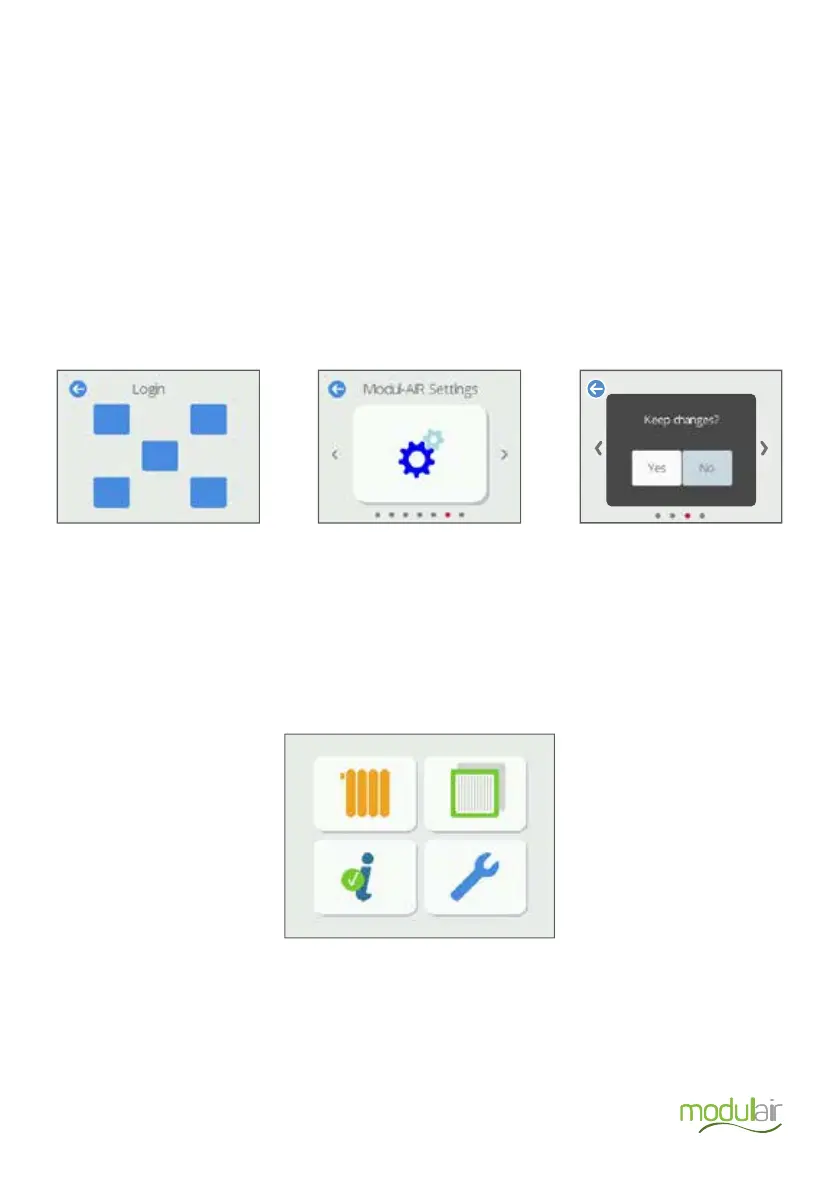
To access and make changes to the Modul-AIR units operation settings you have to first unlock the installer
menu by entering a password. This password is entered by performing a number of tasks in a fixed sequence
on the display. In order to receive this drawing pattern you first must have successfully completed the Joule
Modul-AIR installation training course
To Navigate through the menus on the Modul-AIR unit use the le and right arrows on the display. The arrow
at the top le of the screen is used to return to a higher menu.
If you have changed a setting and want to exit the screen, a dialog box will appear with the text ”Are you
sure?”
• Press Yes to save the setting.
• Press No not to save the setting.
The installer menu access screen
Running hours Filter Control
Information Settings
The navigation button. Confirming a new setting.


 To Next Page