89Modul-AIR Exhaust Air Heat Pump Installation Guide
Reset Flow Protection
If the water temperature in the system exceeds the pre-set value (75°C), the need could arise where the
over-temperature reset button may need to be reset. An error code 71 on the Modul-AIR would signal this.
The procedure to reset the flow protection is as follows:
1. Check whether the central heating system is properly vented. To do this, operate the manual air vent
on top of the Moduł-AIR and start the venting cycle.
If only water comes out of the deaerator, the system is properly vented. If air also comes out of the vent, the
central heating system must be vented again.
2. Disconnect the power supply to the Modul-AIR
3. lf present, disconnect the power supply to the Green Comfort Module.
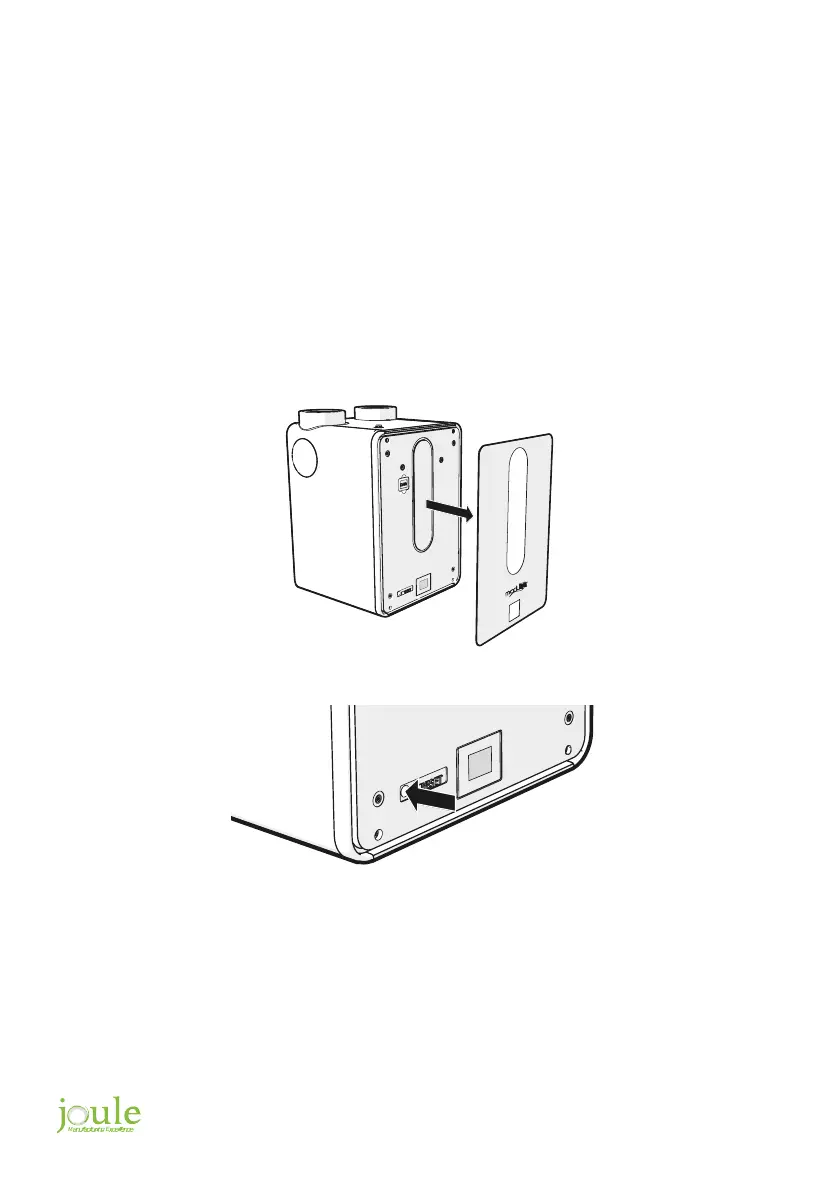
4. Remove the front plate from the Modul-AIR
5. Operate the reset button on the backup heater. Use a pen or a Phillips screwdriver to do this
6. Switch the Modul-AIR and Green Comfort Module on again.
7. Operate the room thermostat and ensure a heat demand of at least 3
o
C above the current room
temperature. This causes the backup water heater to start operating.
8. Check if sensor error 71 has been resolved. If not, go back to step 1.
9. Set the room thermostat back to the correct temperature.


 To Next Page