ACU-5000 Operations Manual
Interoperability Now 9-3
Note the information line at the bottom left of the screen shot. Various pertinent messages are
placed here; each refers either to the current state (as with the “System Ready” message above)
or the status of the previous operation.
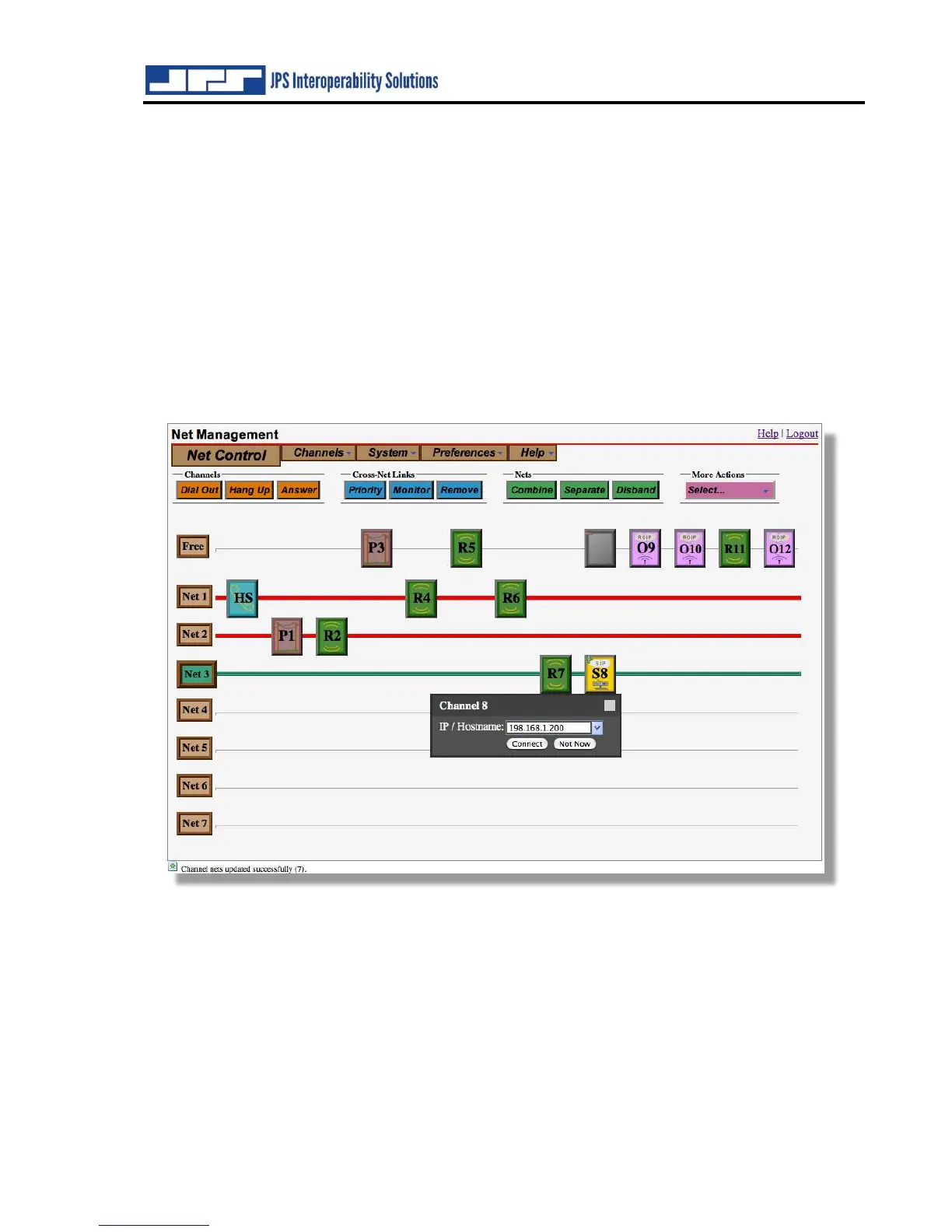
Note: “Drag-and-Drop” procedures can also be used to create and disband nets. Simply drag an
icon to a net line to place it in a net, or from a net to the ‘Free’ net line to take it out of the net.
An entire net can be freed up by dragging the net icon (for example “Net 2”) to the Free icon.
9.1.3 Dial Out Operation
All channel types other than the ‘Radio’ type may Dial Out to select the external link destination
(a phone number for a PSTN channel, or an IP address for a SIP or RoIP channel). To cause one
of these channels to dial out, click the 'Connect' button, then click the channel icon. You will be
prompted for a destination (if applicable). If a channel is configured to 'Require Connect on Link',
you will be automatically prompted to dial out whenever the channel is moved into a net.
Note the grayed-out channel 8 SIP channel icon in the Free row. This indicates that
communications can’t begin until the SIP channel makes an external IP connection. This occurs
after the IP address is entered and the “Connect Now” button has been clicked (see below).



 To Next Page