7 of 40
Programming (continued)
Set Automatic Program
Set the automatic PROGRAM
for each group of zones
(valves) by completing the
following three steps:
1. Set watering START TIMES
® For each start time, all the
zones (valves) selected for
the PROGRAM will come
on in sequential order
® If two start times are
set, the zones (valves)
will come on twice
2. Set WATER DAYS
3. Set ZONE RUNTIME
(durations)
This controller has been
designed for quick intuitive
programming. Remember
these simple tips for hassle
free programming:
® One push of a button
will increment one unit
® Holding a button down will
fast scroll through units
® During the programming,
only flashing units
are able to be set
® Adjust flashing units
using or
® Press or to scroll
through settings as desired
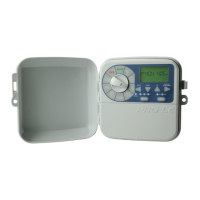
® The MAIN DIAL is
the primary device for
selecting an operation
® Press to select different
PROGRAMS. Each push on
this button will increment
one PROGRAM number



 To Next Page