EasyManua.ls Logo

K-Rain KRC 9 - Set Current Time, Day and Date

Default Icon
40 pages
Print Icon
To Next Page IconTo Next Page
To Previous Page IconTo Previous Page
Loading...
8 of 40
Set Current Time, Day and Date
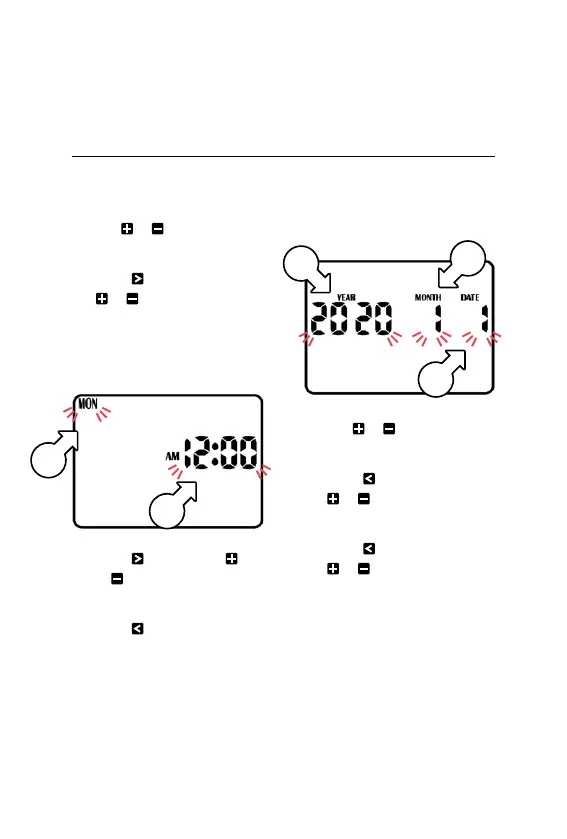
1. Turn the MAIN DIAL to
CLOCK-CALENDAR
2. Use or to adjust the
flashing minutes [a]
3. Press and then use
or to adjust the
flashing hours [a]
® AM/PM must be
set correctly.
4. Press and then use
or to adjust the flashing
days of the week [b]
5. Press repeatedly
until the calendar date
appears on the display
with the year [c] flashing
® The calendar only needs
to be set when selecting
odd/even day watering
6. Use or to adjust
the flashing year [c]
7. Press and then use
or to adjust the
flashing month [d]
8. Press and then use
or to adjust the
flashing date [e]
® To return to the clock, turn
the dial back to AUTO
Programming (continued)
b
a
c
d
e

Related product manuals