EasyManua.ls Logo

K-Rain KRC 9 - Looping Setup

Default Icon
40 pages
Print Icon
To Next Page IconTo Next Page
To Previous Page IconTo Previous Page
Loading...
23 of 40
Other Features (continued)
Looping Setup
1. Turn the MAIN DIAL to
ZONE RUN TIMES
2. Repeatedly press to
access PROGRAM5
settings
3. Set the RUN TIMES as
desired for each ZONE
(see Set Run Times)
4. After setting the
RUNTIMES, press
repeatedly until the display
reads LOOP OFF
5. Press to enable looping
L The display will
read LOOP ON
L Press to proceed to
looping settings, where
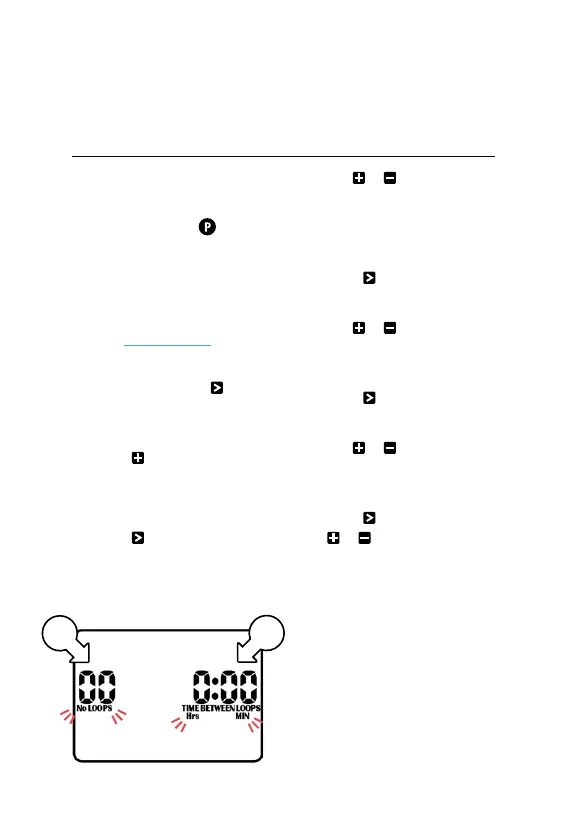
NO LOOPS [y] (number
of loops) will be flashing
6. Use or to adjust
the number of loops
® This controller has a
max of 99 loops
7. Press and HrsMIN
will flash [z]
8. Use or to toggle
between Hrs MIN
or MIN SECS
9. Press to advance to
TIME BETWEEN LOOPS
10. Use or to adjust
the MIN or SECS
between each loop
11. Press and use
or to adjust the
Hrs or MIN between
each loop
y
z

Related product manuals