1918
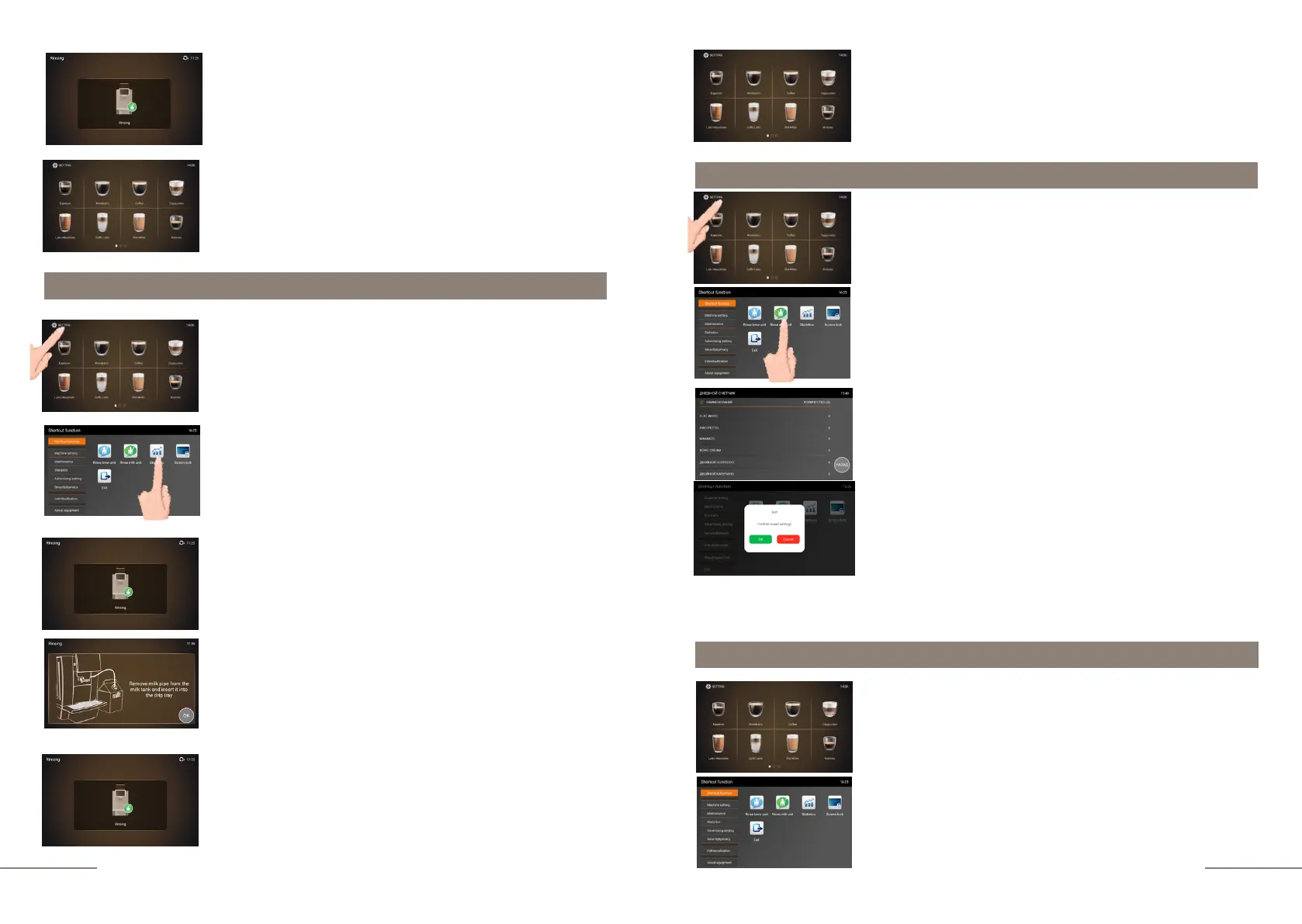
Shortcut function. "RINS MILK UNIT" touch icon
Display message: RINSING.
The rinsing process must not be interrupted. A small amount
of hot water is dispensed through the coffee spout.
Be careful!
At the end of the process, the touch icons for preparing
beverages will appear on the display.
At the end of the process, the touch icons for preparing
beveraged will appear on the display.
The coffee machine is ready to go. Beverage preparation
touch icons are lit.
Press and hold the "SETTINGS" button for 2 seconds to
enter the programming menu.
The SHORTCUT FUNCTION tab is highlighted.
On the right, the shortcut function touch icons are lit.
To start rinsing, click on the RINS MILK UNIT icon.
Display message: RINSING.
The rinsing process must not be interrupted. A small amount
of hot water is dispensed through the coffee spout.
Be careful!
Display message: REMOVE THE MILK PIPE FROM THE
MILK TANK AND INSERT IT INTO THE DRIP TRAY.
Remove the milk pipe from the milk bag, disconnect it from
the thermos container and insert it into the round hole in the
drip tray. Click "OK".
Display message: RINSING.
A small amount of hot water is dispensed through the
cappuccinatore. Be careful!
Shortcut function. "STATISTICS" touch icon
The coffee machine is ready to go. Beverage preparation
touch icons are lit.
Press and hold the "SETTINGS" button for 2 seconds to
enter the programming menu.
The SHORTCUT FUNCTION tab is highlighted.
On the right, the shortcut function touch icons are lit.
To quickly view the daily counter, the number of drinks
prepared during the day, click on the STATISTICS icon.
The total number of drinks prepared is displayed in the upper
right corner. For a detailed view of each beverage, swipe up
from the bottom of the display.
To exit the sub-menu, press BACK.
To exit the menu, press the EXIT touch icon and confirm your
choice by pressing the OK button.
*
NOTE: The daily counter is reset at 00:00 min. If the current time is 08:00 and the coffee
machine time is set to 21:00, then the daily counter will be reset in 3 hours.
Shortcut function. "SCREEN LOCK" touch icon
The coffee machine is ready to go. Beverage preparation
touch icons are lit.
Press and hold the "SETTINGS" button for 2 seconds to
enter the programming menu.
The SHORTCUT FUNCTION tab is highlighted.
On the right, the shortcut function touch icons are lit. To
eliminate the possibility of accidentally starting a
beverage, press the SCREEN LOCK icon.



 To Next Page