5958
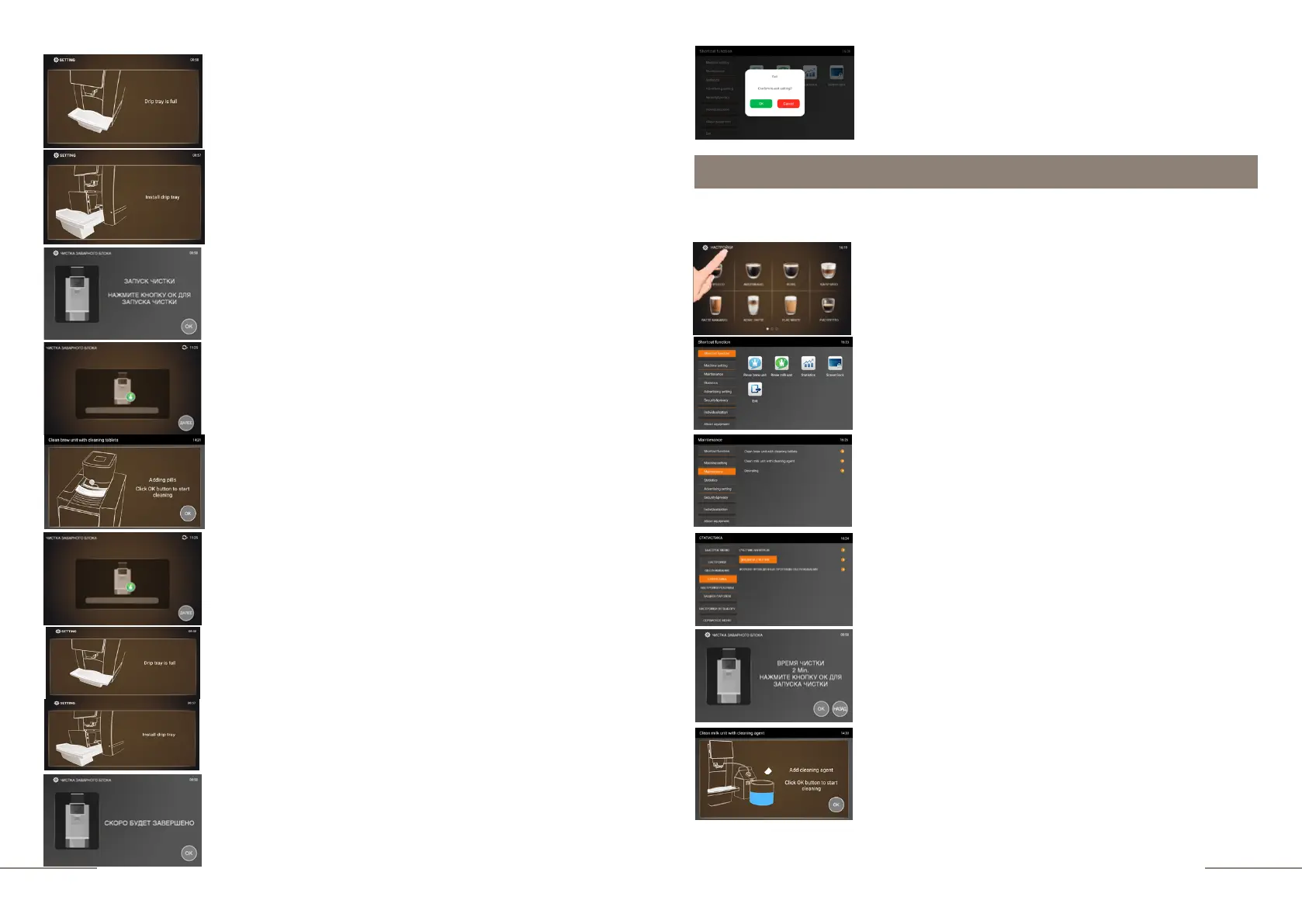
Display message: DRIP TRAY IS FULL. Pull out the tray,
remove the coffee grounds and empty the waste water.
Display message: INSTALL THE DRIP TRAY.
This message will remind you that after emptying, the drip
tray must be placed in the coffee machine. Place a container
with a capacity of 0.7 l under the coffee spout.
Display message: CLEANING START. PRESS THE OK
BUTTON TO START CLEANING. Fulfill the requirement of
the coffee machine.
The status bar of the cleaning process is lit.
Be careful! A small amount of hot water comes out of the
coffee spout.
Display message ADDING TABLETS. CLICK OK BUTTON
TO START CLEANNG. Open the compartment cover and
drop the cleaning tablet into it. Close the compartment
cover. Press the "OK" button to start cleaning.
Display message: CLEANING BREW UNIT WITH
CLEANING TABLETS.
Upon completion of the cleaning process, the display prompts:
DRIP TRAY FULL / INSTALL DRIP TRAY. Fulfill these
requirements.
Display message: WILL BE COMPLETED SOON.
If you are using the milk preparation function, the Auto Cappuccino system must be
cleaned daily to ensure that it functions properly.
Cleaning the milk unit.
Press CLEAN MILK UNIT WITH CLEANING AGENT tab.
Display message: CLEANING TIME 2 Min PRESS THE OK
BUTTON TO START CLEANING.
Click "OK" to start the cleaning process.
Display message: ADD CLEANING AGENT. CLICK OK
BUTTON TO START CLEANING. Pour 250 ml of water into a
separate container and add the cleaning agent to it. Please refer
to the instructions that come with it for the correct dosage. Dip
the milk tube into the prepared solution.
Place an empty 0.7 L container under the combination spout.
Click "OK" to start the cleaning process.
To exit the menu, press the EXIT touch icon and confirm
your choice by pressing the OK button.
Select the MAINTENANCE tab.
The MAINTENANCE tab is highlighted.
The coffee machine is ready. Beverage preparation touch
icons are lit.
Press and hold the "SETTINGS" button for 2 seconds to
enter the programming menu.
The SHORTCUT FUNCTION tab is highlighted.
On the right, the shortcut function touch icons are
lit.



 To Next Page