3332
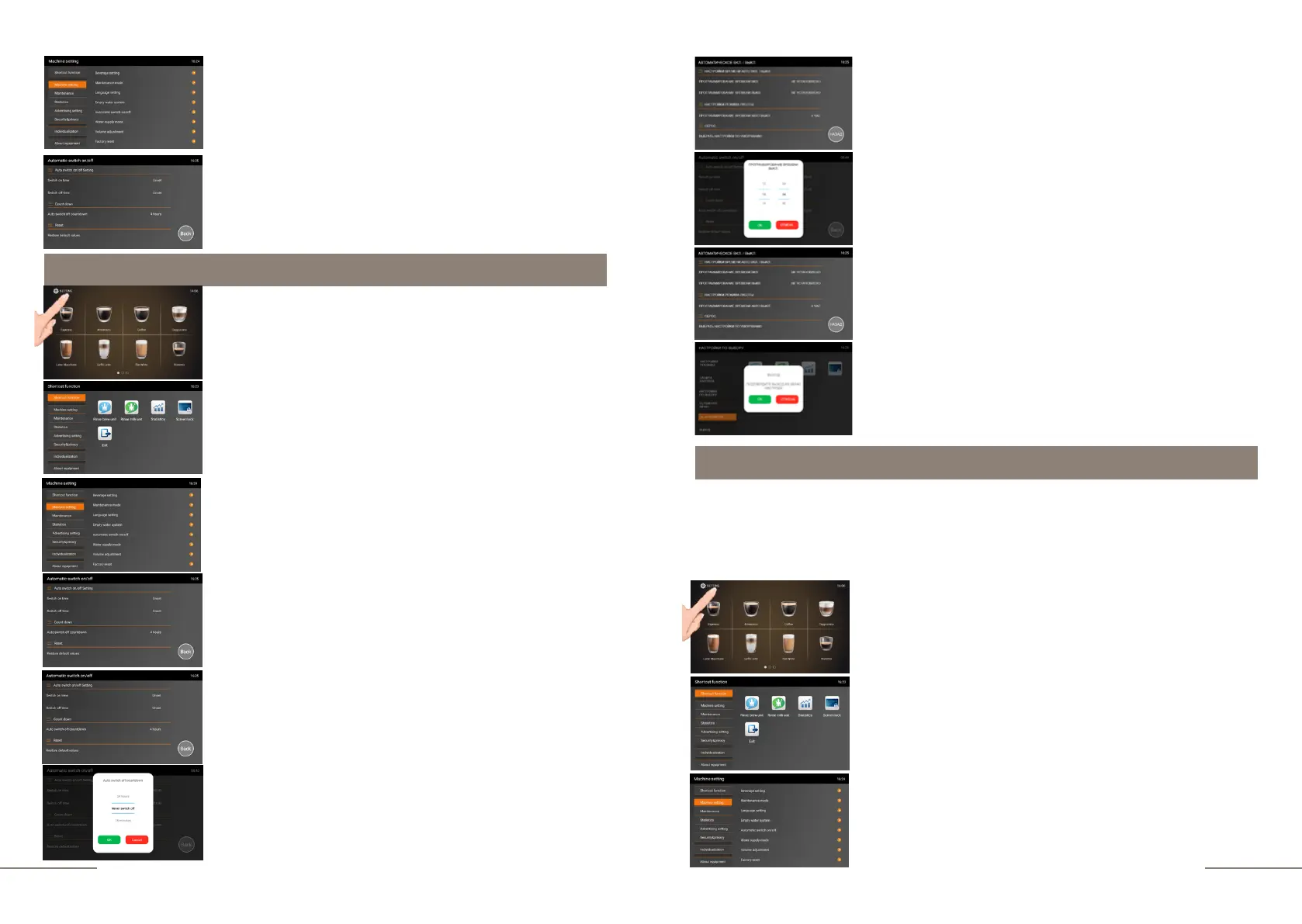
The coffee machine is ready. Beverage preparation touch
icons are lit.
Press and hold the "SETTINGS" button for 2 seconds to
enter the programming menu.
The SHORTCUT FUNCTION tab is highlighted.
On the right, the shortcut function touch icons are
lit.
Select the MACHINE SETTINGS tab and activate it.
The MACHINE SETTINGS tab is highlighted.
Press the AUTOMATIC SWITCH ON/OFF tab.
The AUTO SWITCH ON/OFF TIME SETTINGS window opens.
By default, the auto on and off times are not set.
To set the automatic switch-on time, press SWITCH ON TIME
tab.
The time programming window will open. Select the desired
time in hours and minutes and confirm your choice by
pressing the "OK" button.
Programming ON/OFF time settings
Press the AUTOMATIC SWITCH ON/OFF tab.
A sub-menu with tabs will open:
- Auto switch on/off setting
- Switch off time
- Reset
The coffee machine is ready. Beverage preparation touch
icons are lit.
Press and hold the "SETTINGS" button for 2 seconds to
enter the programming menu.
The SHORTCUT FUNCTION tab is highlighted.
On the right, the shortcut function touch icons are
lit.
Select the MACHINE SETTINGS tab and activate it.
The MACHINE SETTINGS tab is highlighted.
To set the automatic switch-on time, press SWITCH OFF TIME
tab.
The time programming window will open. Select the desired
time in hours and minutes and confirm your choice by
pressing the "OK" button.
Press BACK to exit the time programming menu.
To exit the menu, press the EXIT touch icon and confirm your
choice by pressing the OK button.
Operating time settings
If the automatic switch-off function is activated, after completing the last operation, the
coffee machine switches off automatically after the specified time has elapsed. In this
model of the coffee machine, you can program the interval (15 min., 30 min., 1 hour - 24
hours interval 1 hour, as well as deactivate the automatic switch-off time).



 To Next Page