3130
When the setting is complete, the coffee machine enters
beverage preparation mode.
LANGUAGE SETTING
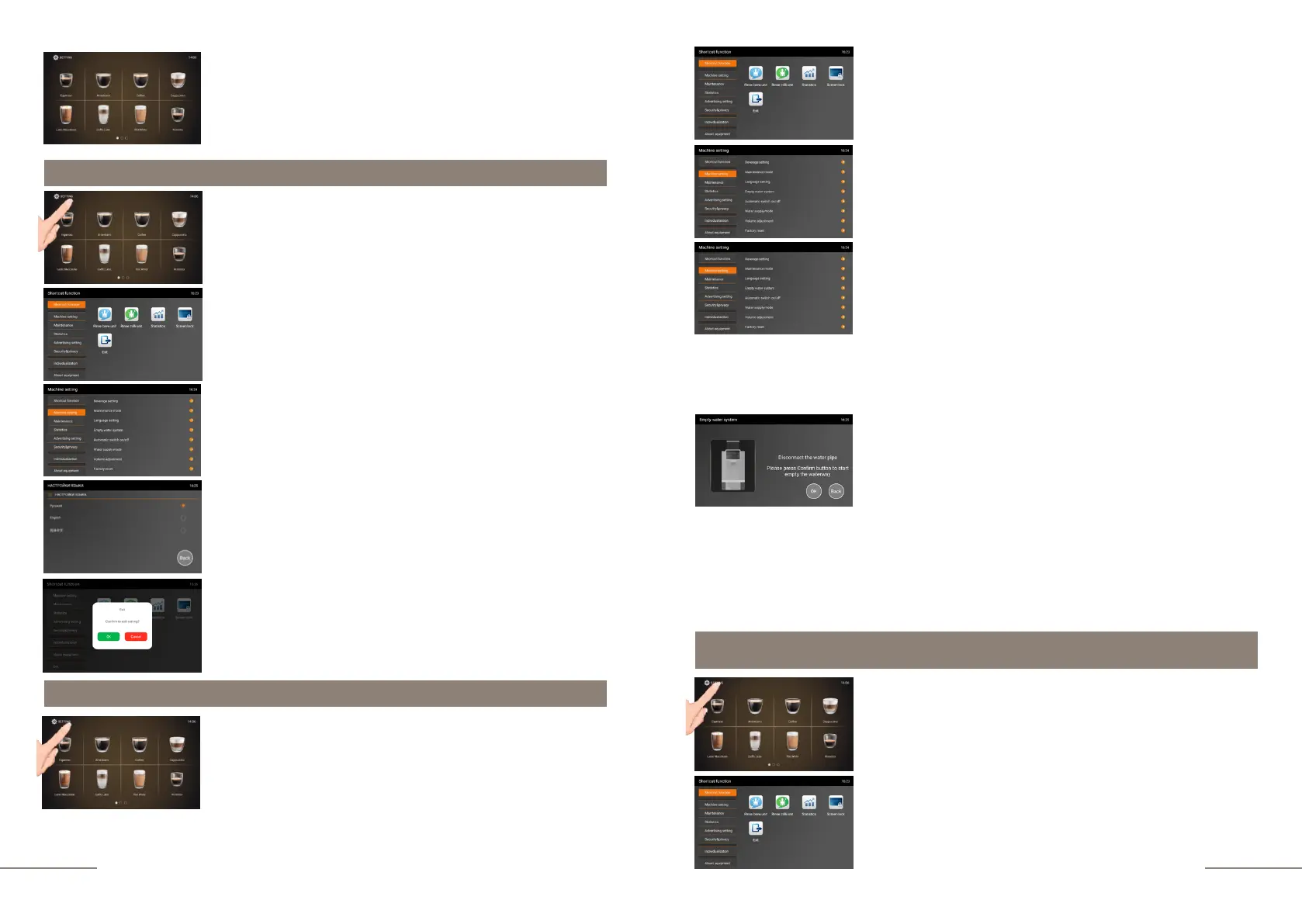
The coffee machine is ready. Beverage preparation touch
icons are lit.
Press and hold the "SETTINGS" button for 2 seconds to
enter the programming menu.
The SHORTCUT FUNCTION tab is highlighted.
On the right, the shortcut function touch icons are
lit.
Select the MACHINE SETTINGS tab and activate it.
The MACHINE SETTINGS tab is highlighted.
Select the LANGUAGE SETTING tab.
The display shows the languages that can be selected. Click
the icon of the desired language. To exit the sub-menu, press
BACK.
To exit the menu, press the EXIT touch icon and confirm your
choice by pressing the OK button.
Emptying water system (Emptying the System for Transportation)
The coffee machine is ready. Beverage preparation touch
icons are lit.
Press and hold the "SETTINGS" button for 2 seconds to
enter the programming menu.
The coffee machine is ready. Beverage preparation touch
icons are lit.
Press and hold the "SETTINGS" button for 2 seconds to
enter the programming menu.
The SHORTCUT FUNCTION tab is highlighted.
On the right, the shortcut function touch icons are
lit.
The SHORTCUT FUNCTION tab is highlighted.
On the right, the shortcut function touch icons are
lit.
Select the MACHINE SETTINGS tab and activate it.
The MACHINE SETTINGS tab is highlighted.
Enter the EMPTY WATER SYSTEM tab.
Display message: Remove water tank.
Fulfill the requirement of the coffee machine.
Display message: WATER TANK REMOVED. PLEASE
PRESS CONFIRM BUTTON TO START EMPTY THE
WATERWAY
Press the "OK" button to confirm the start of the process.
Display message: EMPTY WATER SYSTEM
The system is drying up.
A small amount of water is drained into the waste water collection
tray.
At the end of the process, the coffee machine turns off.
Automatic switch ON/OFF.



 To Next Page