98
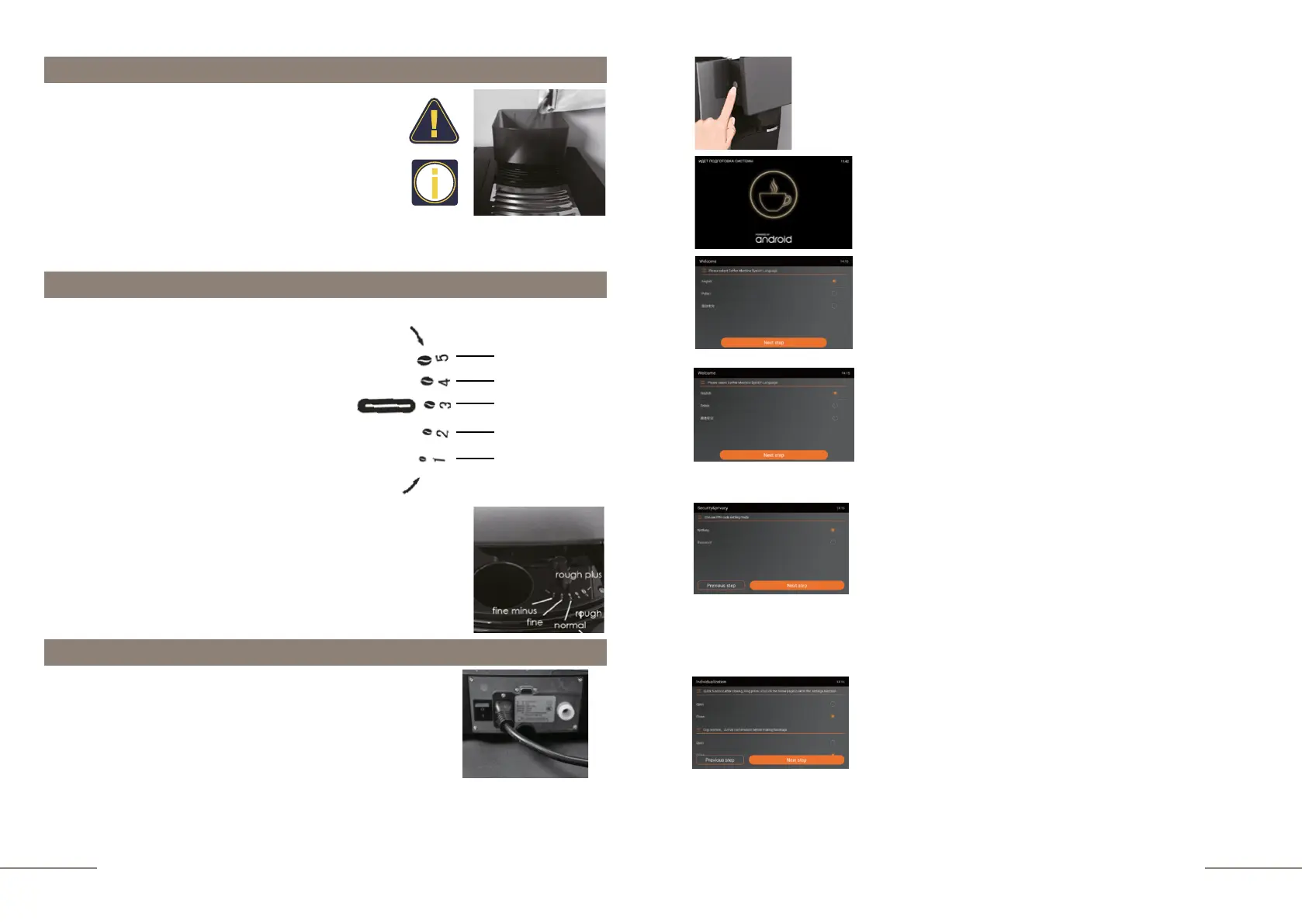
Press the ON/OFF button to activate the appliance.
Display message: "WELCOME". Next, you will be asked
to go through several steps to set up the coffee machine's
operating modes.
Display message: "SELECT LANGUAGE".
The display shows the languages that can be selected. Click
the icon of the desired language, for example "English". To
move to the next item, touch the NEXT STEP icon.
Message on the display: "SELECT THE WATER SUPPLY
MODE". In this menu item, you can choose whether your
coffee machine will take water from the water tank or will be
connected to the tap water supply. Initially, the coffee machine
is set to use water from the tank. Therefore, before connecting
to the tap water supply, perform the first switch-on. To move
to the next item, touch the NEXT STEP icon.
Display message: "SECURITY&PRIVACY".
In this item you can set and activate a password to enter the
SETTINGS menu. Display message: "CHOOSE PIN CODE
SETTING MODE". When activating the MODE WITH
PASSWORD , a window will open
– request for input 6 characters to create a password and a
prompt for password confirmation by re-entering. Press OK to
activate the password mode.
To move to the next item, touch the NEXT STEP icon.
Display message: "INDIVIDUALIZATION". At this point, you
can:
-Select conditions for entering the SETTINGS menu
-Activate cup setting confirmation before cooking
-Enable access to change the recipe during the preparation
process
-Activate the protection mode against accidental ON / OFF.
Filling the coffee bean hopper
•
Never put green (unroasted) coffee beans, coffee
flavored with oils or roasted with added sugar into the
hopper.
•
Only roasted coffee beans may be placed in the
hopper. Never fill the hopper with rice, soybeans,
chocolate, nuts, sugar and spices.
•
Never place foreign objects in order to avoid damage to the coffee grinder.
•
Do not pour liquids into the bean hopper.
Grinder adjustment lever for setting the level of grinding
•
The level of grinding can be continuously
adjusted depending on the degree of
roasting of the coffee beans used.
•
Please adjust the grinding level with the
grinder adjustment lever only when the coffee
grinder is in operation, in order to avoid
damage to the grinder.
•
The adjustment of grinding wheel will be
effective only after making two or more cups
of coffee.
•
It is recommended to set a coarser grind for
dark roast beans and a finer grind for light
roast beans.
•
When the grinding level is set correctly, coffee
is dispensed evenly from the coffee spout.
Power on
1. Connect the power cord to the coffee machine
2. Insert the power plug into the socket.
3. Connect the coffee machine to the mains using the
power switch on the rear panel.
4. Pour water into the water tank and pour beans into the
coffee bean hopper.
Very coarse
Coarse
Medium
Fine
Very fine



 To Next Page