6160
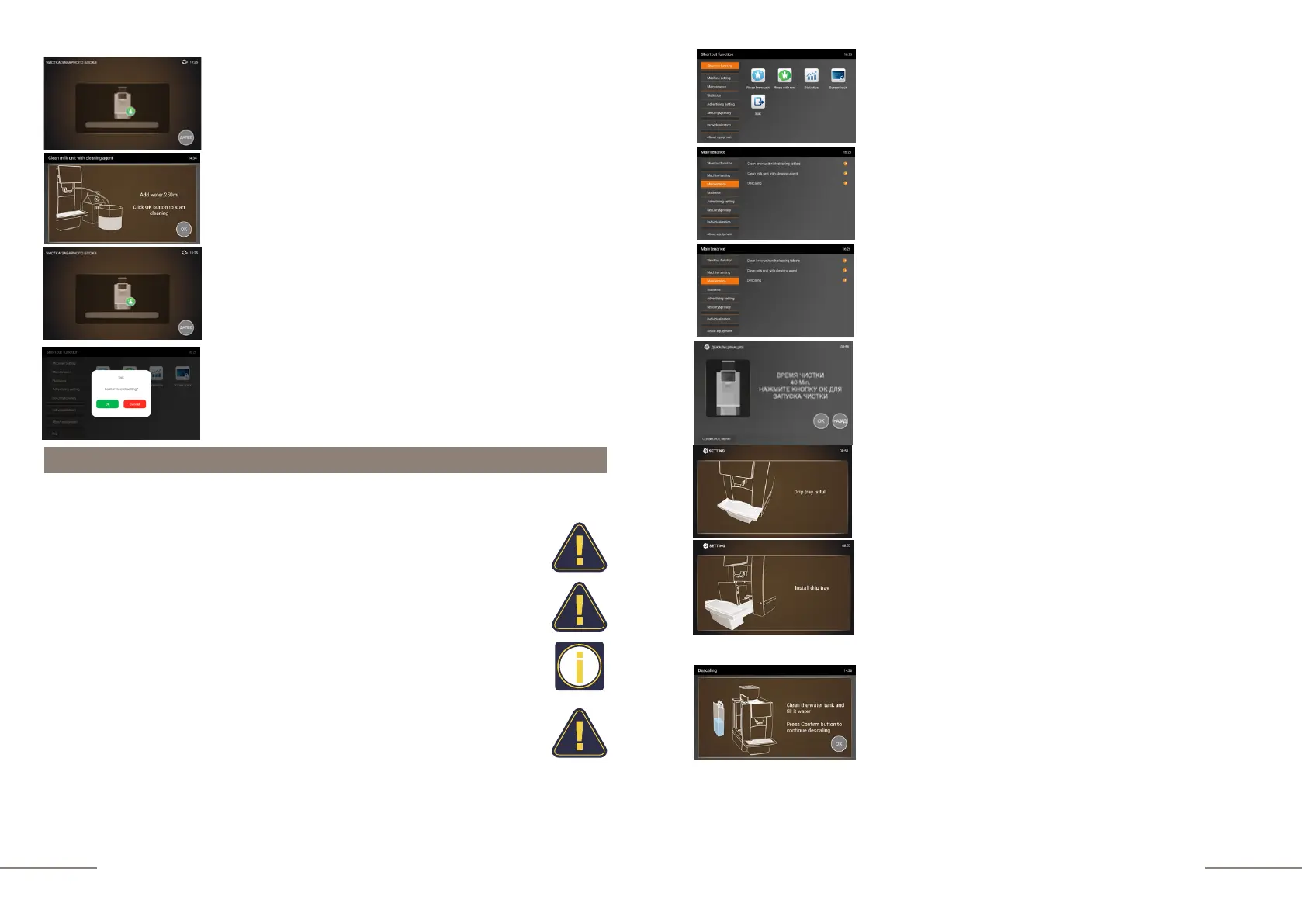
The coffee machine is ready. Beverage preparation touch icons are lit.
Press and hold the "SETTINGS" button for 2 seconds to enter the programming menu.
Display message: CLEAN MILK UNIT WITH
CLEANING AGENT.
Display message: ADD WATER 250ml. CLICK OK BUTTON
TO START CLEANING. Prepare the specified volume of
clean water to rinse the system of cleaning agent. Press the
"OK" button to complete the process.
Display message: CLEAN MILK UNIT WITH
CLEANING AGENT.
Descaling the coffee machine
•
The daily usage will cause lime deposits in coffee machine. The
depositing rate varies with the local water hardness.
•
Decalcifier contains acidic substances that would irritate your eyes and skin, so
you must strictly comply with the security warnings noted by manufacturer on
the packaging. If you have contacted it with your eyes or skin by accident,
please wash it with clean water immediately.
•
To prevent damage to your coffee machine, use only original cleaning
products.
•
A complete descaling cycle takes 40 minutes.
•
Interrupting the descaling process may damage the coffee machine.
Once you have started the descaling process, please do not interrupt it!
Dissolve 1 portion of KAFFIT.com cleaning agent in 1 liter of water (coffee
machine with a 1.8 l tank).
Dissolve 2 portions of KAFFIT.com cleaning agent in 2 liters of water (coffee
machine with a 6.0 l tank).
Select DESCALING.
Displaly message: CLEANING TIME 20 MIN. PRESS OF TO
START THE DESCALING PROSSES.
Display message: REMOVE THE MILK UNIT TUBE FROM
THE MILK CONTAINER.
Display message: CLEAN THE WATER TANK AND FILL IT
WITH WATER. PRESS CONFIRM BUTTON TO CONTINUE
DESCALING.
Dissolve the required amount of cleaning agent in 1 liter or 2 liters
of water (depending on the configuration of the coffee machine),
then pour the resulting solution into the empty water tank and
place it in the coffee machine.
During the first cleaning step, place a 0.7 l container under the
coffee spout. Press the "OK" button.
To exit the menu, press the EXIT touch icon and confirm
your choice by pressing the OK button.
Select the MAINTENANCE tab.
The MAINTENANCE tab is highlighted.
The SHORTCUT FUNCTION tab is highlighted.
On the right, the shortcut function touch icons are
lit.
Display message: DRIP TRAY IS FULL. Pull out the tray,
remove the coffee grounds and empty the waste water.
Display message: INSTALL THE DRIP TRAY.
This message will remind you that after emptying, the drip
tray must be placed in the coffee machine. Place a container
with a capacity of 0.7 l under the coffee spout.



 To Next Page