4140
To exit the sub-menu press BACK.
Statistics
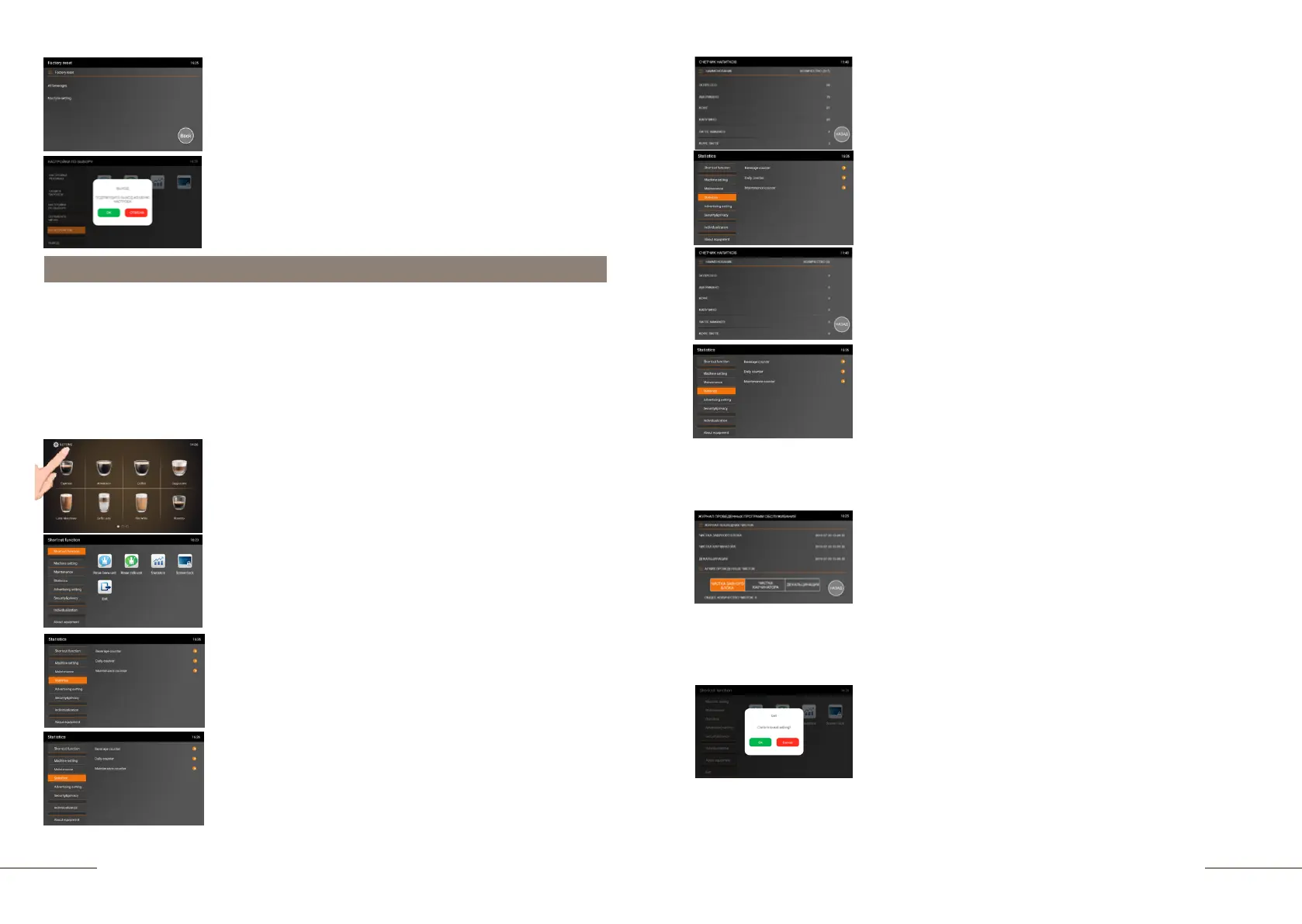
Select the MACHINE SETTINGS tab and activate it.
The MACHINE SETTINGS tab is highlighted.
To view information about the number of drinks prepared,
press the BEVERAGE COUNTER tab.
In this menu item, you can view information about all drinks prepared for the entire period
of using the coffee machine and maintenance programs carried out, as well as information
about beverages prepared during the current day and a calendar of service programs
performed.
Since each coffee machine has been tested at the factory, when you first turn it on, you
can detect a certain number of prepared servings by the counter. In order to view
information about the operation of the coffee machine, you must perform the following
steps:
The top right corner shows the total number of beverages
prepared. For a detailed view of each beverage, swipe up
from the bottom of the display. To exit the sub-menu, press
BACK.
To view information about the number of beverages prepared
during the day, choose the DAILY COUNTER tab.
The top right corner shows the total number of beverages
prepared. For a detailed view of each beverage, swipe up
from the bottom of the display. To exit the sub-menu, press
BACK.
To view information about the number of maintenance
programs performed and the log of recent cleanings, press
the MAINTENANCE COUNTER tab.
In the last cleaning log, you can see the date and time of the
last maintenance programs. In the archive of the cleanings
carried out - the number of programs carried out for the entire
period of time. To check the number of cleanings of the
brewing unit, activate the "CLEAN BREW UNIT WITH
CLEANING TABLETS" tab. The total number of completed
programs is displayed below. To check the number of
cleanings of the milk unit, activate the CLEAN MIK UNIT
WITH CLEANING AGENT tab. The total number of completed
programs is displayed below. To check the number of
descaling performed, activate the DESCALING tab. The total
number of completed programs is displayed below. To exit the
sub-menu, press BACK.
To exit the menu, press the EXIT touch icon and confirm your
choice by pressing the OK button.
To exit the menu, press the EXIT touch icon and confirm your
choice by pressing the OK button.
The coffee machine is ready. Beverage preparation touch
icons are lit.
Press and hold the "SETTINGS" button for 2 seconds to
enter the programming menu.
The SHORTCUT FUNCTION tab is highlighted.
On the right, the shortcut function touch icons are
lit.



 To Next Page