5756
1.
Cut out a circle with a diameter of 8 cm in the countertop.
2.
Remove the ground coffee container from the drip tray.
The coffee machine is ready to go.
Over time, after about 40 servings, the coffee machine will issue a request to empty the
coffee grounds "EMPTY COFFEE CONTAINER". Beverage preparation is not possible.
To reset the request, pull out the tray for a few seconds and put it back. Beverage
making is now available.
Disposal of coffee waste
Your K96L coffee machine is available for direct disposal of coffee grounds under
the countertop. For this you need:
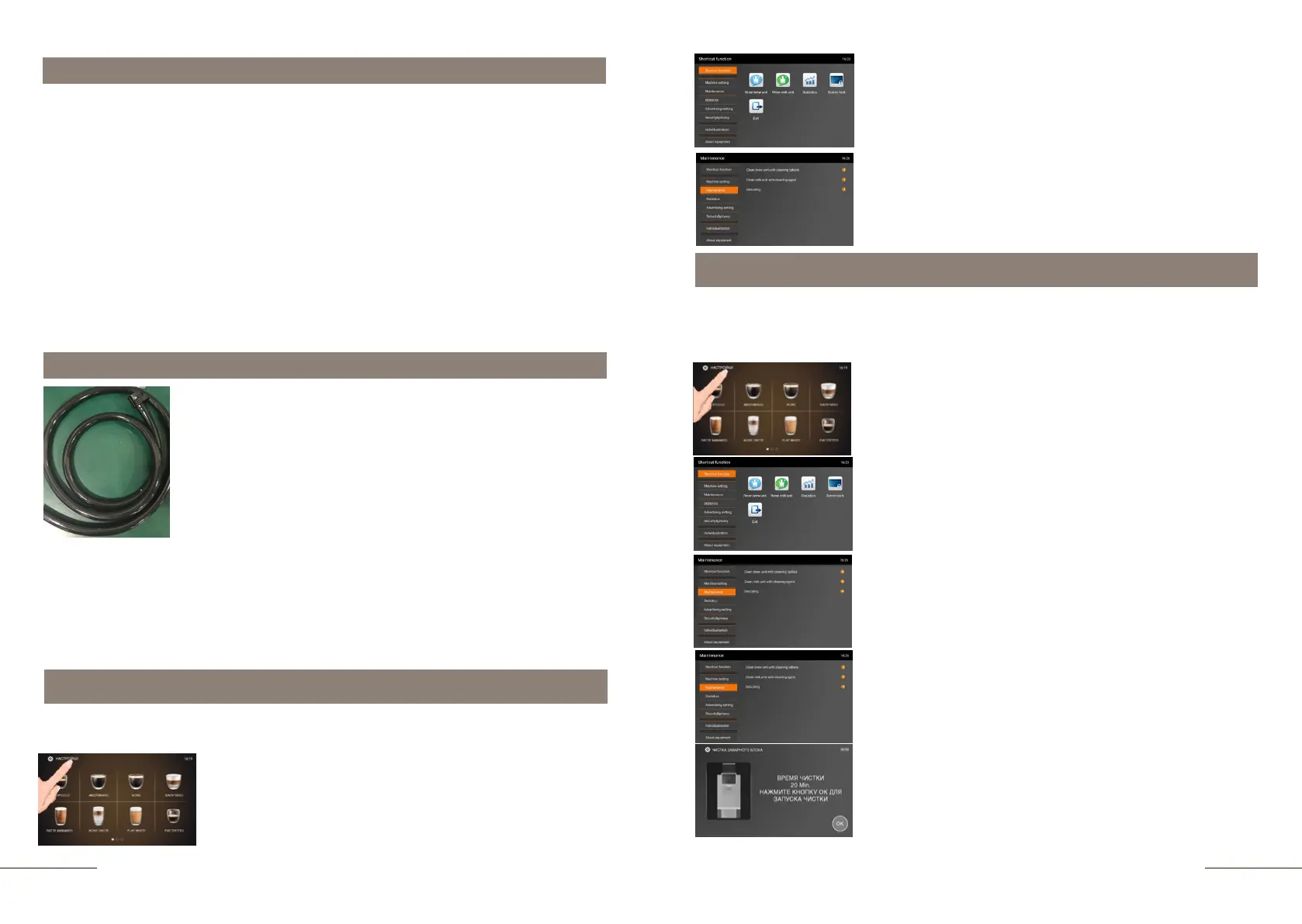
The K96L coffee machine is supplied with a hose for
direct discharge of waste water from the drip tray.
Lenght - 2 meters
Outer tube diameter - 19.73 mm
Inner tube diameter - 13.71 mm
Waste water discharge
When this option is enabled, the request “DRIP TRAY IS FULL" will not appear.
Drainage can occur both in any enlarged container under the tabletop, and connected
directly to the sewerage system (the kit for connecting the drain to the sewerage system is
an additional option).
Maintenance
If you want your coffee machine to serve for a long time and always provide excellent
quality of drinks, do not forget to service it daily.
Select the MAINTENANCE tab.
The MAINTENANCE tab is highlighted.
During the operation of your coffee machine, coffee oils settle on the brew unit and internal
coffee tubes, which leads to a significant deterioration in the taste characteristics of
beverages and even to equipment failure. Therefore, over time (~250-280 cups) it is
necessary to clean the brew unit
Select the MAINTENANCE tab.
The MAINTENANCE tab is highlighted.
Select the CLEAN BREW UNIT WITH CLEANING TABLETS
option.
Display message: “CLEANING TIME 20 Min. PRESS THE OK
BUTTON TO START CLEANING. Fulfill the requirement of
the coffee machine.
Cleaning brewing unit with tablet
The cleaning process will take about 20 minutes. The
cleaning process must not be interrupted!
The coffee machine is ready. Beverage preparation touch
icons are lit.
Press and hold the "SETTINGS" button for 2 seconds to enter
the programming menu.
The SHORTCUT FUNCTION tab is highlighted.
On the right, the shortcut function touch icons are
lit.
The coffee machine is ready. Beverage preparation touch
icons are lit.
Press and hold the "SETTINGS" button for 2 seconds to
enter the programming menu.
The SHORTCUT FUNCTION tab is highlighted.
On the right, the shortcut function touch icons are
lit.



 To Next Page