6766
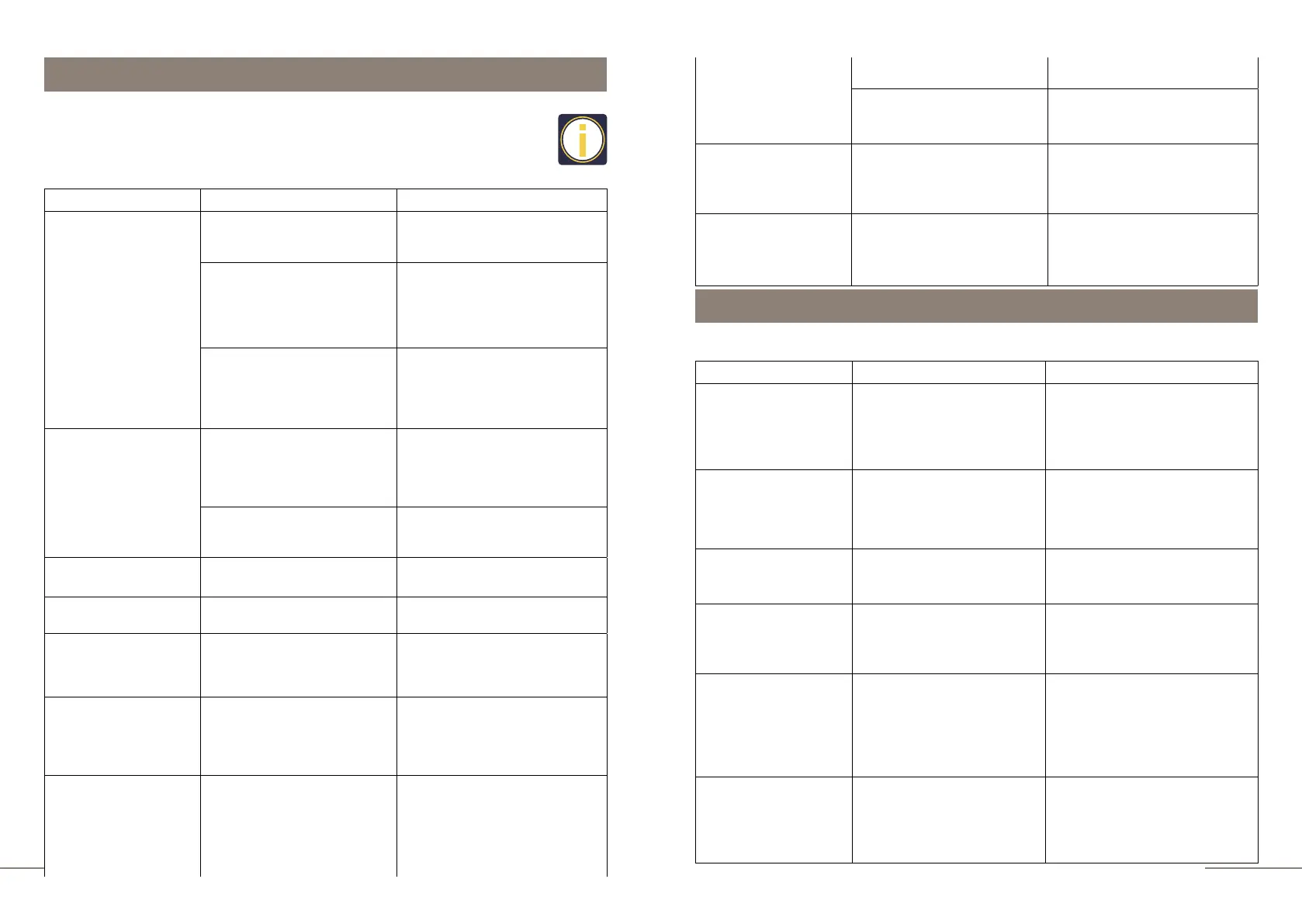
This section is devoted to possible malfunctions that may occur during
operation, as well as their elimination.
If you cannot solve the problem, please contact the technical support or
service center.
Problem Cause Solution
Coffee beverage is not
hot enough
1.
The coffee cup was not
heated.
Before preparation, preheat the
coffee cup with hot water or
steam.
2.
More than 30 minutes have
Start the forced rinsing
process of the coffee machine
(pg. 17).
Enter the programming menu
on the Beverage setting page
and increase the coffee
brewing temperature.
Coffee comes out of
the coffee spout in
separate drops
1.
Adjust the grind lever to a
coarser setting or use ground
coffee marked "For espresso
machines" on the packaging.
2.
The sieve of the brew unit
is clogged.
Forcibly start the brew unit
rinse program (pg. ).
The coffee grinder is
making a lot of noise
Foreign objects have fallen
into the grinder.
Please contact the service
center.
Milk does not foam
The Auto Cappuccino
system is clogged.
Start rins milk unit programm
(pg. ).
Milk splashing
Disassemble and reassemble
the milk unit. Install the milk unit
and fix it firmly.
The message is
permanently lit on the
display "DRIP TRAY IS
FULL"
Empty the drip tray.
The message is
permanently lit on the
display
"INSTALL DRIP
TRAY"
1.
2.
Trouble-shooting
The message is
permanently lit on the
display
"ADD WATER"
1.
The water tank is empty. Fill the water tank.
2.
The water tank is full. A
float has stuck in the water
tank.
Rinse the water tank
thoroughly.
The message is
permanently lit on the
display
"GRINDER FAILURE"
The coffee bean hopper is
empty.
Fill the hopper with coffee
beans. Prepare a beverage and
the prompt will disappear.
Display message
"ERROR 1-7"
Beverage preparation is not
possible.
Restart the coffee machine. If
the error message does not
disappear, turn off the coffee
machine and contact the
service center.
Display messages
This section contains information about messages that may appear on the display of
the coffee machine.
Message Cause Solution
EMPTY TRAY
If the water drip tray is full,
any functionof making
beverage will be out of
service.
Empty the drip tray, rinse it,
clean and dry the metal
contacts on the drip tray and put
the drip tray back into the coffee
machine.
EMPTY GROUNDS
If the coffee grounds
container is full, any function
of making beverage will be
out of service.
Take the coffee grounds
containerout, empty the coffee
grounds container and reinstall
it.
FILL WATER TANK
If water in the tank is used up,
any function of making
beverage will be out of service.
Fill the water tank with water.
FILL BEANS
If coffee beans in the bean
container are used up,
function of making coffee
will be out of service.
Add beans into bean container
and prepare a beverage.
INSTALL TRAY
The drip tray is not
installed
correctly; any function is
out of service.
1.
Install the drip tray correctly.
2.
Clean and dry the metal
contacts on the drip tray and
put the drip tray back into the
coffee machine.
PRESSURE HIGH
The system has been
vented. Air has entered the
internal tubes of the coffee
machine. Any functions
are not available.
Press the OK button to correct
this problem. The self-
diagnostic process starts
automatically.
passed since the preparation
of the previous drink. The
brewer and inner tubes have
already cooled down.
3.
Insufficient beverage
brewing temperature is set.
The grind setting is too fine
or you are using ground
coffee that is not suitable
for espresso coffee.
The milk unit is not
assembled or installed
correctly.
The drip tray is full.
Beverage preparation is
not possible.
Drip tray installed
incorrectly or missing.
Beverage preparation is not
possible.
Install the drip tray correctly.
Carefully clean the metal
contacts on the drip tray
and wipe them dry.



 To Next Page