4544
Advertising settings. Welcome ADs
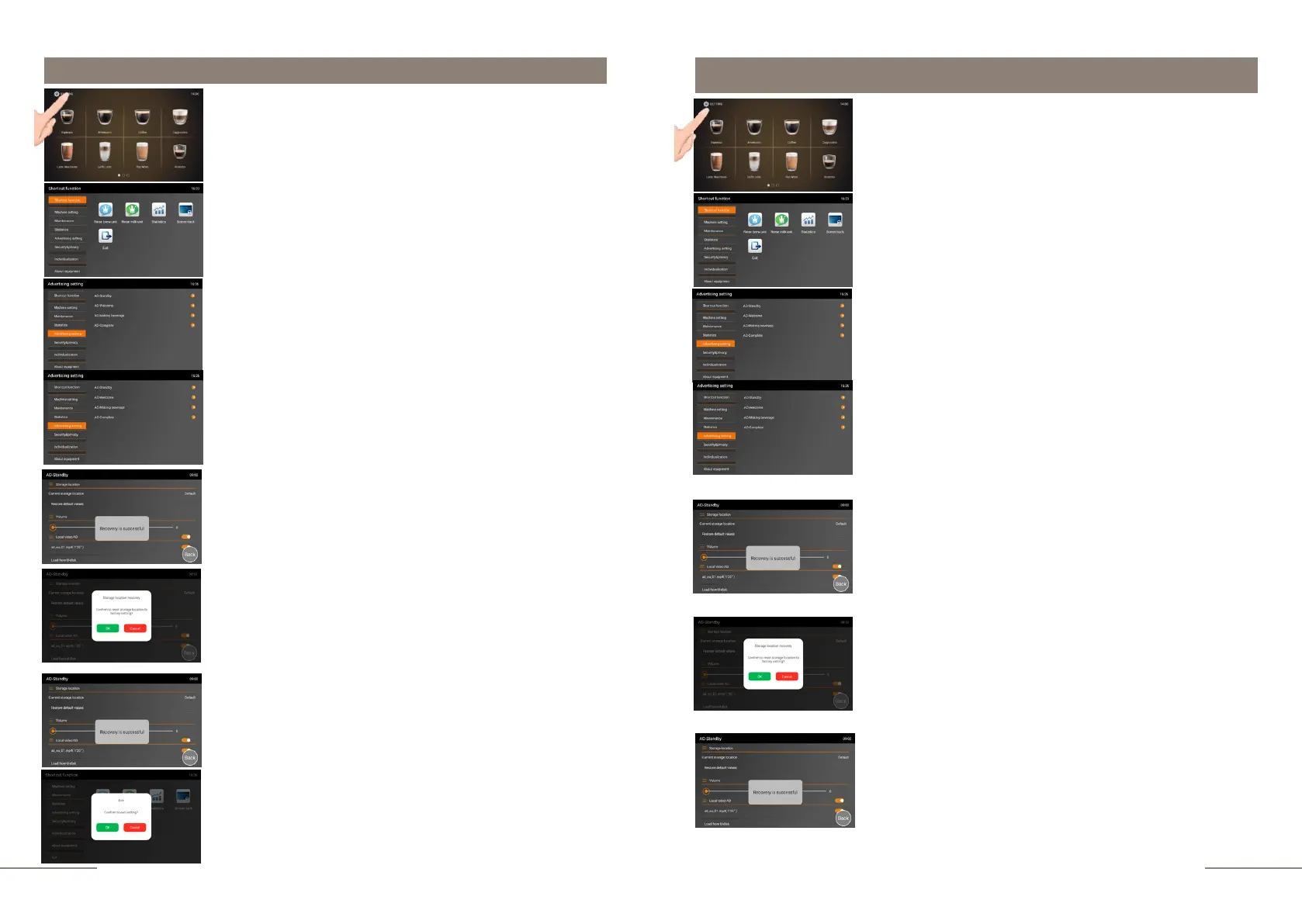
Select the ADVERTISING SETTING tab and activate it. The
ADVERTISING SETTING tab is highlighted.
Select the AD-WELCOME option from the ADVERTISING
SETTING tab.
A tabbed window will open:
- LOCAL VIDEO AD
- VOLUME
LOCAL VIDEO AD tab.
The factory loaded video is used by default. To clear the
storage space, activate the RESTORE DEFAULT VALUES
tab.
A window will open: CONFIRM TO RESET STORAGE
LOCATION TO FACTORY SETTING.
To confirm the reset, press "OK" or "CANCEL" to cancel the
action.
VOLUME tab - here you can set the volume of a video
playback. Move the cursor from left to right to set a
comfortable value for you.
To exit the menu, press the EXIT touch
icon and confirm your choice by pressing
the OK button.
Advertising settings. ADs while making a beverage
Select the ADVERTISING SETTING tab and activate it. The
ADVERTISING SETTING tab is highlighted.
Select the AD-MAKING BEVERAGE option from the
ADVERTISING SETTING tab.
A window will open: CONFIRM TO RESET STORAGE
LOCATION TO FACTORY SETTING.
To confirm the reset, press "OK" or "CANCEL" to cancel the
action.
COUNT DOWN tab.
Here you can select the format for playing the video during the
preparation of beverages. Available values are 3, 5, 10 seconds
or close. If you select the time range of 3.5 or 10 seconds, the
video playback during the preparation of the beverages will be
played in full screen mode.
The coffee machine is ready. Beverage preparation touch
icons are lit.
Press and hold the "SETTINGS" button for 2 seconds to
enter the programming menu.
The SHORTCUT FUNCTION tab is highlighted.
On the right, the shortcut function touch icons are
lit.
The coffee machine is ready. Beverage preparation touch
icons are lit.
Press and hold the "SETTINGS" button for 2 seconds to
enter the programming menu.
The SHORTCUT FUNCTION tab is highlighted.
On the right, the shortcut function touch icons are
lit.
A tabbed window will open:
- LOCAL VIDEO AD
- COUNT DOWN
- VOLUME
LOCAL VIDEO AD tab.
The factory loaded video is used by default. To clear the
storage space, activate the RESTORE DEFAULT VALUES
tab.



 To Next Page