TECHNICAL DESCRIPTION MULTICAL
®
401
5512-091 GB/02.2008/Rev. J1
55
13 Calibration and verification
In order to be able to carry out test/verification of MULTICAL
®
401 with a minimum use of time the meter has a
testing mode. When the meter is in testing mode the program runs approx. 4 times faster than in standard mode.
Testing mode also has some extra functions as described below.
(NB. MULTICAL
®
401 uses approx. 4 times more current in testing mode. However, under normal circumstances
the meter will only be in testing mode e.g. 9 hours per 5 years, which has no influence on the total lifetime of the
battery)
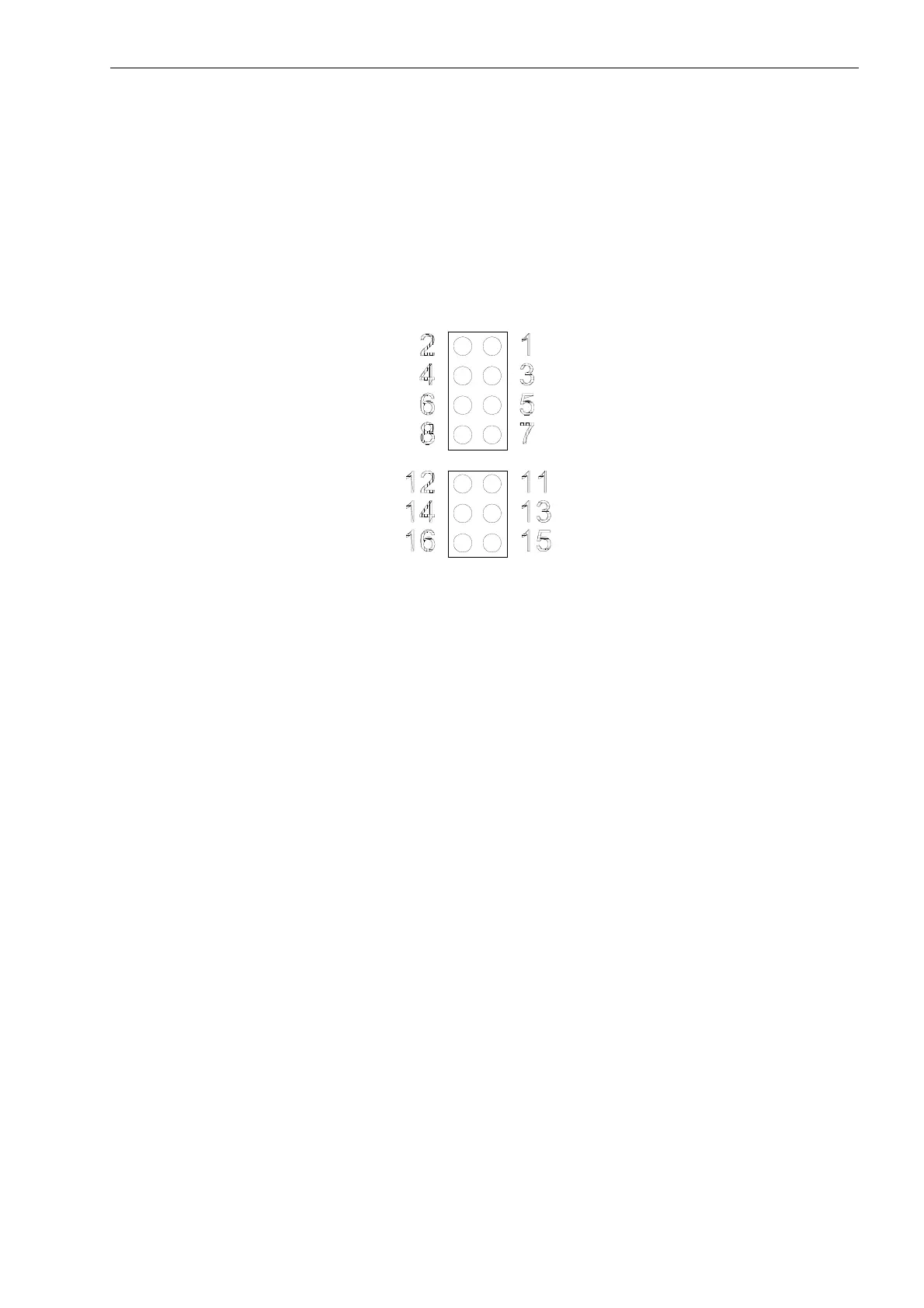
Figure 46: Module and test plug (No. 1-8 is sealed by a verification seal)
Flow verification
Flow measurement operates with absolute time measurement, and is therefore independent of the temperature
sensors. The flow part can be verified as a separate unit, if a 3-part verification is required.
STARTING UP
16 seconds must ellapse from start up to calibration in order to allow a true reading to be reached.
MEASURING FLOW
To obtain a correct flow measurement, calibration must take min. 2 minutes.
EVACUATION
MULTICAL
®
401 must NOT be evacuated (subjected to vacuum).
Calculator verification
The calculator can be verfied separately by means of temperature simulation resistances connected to the
terminal strips Nos. 5-6-7-8. Volume simulation can be made by means of the built-in ”Autointegration” (see
section 13.2).
Temperature simulation via the test plug is only possible when verification equipment type 66-88-385 is used
(see section 14.3
Verification with METERTOOL).
GND
tF temperature
tF sense
GND
GND
Tx1 – from
P to module
Input B or CE – Tx2
3.6 V internal supply
tR temperature
tR sense
Test input for
P
3.6 V supply for modules
Rx1 – from module to
P
Input A – Rx2












 To Next Page