TECHNICAL DESCRIPTION MULTICAL
®
401
5512-091 GB/02.2008/Rev. J1
60
14.1.5 Verification equipment type 66-99-385
See section 14.3
Verification with METERTOOL for further information.
14.1.6
Reading MULTICAL
®
401
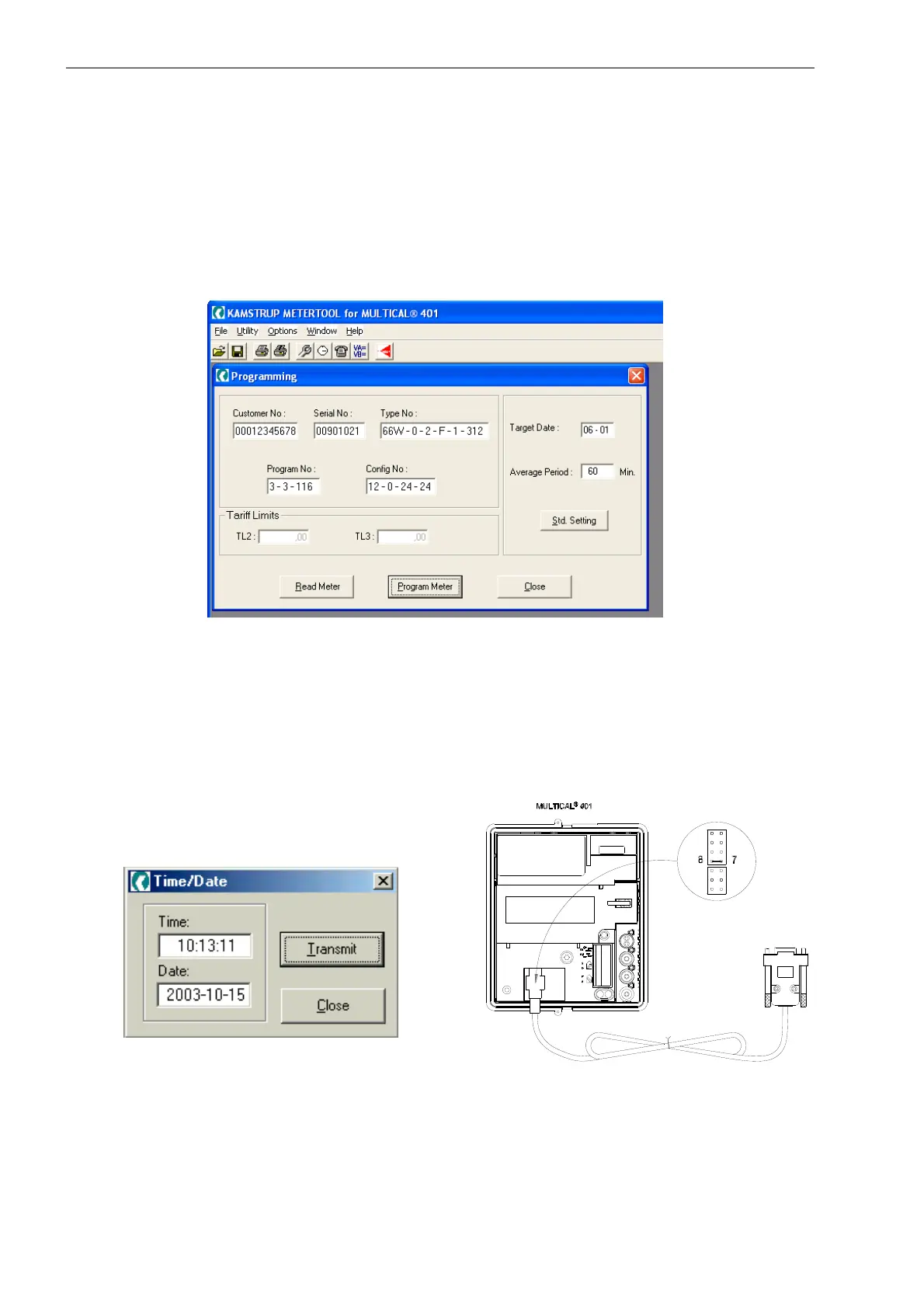
Connect the serial data communication as described in previous sections and start the program by clicking on the
icon “METERTOOL” and select MULTICAL
®
401. Select the button “Read meter”, and data will be transmitted from
the meter and shown on the monitor.
Figure 49
14.2 Programming
It is important that you are familiar with all calculator functions before programming.
All necessary information appears in this technical description.
Furthermore, you must check the computer’s internal clock before programming, as date and time will be
transmitted from the PC to the calculator when programming “Time/Date”.
Figure 50 Figure 51
14.2.1 Partial programming
If the programming lock in MULTICAL
®
401 (indicated by a ring in the diagram above) is open, the meter can only
be partially programmed.













 To Next Page