38
Music Menu
Basic Operation
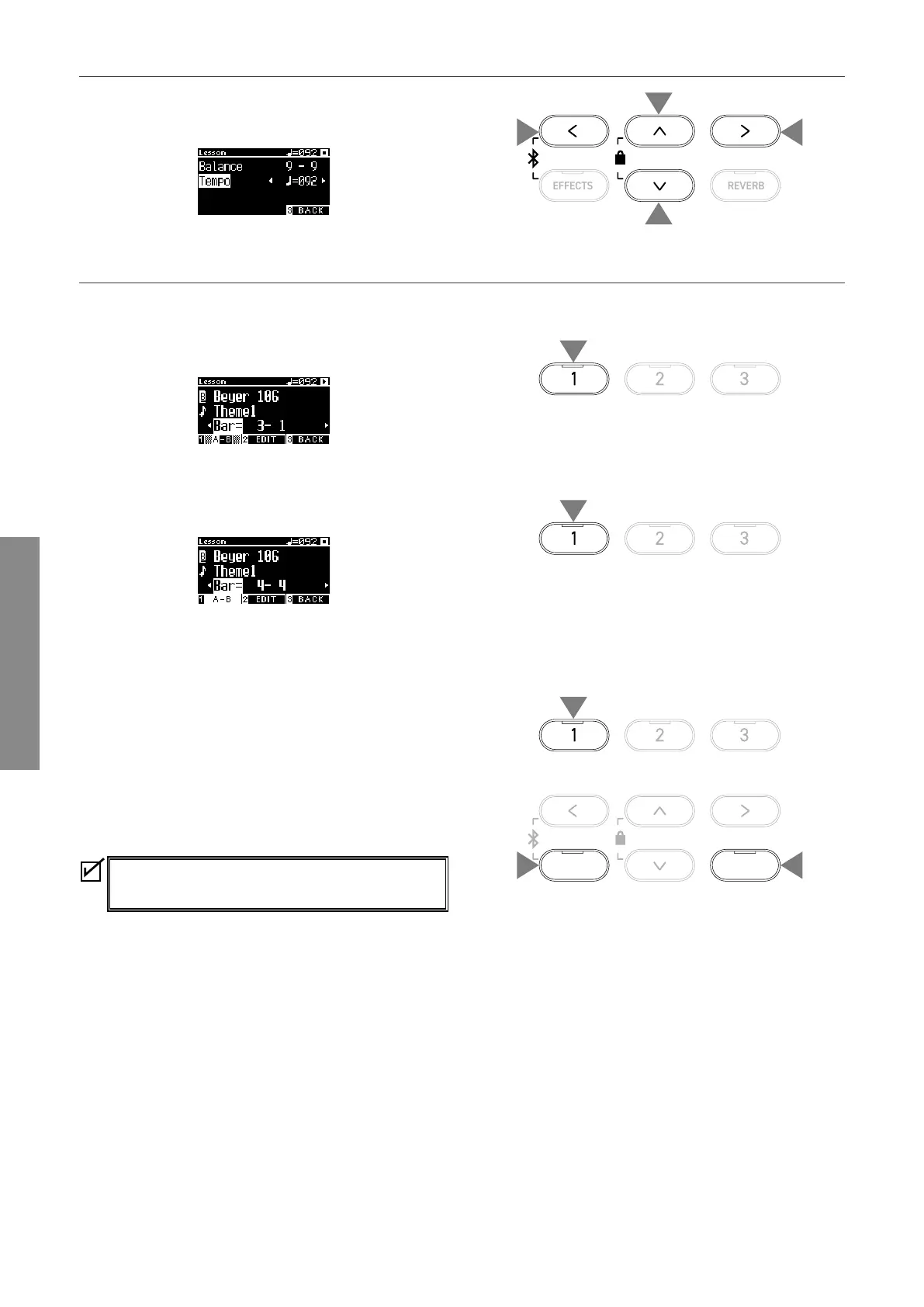
▋ Practicing by changing the tempo
1. On the Lesson Edit screen, press the [UP]/[DOWN] button to
select “Tempo”.
2. Press the [LEFT]/[RIGHT] button to adjust the value.
▋ Practicing in an A-B repeat
Specify two bar positions within a lesson song to practice between these two positions repeatedly.
Method 1
1. While playing a lesson song, press the [1] button to specify
the start point of the repeat.
The start point (A) is set and the LED indicator of the [1] but-
ton starts ashing.
2. Upon reaching the desired position, press the [1] button to
specify the end point (B) of the repeat.
The end point (B) is set and the LED indicator of the [1] button
turns on.
Once an A-B repeat is set, the playback position returns to 2
beats before the start point after reaching the end point.
3. Press the [1] button again to cancel the repeat point setting
and restore the normal playback.
Method 2
Press the [EFFECTS] or [REVERB] button while stopping to set the
bar positions of the repeat.
Note that the bar of the end point cannot be set earlier
than the bar of the start point.
1
1
2
2
1
2
3
EFFECTS REVERB



 To Next Page