71
Adjustments & Settings
Settings Menu
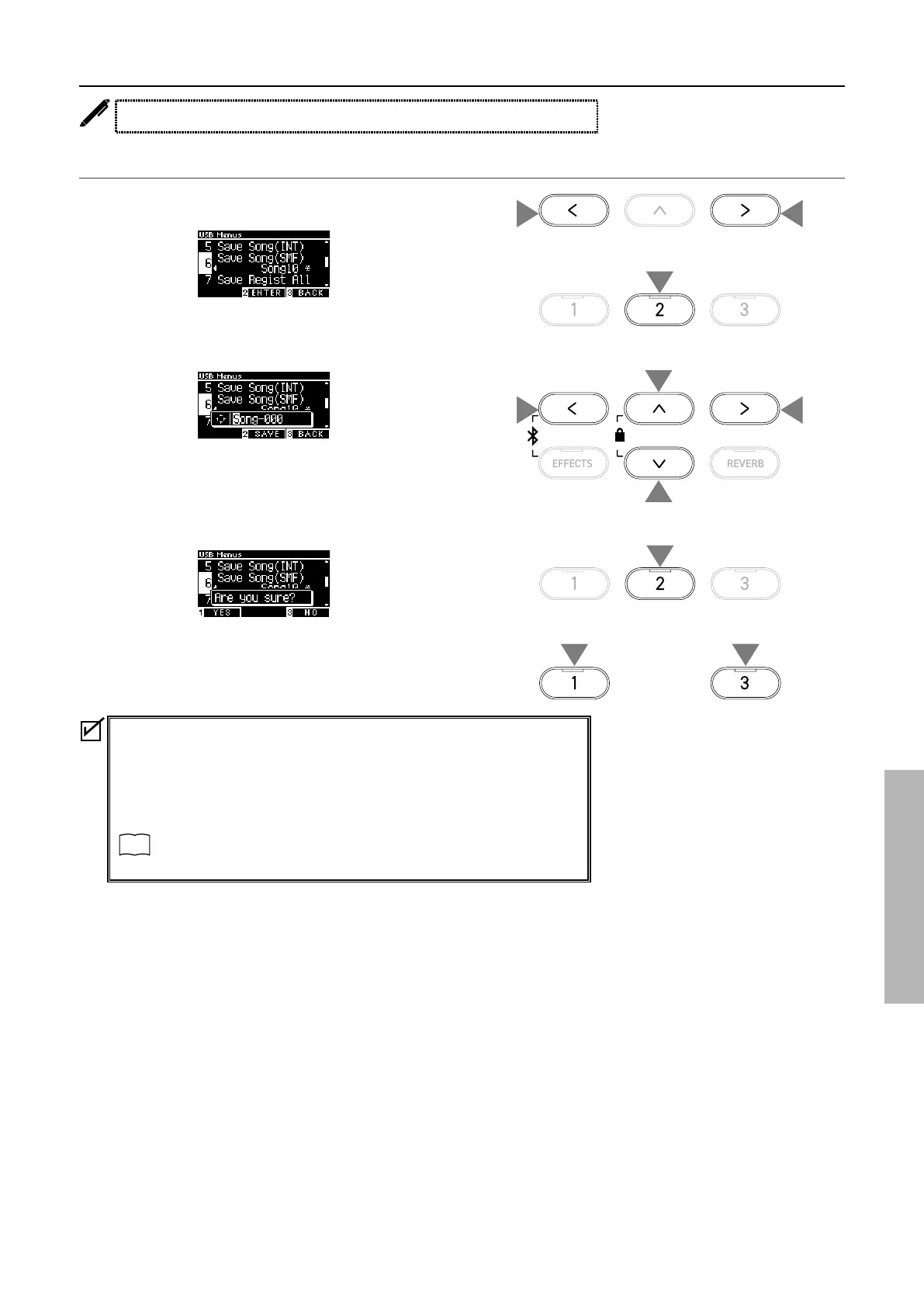
6 Save SMF Song
The display shows “Save Song(SMF)”.
Saving
1. With “Save Song(SMF)” selected, press the [LEFT]/[RIGHT]
button to select a song to be saved.
2. Press the [2] button.
3. Specify the name for the song to be saved to the USB mem-
ory device.
Press the [LEFT]/[RIGHT] button to move the cursor and press
the [UP]/[DOWN] button to change characters.
Up to 12 characters can be specied for the le name.
4. Press the [2] button after entering the le name.
5. Press the [1] button to save, or press the [3] button to cancel.
In the case where a le with the same name already exists,
specify whether to overwrite it.
Press the [1] button to overwrite, or press the [3] button to
specify another name.
The song le will be saved in the root folder of the USB memory device.
It is not possible to save the le in a dierent folder.
The extension of the saved song le is “MID”.
Files (*.MID) that have been saved by Save Song (SMF) cannot be loaded into the
instrument’s internal song memories.
P70
Use Save Internal Song to load songs into the ten song memories avail-
able on the instrument.
2
4
or
55
3
3
3
3
1
1



 To Next Page