40
Music Menu
Basic Operation
Concert Magic
Playing a Concert Magic song
Selecting a Concert Magic song
Two Concert Magic songs are assigned to each key.
Bank A from A1 to A88 and Bank B from B1 to B88
contain 176 songs in total.
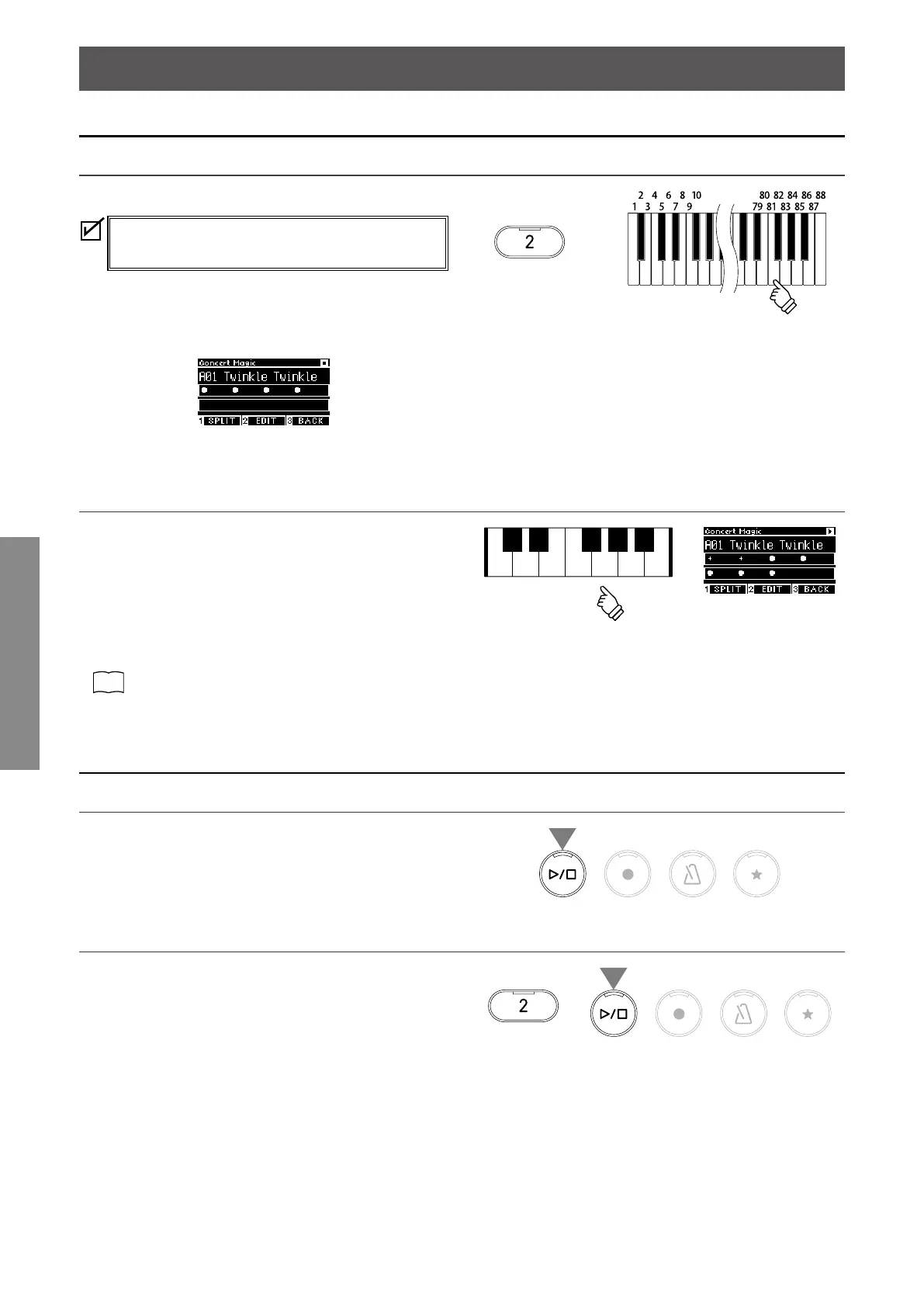
On the Concert Magic screen, press and hold the [2] button, then
press a key to select the desired concert magic song. Press the
same key again to switch between Bank A and Bank B.
▋ Performing the selected Concert Magic song
• Tap any key to perform the concert magic song.
• The tempo of the song is determined by the tapping speed.
• The volume of the song is determined by the tapping force.
• Black circles () on the display change to plus symbols (+) as
the song progresses.
Use them as a guide for tapping.
• The sound can be changed by the same operation as the nor-
mal sound change operation.
P81
Sound/Demo Songs List
Listening to a Concert Magic song
Random Play
With a concert magic song selected, press the [PLAY/STOP] but-
ton to play concert magic songs randomly.
Press the [PLAY/STOP] button again to stop the playback.
▋ Category Play
With a concert magic song selected, press and hold the [2] but-
ton and press the [PLAY/STOP] button to play all of the songs in
the same group as the selected song repeatedly, in numerical
order.
hold
hold



 To Next Page