73
Adjustments & Settings
Settings Menu
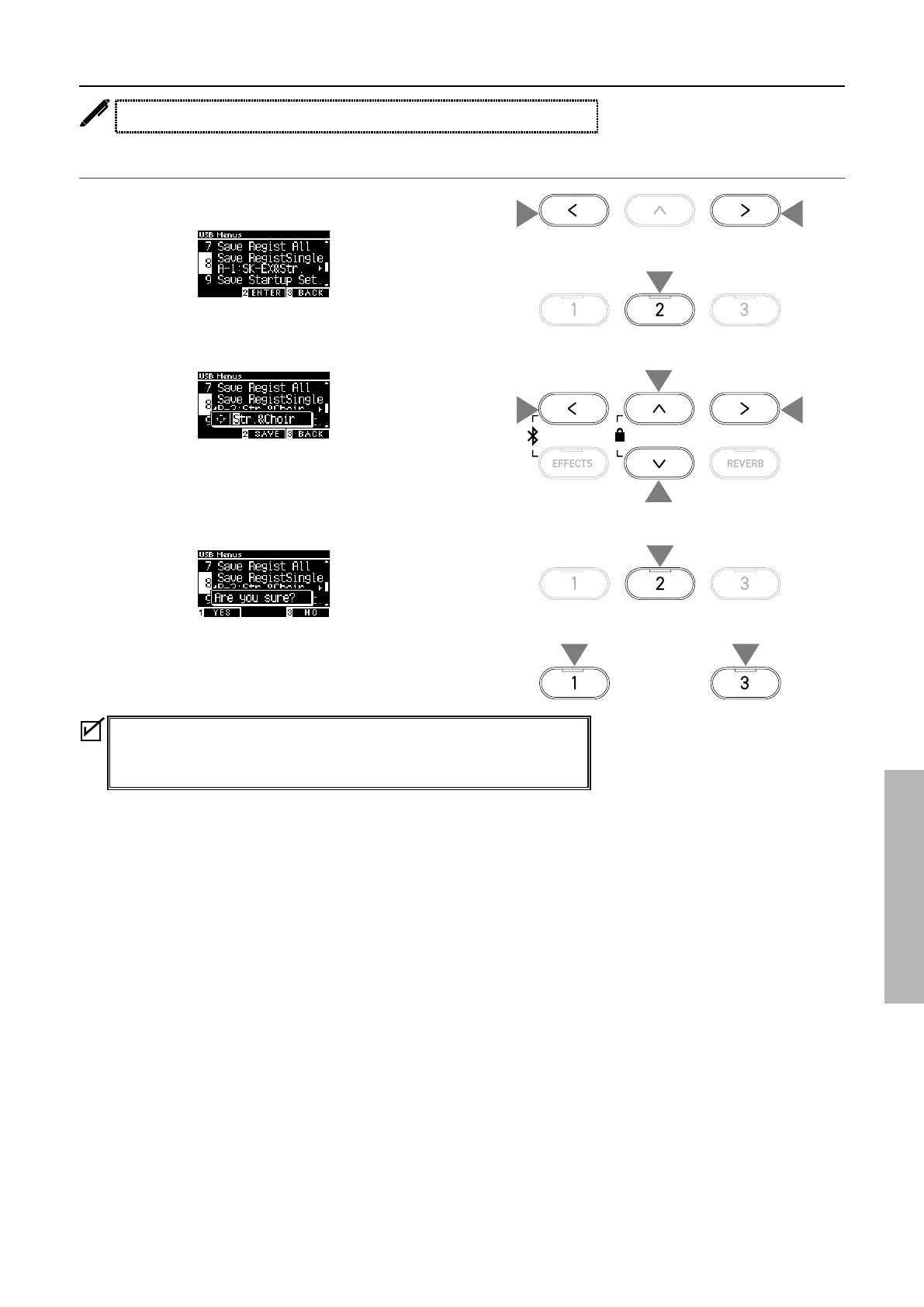
8 Save Registration Single
The display shows “Save RegistSingle”.
Saving
1. With “Save RegistSingle” selected, press the [LEFT]/[RIGHT]
button to select the registration to be saved from A1 to B8.
2. Press the [2] button.
3. Specify the name for the le to be saved to the USB memory
device.
Press the [LEFT]/[RIGHT] button to move the cursor and press
the [UP]/[DOWN] button to change characters.
Up to 12 characters can be specied for the le name.
4. Press the [2] button after entering the le name.
5. Press the [1] button to save, or press the [3] button to cancel.
In the case where a le with the same name already exists,
specify whether to overwrite it.
Press the [1] button to overwrite, or press the [3] button to
specify another name.
The song le will be saved in the root folder of the USB memory device.
It is not possible to save the le in a dierent folder.
The le saved by Save Registration Single is not compatible with other models.
2
4
or
55
3
3
3
3
1
1



 To Next Page