47
Adjustments & Settings
Settings Menu
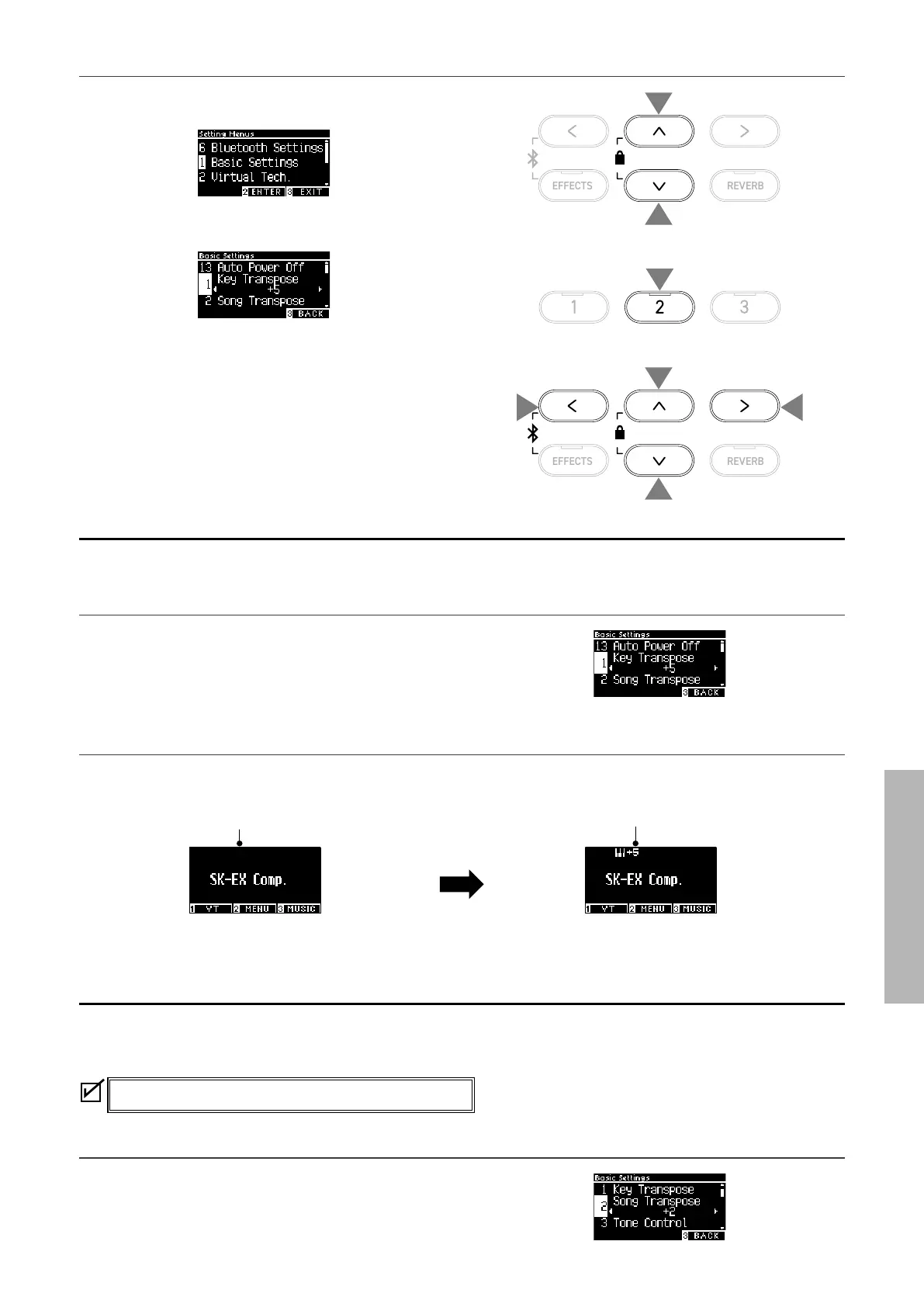
▋ Entering the Basic Settings screen
1. On the Settings Menu screen, press the [UP]/[DOWN] button
to select “Basic Settings”.
2. Press the [2] button to enter the Basic Settings screen.
3. Press the [UP]/[DOWN] button to select the function to use.
4. Press the [LEFT]/[RIGHT] button to set the value or type.
• Pressing the [LEFT]/[RIGHT] buttons simultaneously will re-
store the default setting.
1 Key Transpose
The Key Transpose setting changes the pitch of the keyboard in semi-tone steps.
Key Transpose setting
The value can be specied in the range from -12 to +12 in semi-
tone steps.
▋ Checking the Key Transpose status
The transpose icon appears on the Home screen if Key Transpose is changed from its default setting 0.
LCD display when Key Transpose is set to “+5”
LCD display when Key Transpose is set to
the default value “0C”
2 Song Transpose
The Song Transpose function transposes songs played from a USB memory device (SMF and KSO les),
Internal Recorder, Piano Music, Lesson, and Concert Magic.
Demo Songs cannot be transposed.
Song Transpose setting
Transposition can be specied in semi-tone steps.
1
1
2
3
3
4
4



 To Next Page