77
Adjustments & Settings
Settings Menu
Bluetooth Settings
Availability of Bluetooth function dependent on market location.
Bluetooth Settings
Type Description Connection method
Bluetooth MIDI When using a smart device app that supports
Bluetooth MIDI, this function allows the instru-
ment to be controlled by an app, or send/receive
MIDI data wirelessly.
Enable the smart device’s Bluetooth function,
launch an app that supports Bluetooth MIDI, then
select “CA501 MIDI” from the app’s connection set-
ting screen.
Bluetooth Audio This function allows audio from the connected
smart device (such as songs, videos, etc.) to be
played through the instrument’s speakers wire-
lessly.
Enable the smart device’s Bluetooth function, then
select “CA501 Audio” from the device’s Bluetooth
connection setting screen.
If “CA501 Audio” does not appear, press and hold
the [LEFT] and [EFFECTS] buttons on the instru-
ment’s control panel while the Home screen is
shown in the display. After pairing successfully,
the instrument will automatically reconnect to the
smart device when the power is turned on.
• For more detailed instructions regarding Bluetooth pairing, please refer to the supplementary Bluetooth® Connectivity
Guide manual, available from the Kawai Global website: https://www.kawai-global.com/support/manual.
• Only one smart device can be connected to the piano’s Bluetooth MIDI or Bluetooth audio at a time.
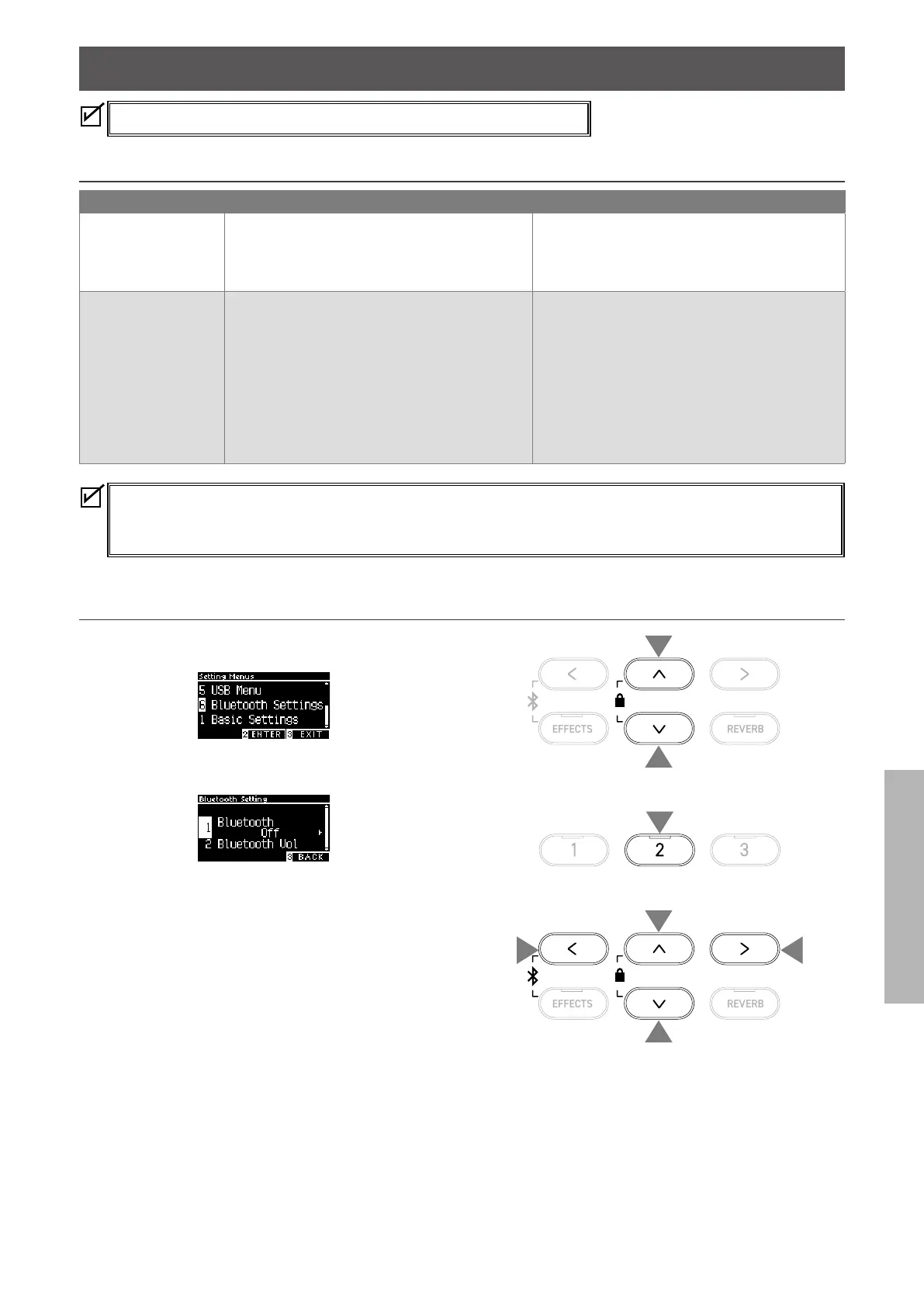
▋ Entering the Bluetooth Settings screen
1. On the Settings Menu screen, press the [UP]/[DOWN] button
to select “Bluetooth Settings”.
2. Press the [2] button to enter the Bluetooth Settings screen.
3. Press the [UP]/[DOWN] button to select the type to use.
4. Press the [LEFT]/[RIGHT] button to set the value.
• Pressing the [LEFT]/[RIGHT] buttons simultaneously will re-
store the default setting.
1
1
2
3
3
4
4



 To Next Page