60
Adjustments & Settings
Settings Menu
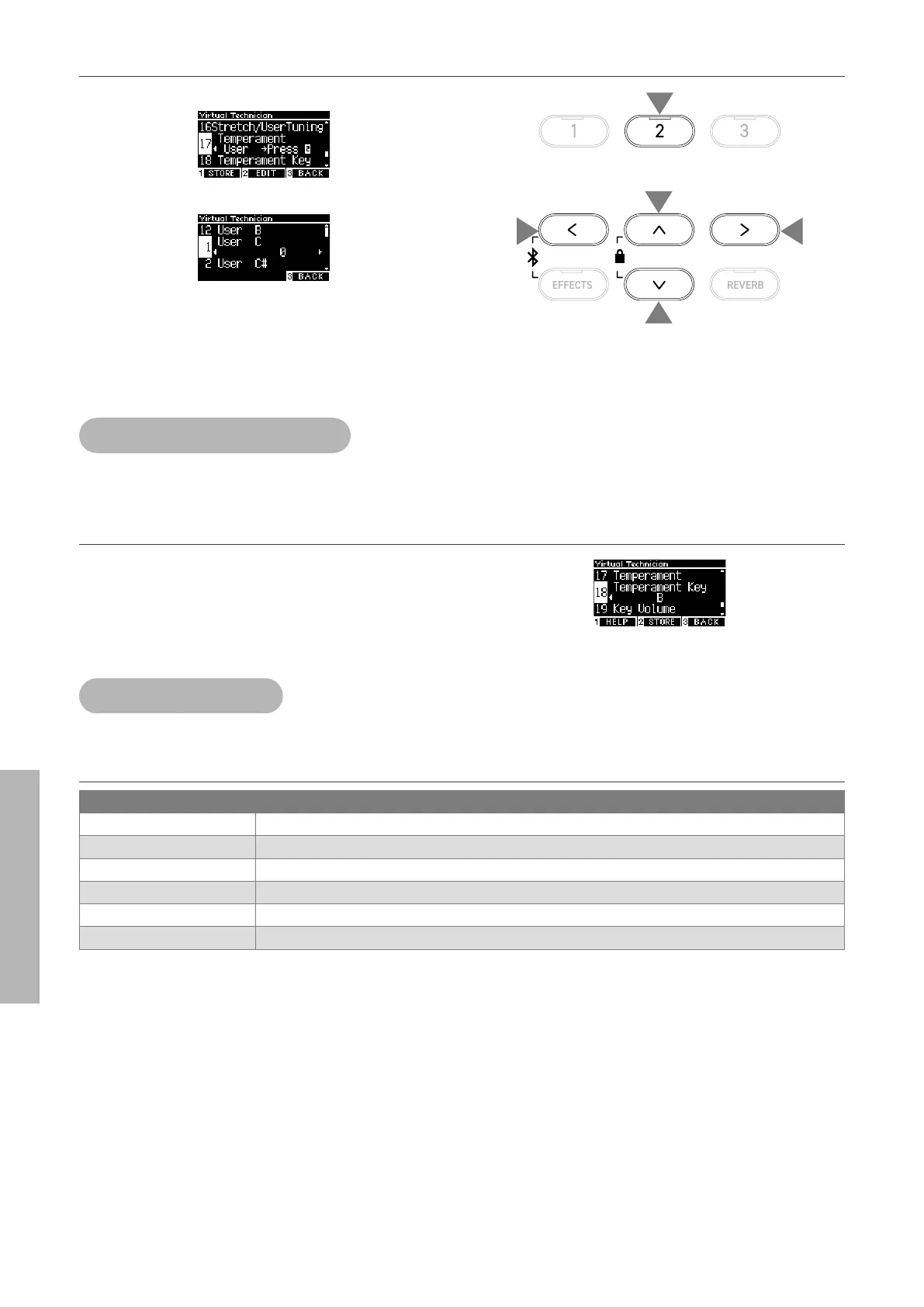
▋ User Temperament settings
1. With “User” selected, press the [2] button.
2. Press the [UP]/[DOWN] button to select the sound to tune.
3. Press the [LEFT]/[RIGHT] button to set the value.
• With “User” selected, pressing the [1] button will save the spec-
ied value to the selected sound.
18 Temperament Key
Temperaments apart from the equal temperament are specic to the key. The Temperament Key function
adjusts the temperament to the specied tonic of the song to be played.
Selecting Temperament Key
The value can be specied in the range from C to B.
The temperament does not change if the equal temperament is
specied even when the tonic is set.
19 Key Volume
The Key Volume function allows players to adjust the volume of each of the 88 keys.
Key Volume types
Key Volume Description
Normal The default setting for the 88-key volume.
High Damping The volume is gradually reduced towards the upper sound range.
Low Damping The volume is gradually reduced towards the lower sound range.
High & Low Damping The volume is gradually reduced towards the upper and lower sound range.
Center Damping The volume is gradually reduced towards the center of the keyboard.
User The volume can be set between -50 and +50 for each of 88 keys.
1
2
2
3
3


 To Next Page