119
Appendix
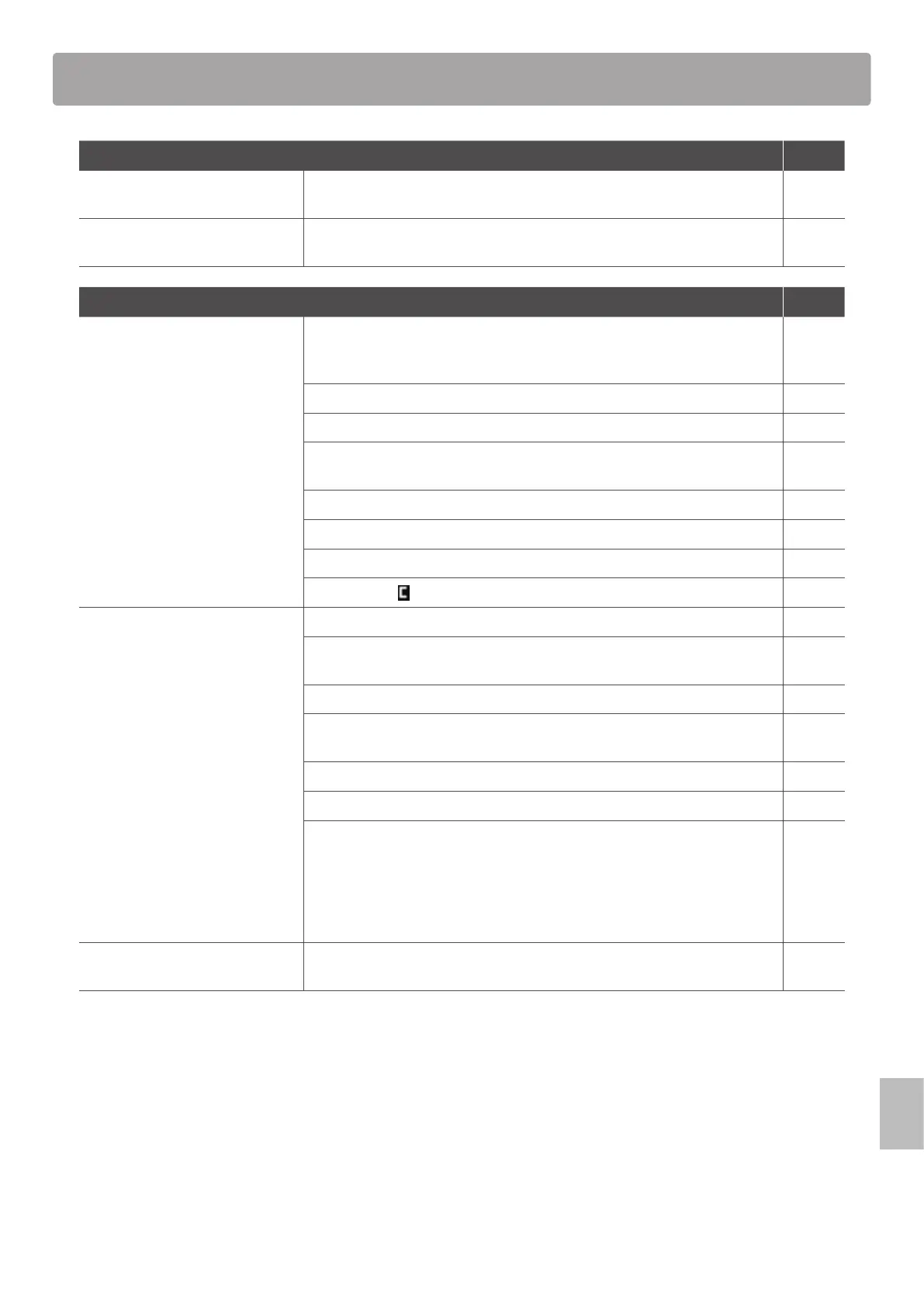
Troubleshooting
Power Page
The instrument does not turn on. Check that the AC power adaptor is rmly attached to the instrument, and
connected to an AC outlet.
16
The instrument turns itself o after
a period of inactivity.
Check that the ‘Auto Power O’ setting is not enabled. 107
Sound Page
The instrument is turned on,
however no sound is produced
when the keys are pressed.
The MP7SE does not feature built-in speakers. Check that a mixer, keyboard
amplier, or headphones are connected to the instrument correctly. If using an
external mixer or amplier, check that the settings are correct.
18
Check that the MASTER VOLUME fader is not set to the lowest position. 12
Check that at least one zone’s ON/OFF button is turned on. 22
Check that at least one zone is set to INT or BOTH mode. The red LED above the
ON/OFF button (INT) should be lit.
23
Check that at least one zone’s VOLUME fader is not set to the lowest position. 22
Check that the LOCAL OFF button is not turned on. 37
Check that the expression pedal is not set to the minimum position. 17
Check that the
MasterVol parameter in the EDIT menu is not set to 0. 42
No sound is produced for a part
of zones or the sound volume is
reduced.
Check that the zone’s ON/OFF button is turned on. 22
Check that the zone is not set to EXT mode. The red LED above the ON/OFF
button (INT) should be lit.
23
Check that the zone’s VOLUME fader is not set to the lowest position. 22
Check that the zone’s ON/OFF button is not green. If it is green, please check
the Key Range parameter setting in the EDIT menu.
24
47
Check that the AMP level parameter in the EDIT menu is not set to 0. 41
Check that the modulation wheel is not assigned to the ‘Expression’ function. 49
Check that the Receive Mode parameter in the SYSTEM:MIDI menu is not
set to ‘Multi’, and the Receive Channel is not set to MAIN or SUB1~3. Some
control change messages may aect the volume faders and/or the EDIT menu
parameters in section Receive mode. If playing separate sections by MIDI
or control change is not required, please set the Receive Mode parameter to
‘Panel’.
110
158
The sound distorts when playing at
very loud volume levels.
Check that the MASTER VOLUME fader is set to an appropriate level, reducing
the volume if excessive distortion is heard.
12



 To Next Page