79
Recorder
Song Recorder (Internal memory)
9
SMF Direct Play
This function allows 16-track SMF les to be played directly from USB memory.
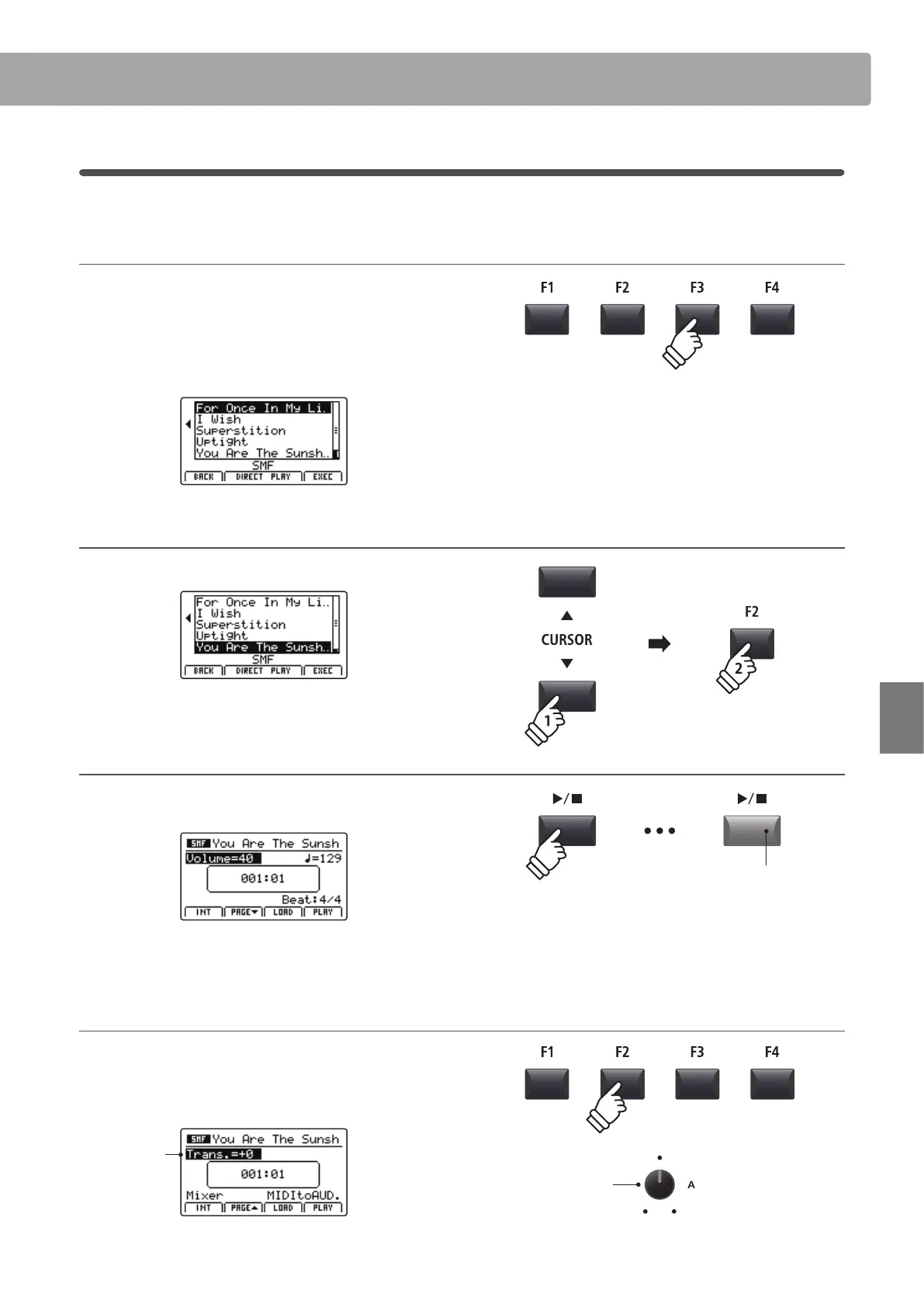
1. Selecting the Load SMF function
After preparing and connecting the USB memory:
Press the F3 function button (LOAD).
A listing of the SMF les stored in the root folder of the USB
device will be shown in the LCD display.
2. Selecting the SMF le to play
Press the CURSOR buttons to select the desired MIDI le.
Press the F2 or F3 function buttons (DIRECT PLAY).
3. Playing the selected SMF le
After selecting the Direct Play function, the player screen will be
shown in the LCD display.
For more information about playing the loaded MIDI le and using
the ‘Chain Play’ feature, please refer to page 71.
Changing the song transpose value
Press the F2 function button (PAGE) to show the second page
of playback functions.
Turn control knob A to change the song transpose value.
Song
transpose
* The Song Transpose value can be adjusted within the range of –12 ~ +12.
* Press the F1 function button (INT) to exit the SMF Direct Play function and
return to the internal song player screen.
Song
transpose
LED indicator ON:
Playback is in progress



 To Next Page