73
Recorder
Song Recorder (Internal memory)
3
Saving a song as an SMF le
This function is used to save recorder songs to a USB memory device in SMF (Standard MIDI File) format.
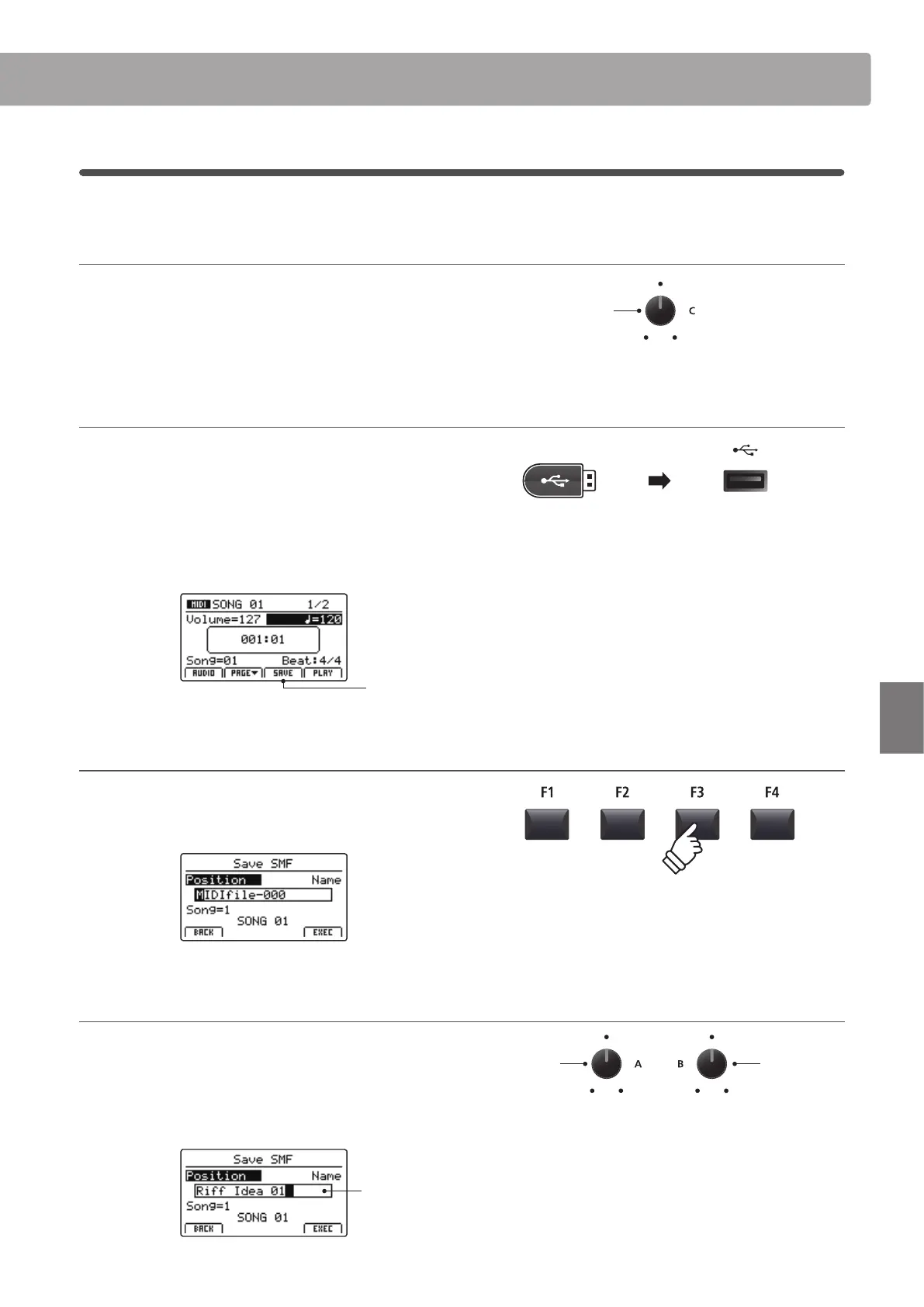
1. Selecting the song memory
After turning Recorder mode ON, and recording a song:
Turn control knob C to select the song memory to be saved to
the USB memory in SMF format.
2. Connecting a USB memory device
Connect a USB memory device to the USB to Device port.
* USB devices should be formatted to use the ‘FAT’ or ‘FAT32’ lesystems.
The USB device will be scanned, and the SAVE function will
appear at the bottom of the LCD display.
* The SAVE function will appear only when the selected song memory has
been recorded to.
Save
function
3. Selecting the Save SMF function
Press the F3 function button (SAVE).
The Save SMF screen will be shown in the LCD display.
4. Entering a lename
Turn control knobs A and B to move the cursor position and
select the characters for the song name.
* Saved SMF les are limited to a maximum name length of 18 characters.
* The saved SMF le will be stored in the root folder of the USB memory
device. It is not possible to store the le in a dierent folder.
Song
name
Move cursor
position
Select
character
Song
memory



 To Next Page