71
Recorder
Song Recorder (Internal memory)
2
Playing back a song
This function is used to playback recorder songs stored in internal memory. To playback a song immediately after
recording, start this process from step 3.
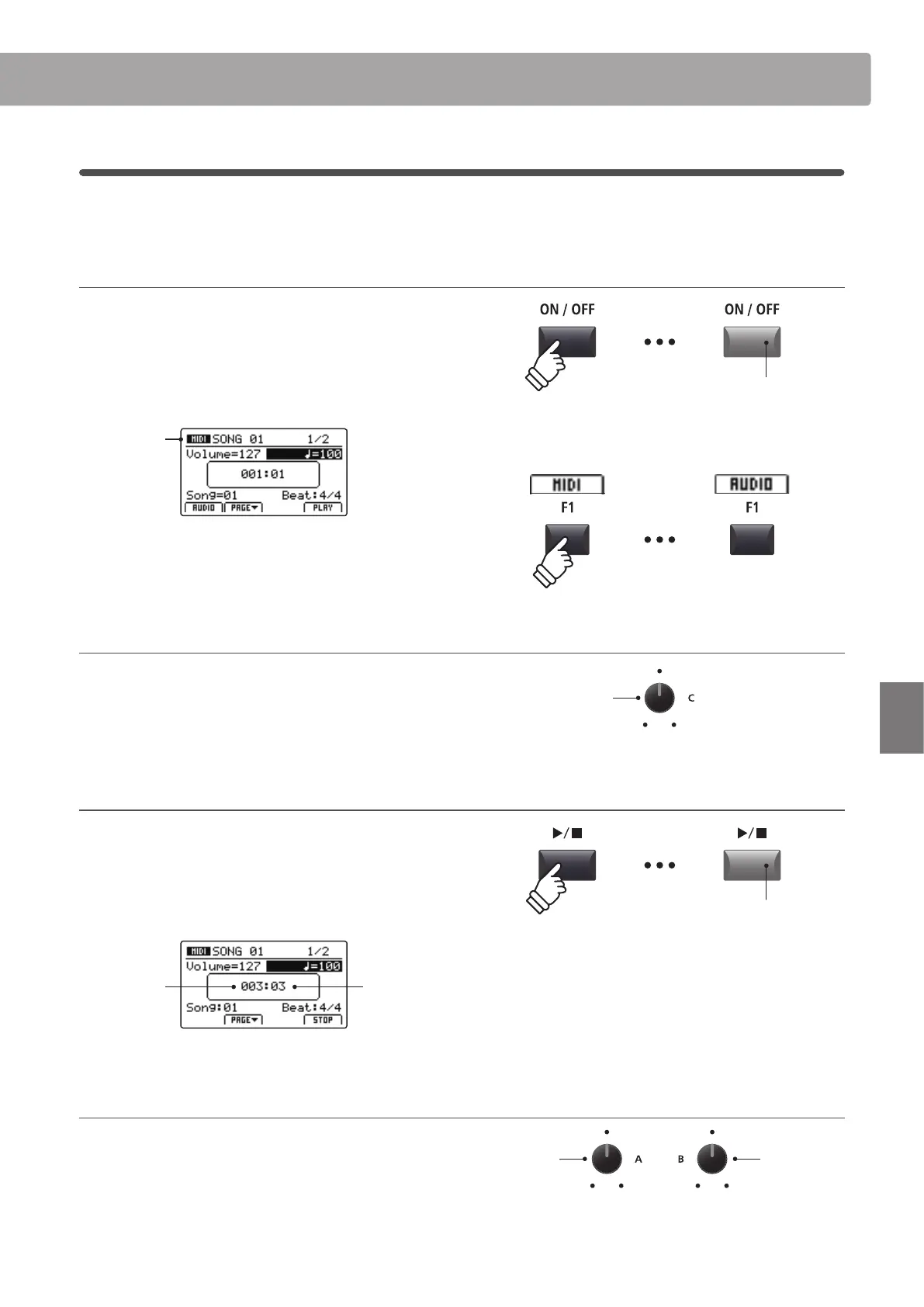
1. Turning the Recorder mode ON
Press the RECORDER section’s ON/OFF button to turn Recorder
mode ON.
The LED indicator for the RECORDER section’s ON/OFF button
will turn ON, and the MIDI recorder screen will be shown in the
LCD display.
MIDI
recorder
selected
If a USB memory device is connected, press the F1 button (MIDI) to
select the MIDI recorder function.
2. Selecting the song to playback
Turn control knob C to select the song memory to be played
back.
* Song selection is not possible during playback.
3. Starting song playback
Press the / recorder control button.
The LED indicator for the / button will turn ON, and the
selected song will start to play.
* The F4 function button (PLAY) can also be used to start song playback.
Bar
(of song)
Beat
(of bar)
Adjusting playback volume and tempo
Turn control knobs A and B to adjust the playback volume and
tempo of the song.
* The playback volume and tempo of the song can be adjusted both before
and during playback.
LED indicator ON:
Recorder mode is turned ON
Song
memory
Playback
volume
Tempo
LED indicator ON:
Playback is in progress



 To Next Page