63
EDIT Menu
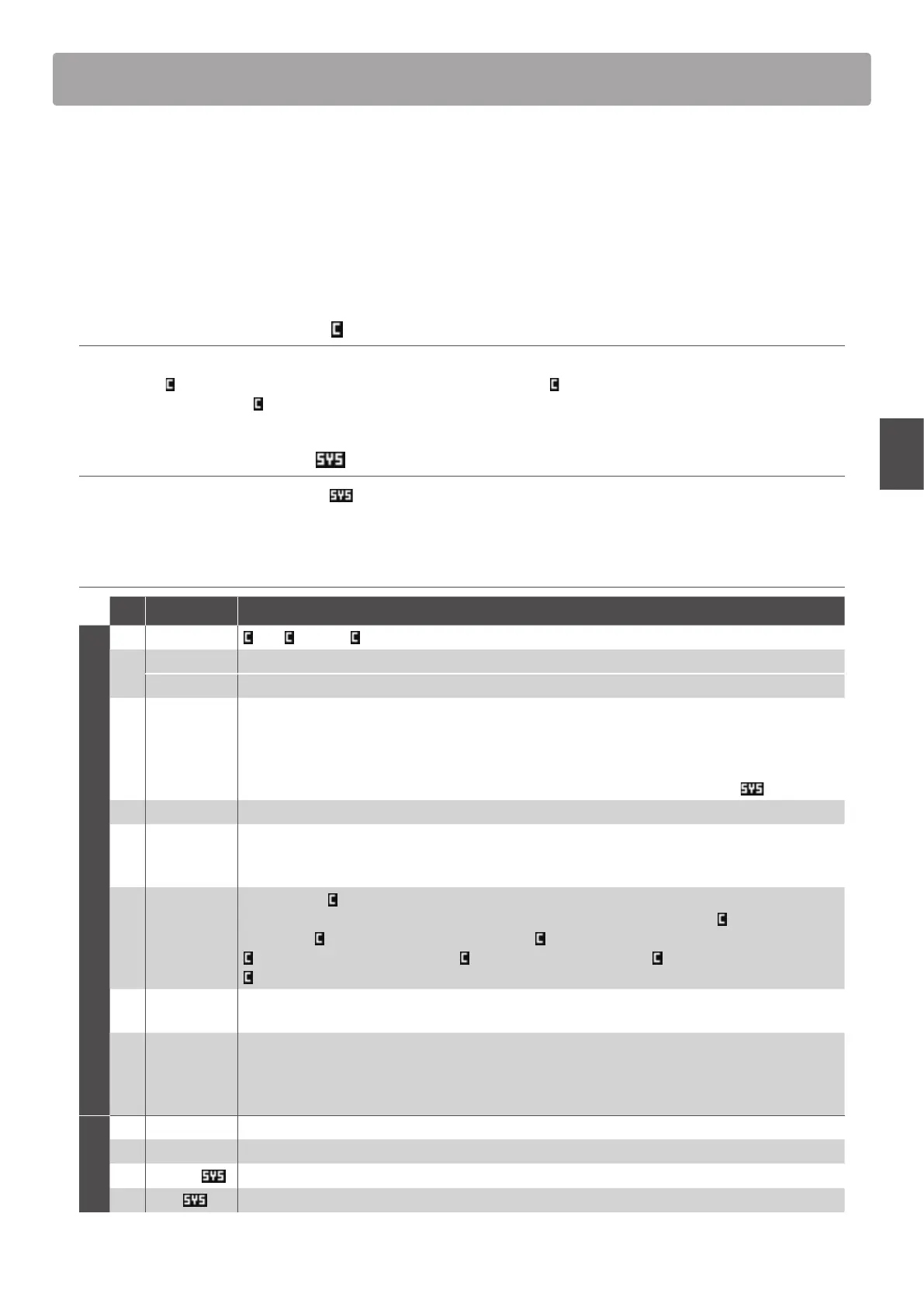
Overview of the EDIT Menu (BOTH mode)
When a zone is set to BOTH mode, the EDIT menu will display a combination of INT mode and EXT mode parameters.
The rst eight categories will contain normal INT mode parameters, with an additional four categories containing
EXT mode parameters.
* For more information about INT mode and EXT mode parameters please refer to pages 38 and 54.
As with zones set to INT and EXT mode, this collection of parameters, together with other adjustable settings, can
be stored as a SETUP memory (page 65). The MP7SE provides 256 user programmable SETUP memories.
About Common parameters ( icon)
Unless stated, parameter settings for the MAIN, SUB1, SUB2, and SUB3 zones are independent for each zone. However, parameters
marked with a
icon are common for all four zones. For example, changing the Right Pedal Assign parameter for the MAIN zone
will automatically change the
Right Pedal Assign parameter for the SUB1, SUB2, and SUB3 zones.
About System parameters ( icon)
EXT mode zone parameters marked with a icon are SYSTEM parameters and memorised automatically, without the need to use
the STORE function.
BOTH mode zone parameters
No. Category Parameters
INT mode parameters
1 REVERB Type, Pre Delay, Time, Depth
2
EFX Category, Type, Parameters (prm1~prm10, depending on EFX type)
AMP Amp Type, Drive, Level, Amp EQ Lo, Amp EQ Mid, Amp EQ Hi, Mid Freq., Mic Type, Mic Position, Ambience
3 Sound
Volume, Panpot, Filter Cut-o, Filter Resonance, DCA Attack Time, DCA Decay Time, DCA Sustain Level,
DCA Release Time, DCF Attack Time, DCF Attack Level, DCF Decay Time, DCF Sustain Level, DCF Release Time,
DCF Touch Depth, DCA Touch Depth, Vibrate Depth, Vibrate Rate, Vibrate Delay, Octave Layer Switch,
Octave Layer Level, Octave Layer Range, Octave Layer Detune, Portamento, Porta. Time, Porta. Mode
tonewheel: Drawbar Position, Percussion, Perc. Level, Perc. Decay, Perc. Harmonic, Volume, Ext. Control
4 Tuning Fine Tune, Stretch Tuning, Temperament, Key of Temperament
5 Key Setup
Touch Curve, Dynamics, Trigger Mode, Minimum Touch, Octave Shift, Zone Transpose, Key Scaling Damping,
Key Scaling Key, Key Range Zone Lo, Key Range Zone Hi, Velocity Switch, Velocity Switch Value, Solo,
Solo Mode, Key Volume
6 Controllers
Damper Pedal,
Damper Pedal Assign, Damper Pedal Mode, Pitch Bend, P. Bend Range, Soft Pedal Depth,
Modulation Wheel, Modulation Wheel Assign, Modulation Depth Range, SW1 Button,
SW1 Button Assign,
SW2 Button,
SW2 Button Assign, Footswitch Pedal, Footswitch Pedal Assign, Expression Pedal,
Expression Pedal Assign, Right Pedal, Right Pedal Assign, Center Pedal, Center Pedal Assign, Left Pedal,
Left Pedal Assign
7 Knob Assign
Knob A Assign, Knob B Assign, Knob C Assign, Knob D Assign,
Knob2 A Assign, Knob2 B Assign, Knob2 C Assign, Knob2 D Assign
8
Virtual
Technician
piano: Voicing, String Resonance, Undamped Resonance, Damper Resonance, Key-o Eect, Damper Noise,
Hammer Delay, Fall-back Noise, Topboard, Stereo Width
e.piano/harpsi/bass: Key-o Noise, Key-o Delay
drawbar*: Key Click Level, Wheel Noise Level
EXT mode
9 Ch/Program MIDI Transmitting Channel, Program*, Bank MSB*, Bank LSB*
10 SETUP Send Program, Send Bank, Send Volume, Send Knobs
11 Transmit
Transmit System Exclusive, Transmit Recorder
12 MMC
Transmit MMC, MMC Device ID, MMC Commands
* When a zone is set to BOTH mode, the Program, Bank MSB, and Bank LSB parameters are xed, and cannot be adjusted.



 To Next Page