20
Main Operation
Getting Started
After connecting the power cable, speakers/headphones, and pedals, it’s time to start playing the MP7SE stage
piano. This page will explain how to turn on the instrument, set the MAIN zone volume, and adjust the master
volume.
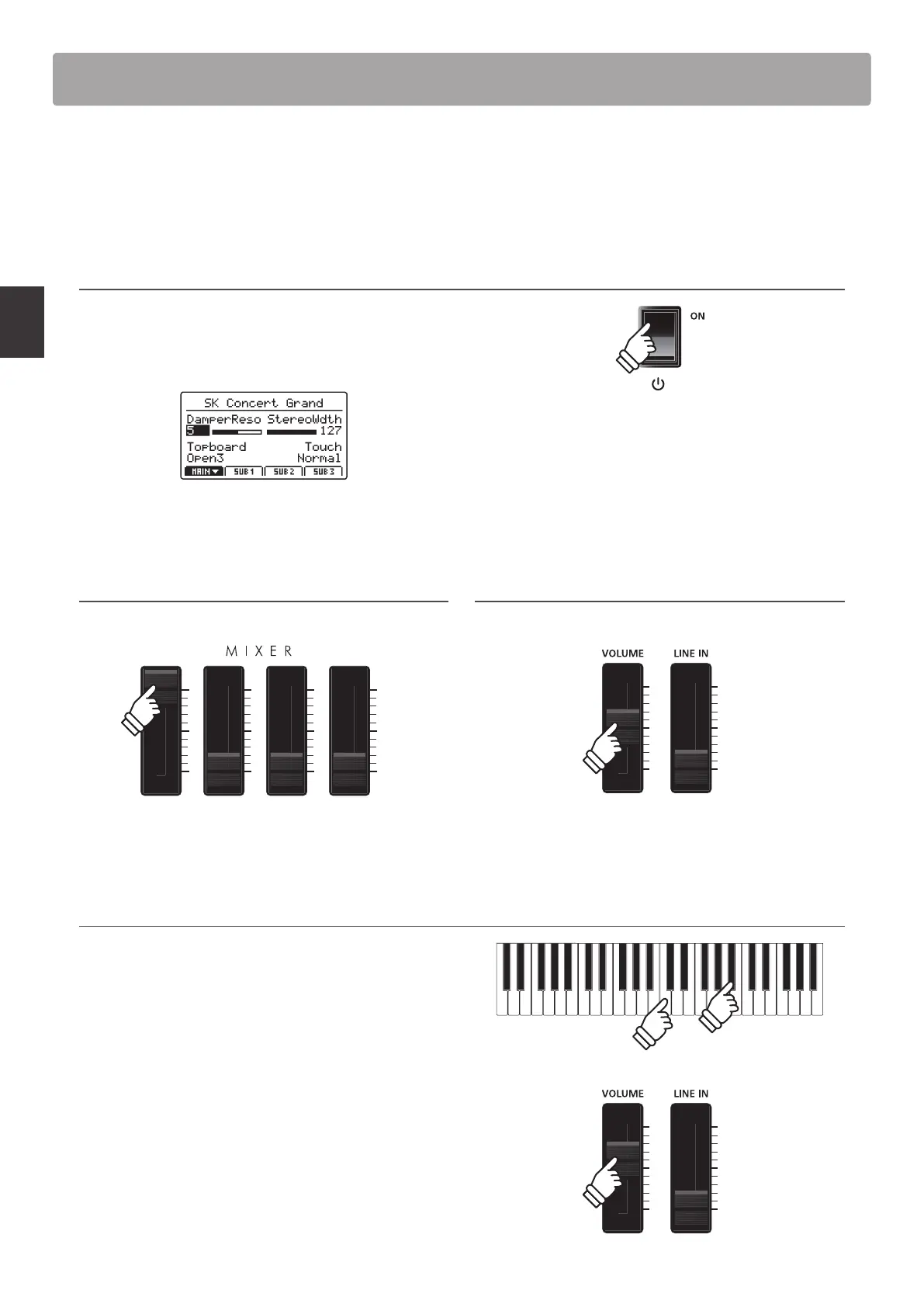
1. Turning the MP7SE ON
Press the POWER SWITCH.
The instrument will turn ON, and after a brief period the main
Play Mode screen will be shown in the LCD display.
* For more information about the play screen, please refer to page 26.
2. Adjusting the MAIN zone volume
Move the MAIN zone volume fader to the top-most position.
* For more information about adjusting the volume of zones, please refer
to page 22.
3. Adjusting the MP7SE’s master volume
Move the MASTER VOLUME fader to the half-way position.
4. Playing the piano
Start playing the piano.
The rich sound of a Kawai SK-EX Concert Grand Piano will be
heard as the keys are pressed.
If necessary, increase or decrease the MASTER VOLUME fader to
nd a comfortable listening level.
* The MP7SE features a power saving mode that can turn o the instrument
automatically after a specied period of inactivity. For more information,
please refer to page 107.



 To Next Page