44 TOS5200
CONFIG Settings
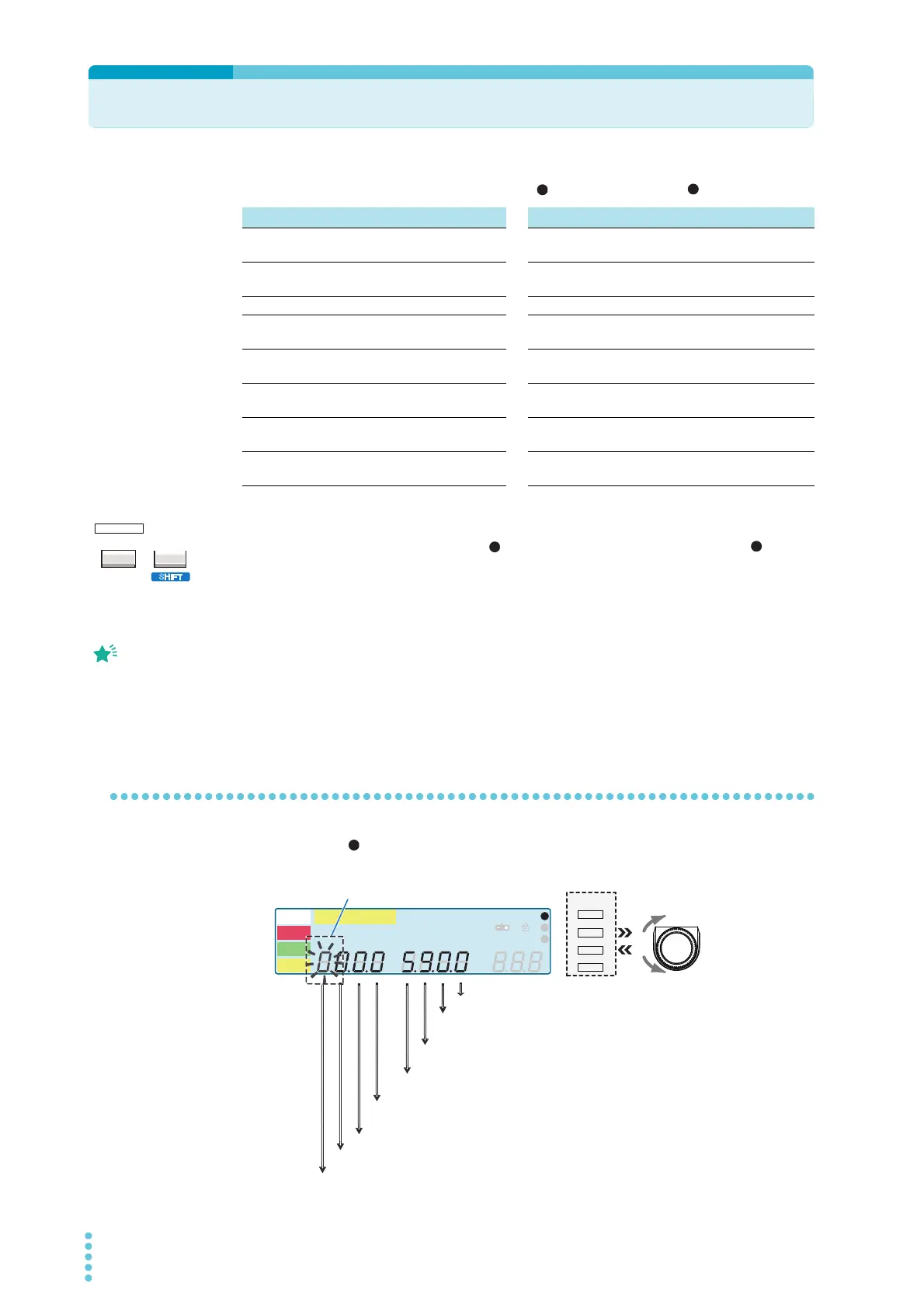
CONFIG settings are provided on the CONFIG screen and CONFIG screen.
1
Press CONFIG (SHIFT+FUNCTION) to display the CONFIG setup screen.
Press once to show the CONFIG screen and twice to show the CONFIG screen.
2
Press MEMORY 2 or MEMORY 3 to move to the CONFIG item that you
want to set, and then use the rotary knob to set the value.
To exit from the CONFIG setup screen and return to the basic setup screen, press STOP.
If you enter CONFIG settings again without first turning the power off, the screen that you pre-
viously were viewing will be displayed.
CONFIG 1 settings
On the CONFIG setup screen, you can set the test mode and buzzer volume level.
CONFIG 1 CONFIG 2
Double Action Double action feature H.V ON Output when there is residual volt-
age or during testing
Momentary Momentary feature Test Output during testing when the
test voltage is at the set value
Fail Mode Fail mode feature Pass PASS judgment output
Pass Hold PASS judgment result hold
time
Upper Fail Output when upper limit judgment
is FAIL
Pass Buzzer volume level for PASS
judgment
Lower Fail Output when lower limit judgment
is FAIL
Fail Buzzer volume level for FAIL
judgment
Ready Output when READY is displayed
Baudrate RS232C baud rate Protection Output during PROTECTION
mode
Talk Mode Talk mode Power ON Output when the POWER switch
is on
1
The first screen that is dis-
played when you perform
configuration settings is
called CONFIG setup
screen.
1
A
kV
Mȍ
mA
CONFIG
RISE TEST
RMS AVE MORE CAL RMT
MT
LIMIT
50Hz 60Hz
UPPER
LOWER W COMP
s
1
2
3
READY
TEST
PAS S
FAIL
PROTECTION
FAIL judgment buzzer volume level setting
[0 to 9: 10 setting levels]
PASS judgment buzzer volume level setting
[0 to 9: 10 setting levels]
Talk mode setting [0: off, 1: on]
RS232C baud rate setting
[0: 9 600, 1: 19 200, 2: 38 400, 3: 57 600, 4: 115 200]
Fail mode function setting [0: off, 1: on]
Momentary function setting [0: off, 1: on]
Double action feature setting [0: off, 1: on]
Judgment result hold time setting
[0: 50 ms, 1: 100 ms, 2: 200 ms, 3: 1 s, 4: 2 s, 5: 5 s, 6: HOLD]
1
MEMORY
2
3
RECALL
Example: Selecting the double action feature
(blinking)



 To Next Page