16
SETTING UP YOUR FOOD PROCESSOR
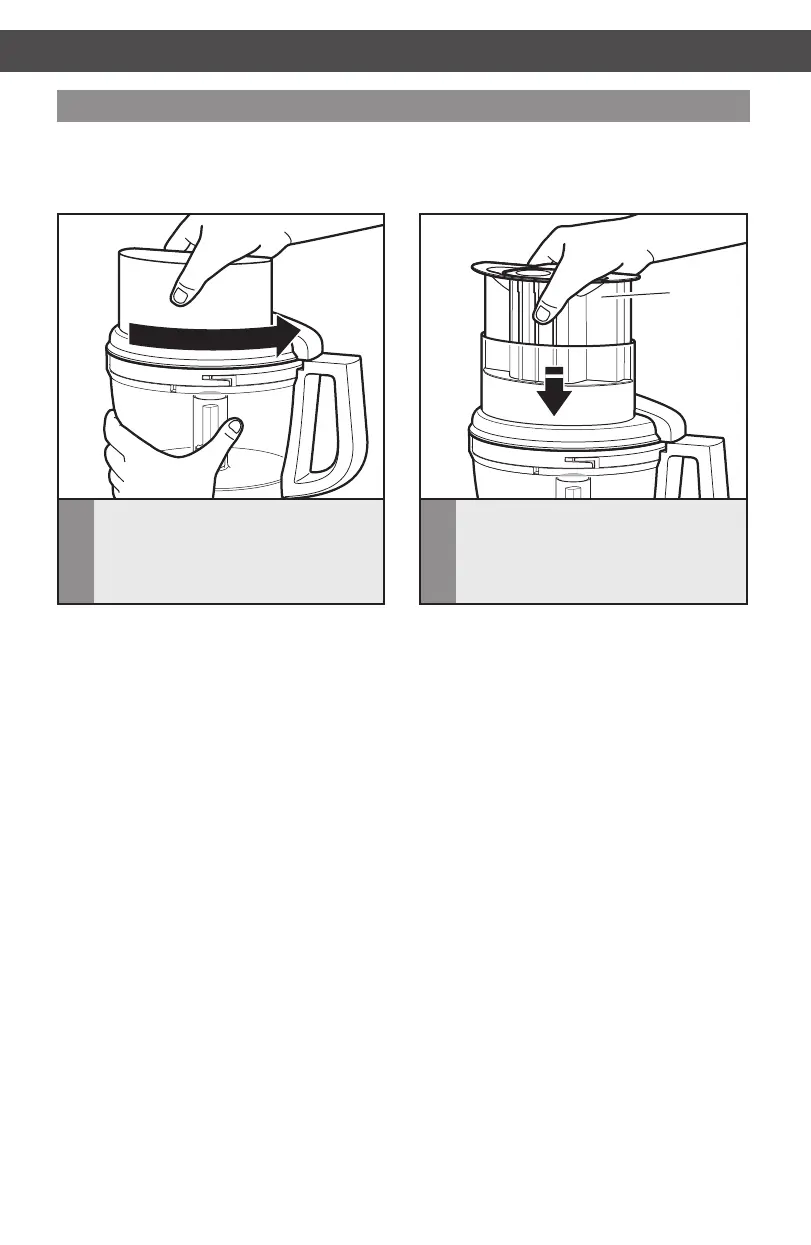
Attaching the work bowl cover
SETTING UP YOUR FOOD PROCESSOR
Food
pusher
1
Place the work bowl cover on the
work bowl with the feed tube just to
the left of the work bowl handle. Grasp
the feed tube and turn the cover to the
right until it locks into place.
2
Fit the food pusher into the 3-in-1
feedtube.See“Usingthe3-in-1
Feed Tube” for details on working with
different sized foods.
NOTE: Be sure to install the desired
accessory before attaching the work
bowl cover.
NOTE: Your Food Processor will not operate unless the work bowl and work bowl cover are
properlylockedonthebase,andthelargepusherisinsertedtothemaximumlllineonthe
feed tube (approximately halfway down).
W10505785C_01_ENv08.indd 16 9/12/14 8:24 AM


 To Next Page
 Loading...