25
English
Using the pulse control
USING YOUR FOOD PROCESSOR
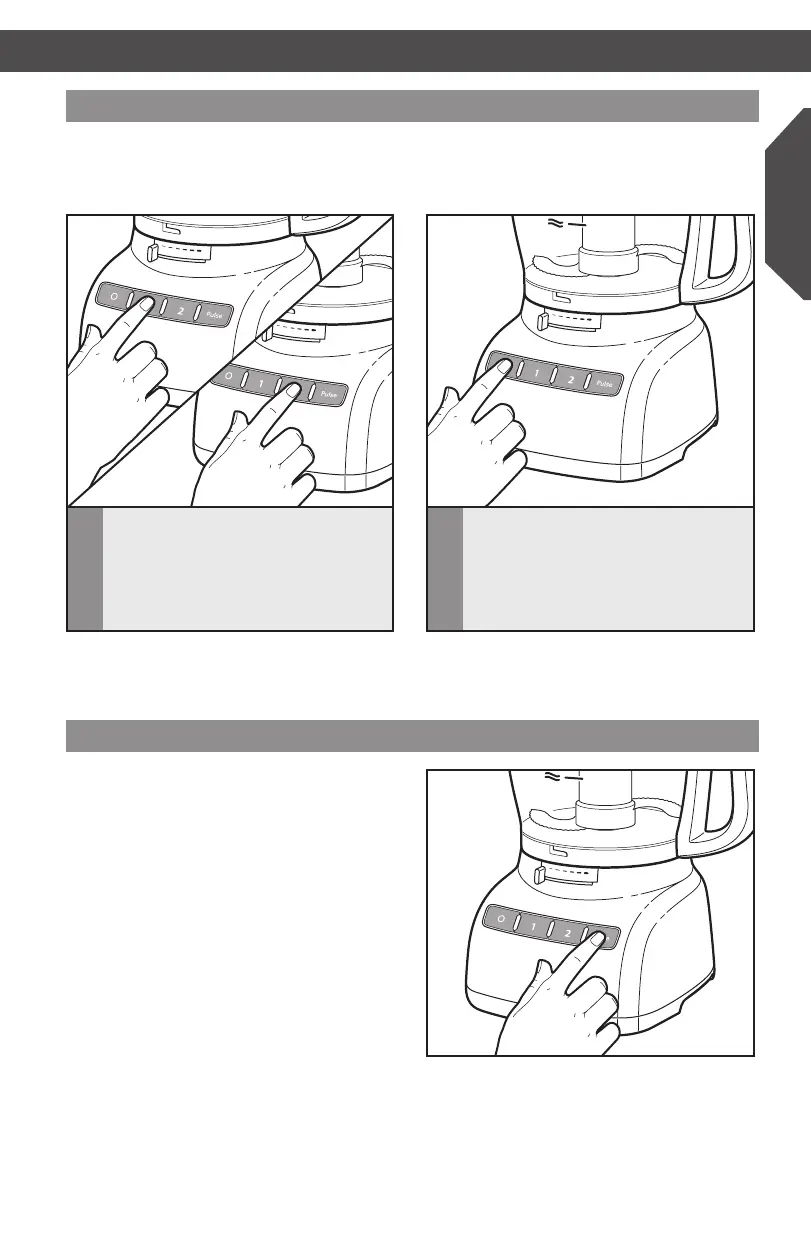
The pulse control allows precise control of
the duration and frequency of processing.
It’s great for jobs which require a light touch.
JustpressandholdthePULSEButtonto
startprocessingathighspeed,andrelease
it to stop.
USING YOUR FOOD PROCESSOR
Using the speed 1/speed 2 control
IMPORTANT: Wait until the blade or disc comes to a complete stop before removing the
work bowl cover. Be sure to turn off the Food Processor before removing the work bowl
cover,orbeforeunpluggingtheFoodProcessor.
NOTE:IftheFoodProcessorfailstooperate,makesuretheworkbowlandcoverare
properlylockedonthebase(see“SettingUpYourFoodProcessor”).
2
TostoptheFoodProcessor,pressthe
O (OFF) button. The indicator light will
go out and the blade or disc will stop
within a few seconds.
1
ToturnontheFoodProcessor,press
theSpeed1button(lowspeed,for
softfood)ortheSpeed2button
(highspeed,forhardfood).TheFood
Processor will run continuously and the
indicator light will glow.
W10505785C_01_ENv08.indd 25 9/12/14 8:25 AM



 To Next Page
 Loading...