26
USING YOUR FOOD PROCESSOR USING YOUR FOOD PROCESSOR
CARE AND CLEANING
4
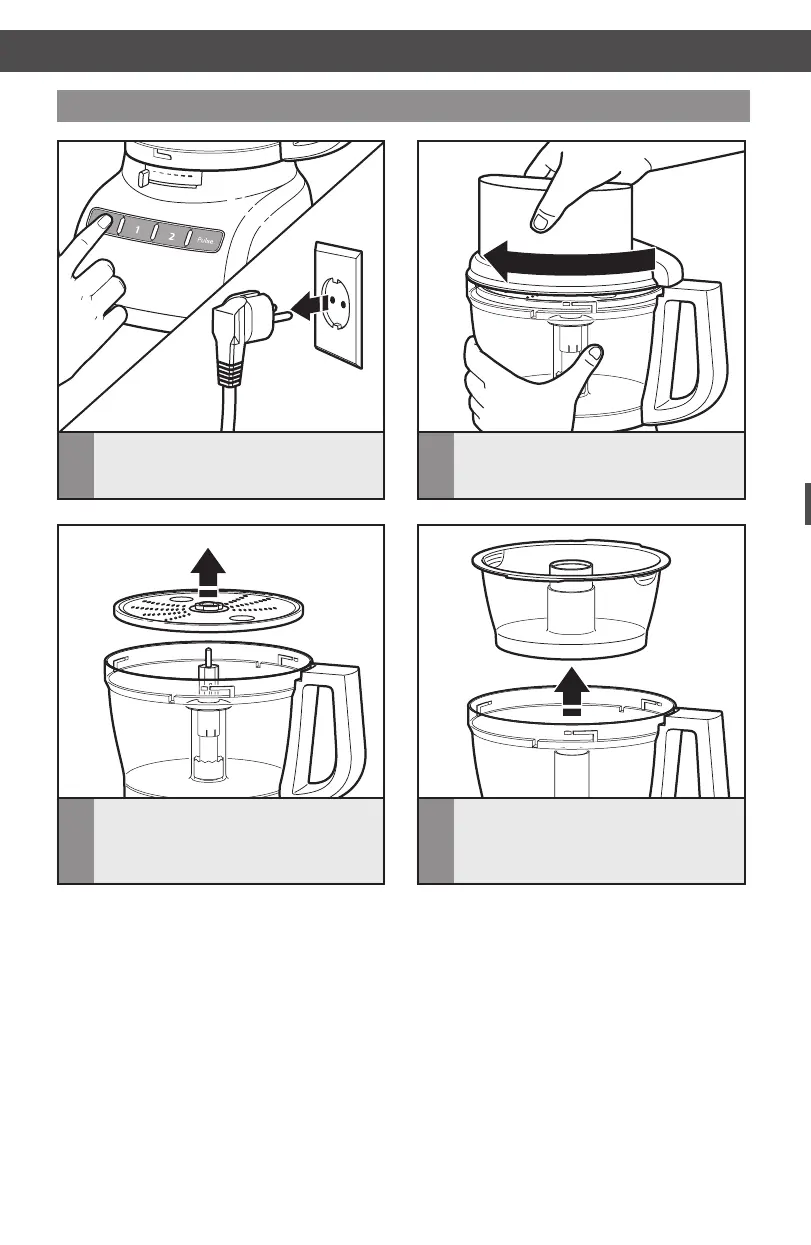
Ifusingthemini-bowl*,graspand
removethebowlusingthengergrips
located along the top edge of the bowl.
Removing processed foods
3
Ifusingadisc,removeitbefore
removing the bowl. Holding the
discbythe2ngergrips,liftit
straight up. Remove the adapter.
2
Turn the work bowl cover to the
left and remove.
1
Press the O (OFF) button. Unplug the
Food Processor before disassembling.
* Included only in model 5KFP1335
W10505785C_01_ENv08.indd 26 9/12/14 8:25 AM


 To Next Page
 Loading...