21
English
SETTING UP YOUR FOOD PROCESSOR
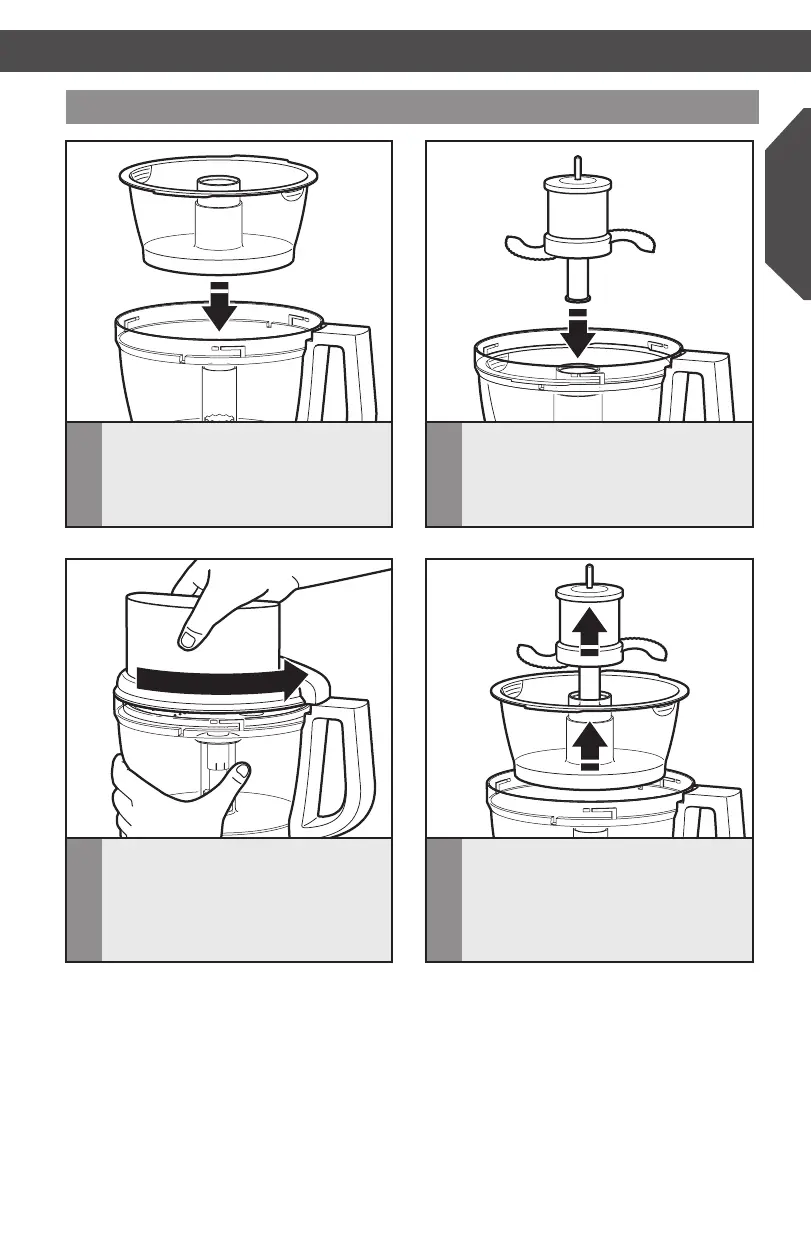
Installing the mini-bowl* and mini-blade*
3
Installtheworkbowlcover,beingsure
it locks into place.
2
Insert the drive adapter into the
mini-blade,andplaceonthepower
shaft. It may be necessary to rotate the
blade until it falls into place. Press down
rmlytolockitintoplace.
1
Place the mini-bowl inside the work
bowl over the power shaft. Rotate the
mini-bowl until the tabs on the top
edge of the bowl drops into the indents
on the top of the work bowl.
4
To remove the mini-bowl after
processing,removethemini-blade
by pulling straight up on the cap. Then
liftthebowlstraightupandout,using
thetwongergripslocatedalongthe
top edge of the bowl.
SETTING UP YOUR FOOD PROCESSOR
* Included only in model 5KFP1335
W10505785C_01_ENv08.indd 21 9/12/14 8:24 AM


 To Next Page
 Loading...