19
English
SETTING UP YOUR FOOD PROCESSOR
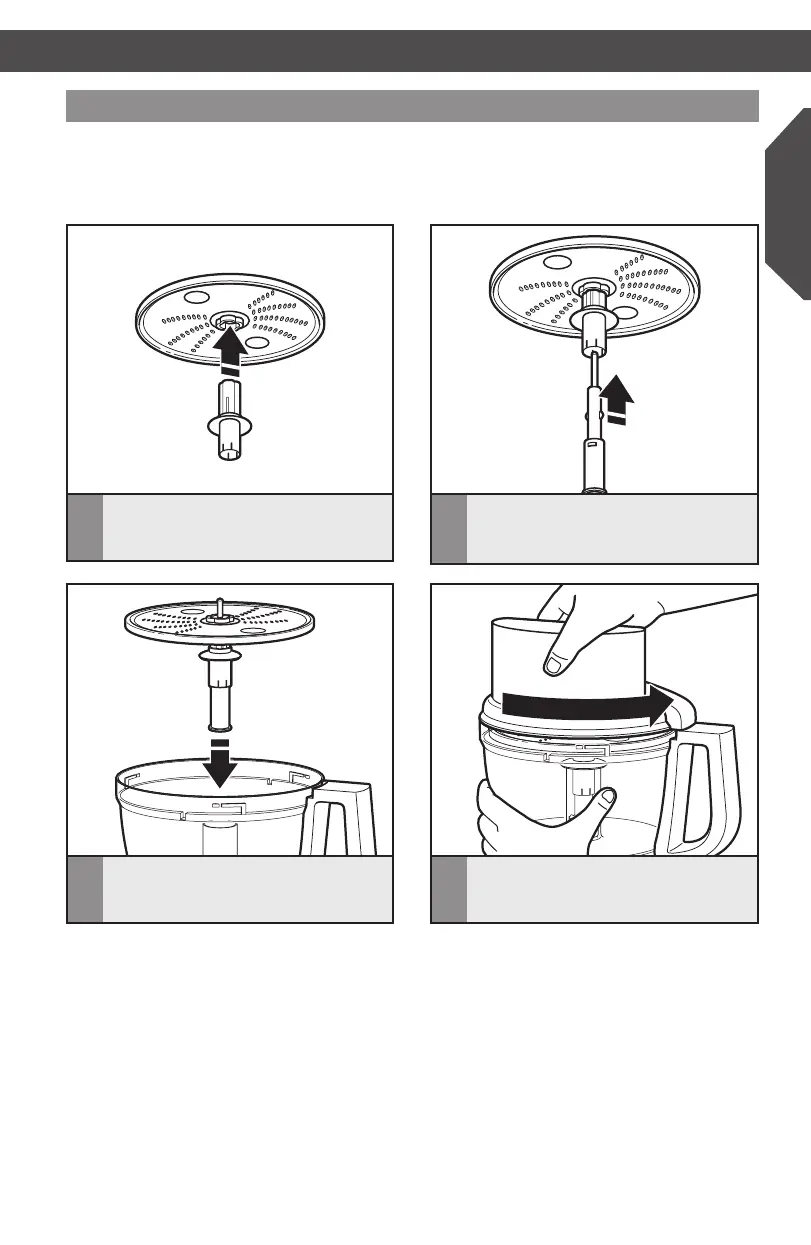
Installing the shredding disc
3
Withtheworkbowlinstalled,slidethe
drive adapter onto the power shaft.
2
Slidethedriveadapterintothedisc
adapterasfarasitwillgo,untilit
clicks into place.
1
Holdingthediscbythe2ngergrips,
insert the disc adapter into the hole in
the bottom of the disc.
4
Installtheworkbowlcover,beingsure
it locks into place.
SETTING UP YOUR FOOD PROCESSOR
IMPORTANT:Whenusingthereversibleshreddingdisc,havethedesiredside
(medium/ne)facingUP.
TIP: You may need to turn the disc/drive adapter until it drops down into place.
W10505785C_01_ENv08.indd 19 9/12/14 8:24 AM


 To Next Page
 Loading...