93
The submenu enables setting the output of air supply and exhaust fans and
setting temperature for the comfort mode
Comfort ->
Air supply – control level setting
of air supply fan
Air exhaust – control level
setting of air exhaust fan
Pressure setting – requested
pressure setting (active in case
of output adjustment of pressure
transducer)
Temperature setting – requ-
ested temperature setting
The submenu enables setting the output of air supply and exhaust fans and
setting temperature for the maximum operation mode
Maximum – >
Air supply – control level setting
of air supply fan
Air exhaust – control level
setting of air exhaust fan
Pressure setting – requested
pressure setting (active in case
of output adjustment of pressure
transducer)
Temperature setting – requ-
ested temperature setting
The submenu enables setting of the calendar function (calendar type
selection: K1,K5+2,K7 can be made in menu: Main menu/Settings/
Calendar type)
Calendar ->
Set date – current date setting
Set time – current time setting
K1 Pon-Nd – „K1” calendar
setting, common settings for
each weekday
K5+2 Pon-Pt – „K5+2” calendar
setting, common settings for
workdays, Monday to Friday
K5+2 Sob-Nd – „K5+2” calen-
dar setting, common settings for
weekend, Saturday and Sunday
K7 Pon-Nd – „K7” advanced
calendar setting,
individual settings for each day
of the week
NOTE!
It is not recommended to reduce the fan
speed below 50% due to the possibility
of overheating of the electric heater.
11.4.2 Calendar
Calendar type selection: K1,K5+2,K7 can be made in
menu: Main menu/Settings/Calendar type.
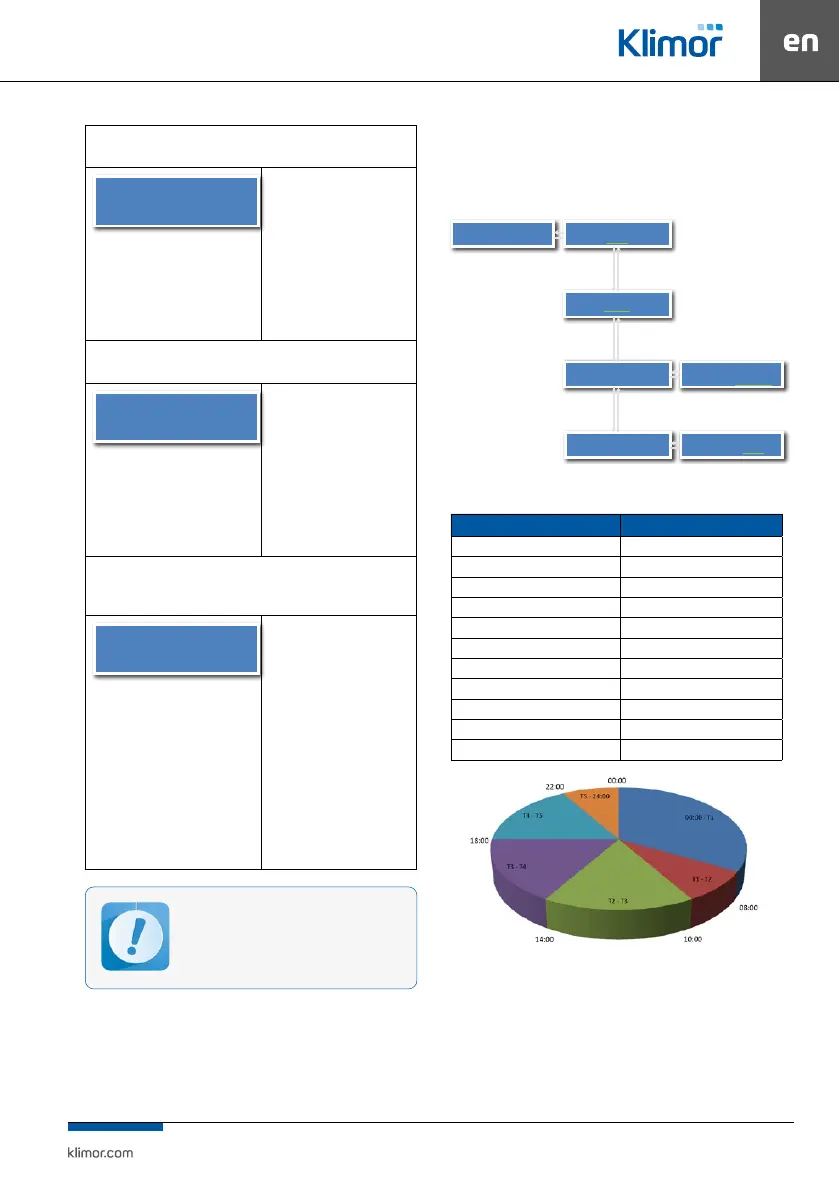
„K1” type calendar programming method
„K1” calendar has got common settings for each weekday
K1:Pon-Nd ->
T1
8:00
T5
22:00
00:00 – T1 ->
Select the mode of
operation
Comfort
T5 – 00:00 ->
Select the mode of
operation
Stop
OK
OK
OK
C
C
C
Setting the time thresholds
for each of the six time
periods
Operating mode setting for
each of six time ranges
Table 12 Sample settings:
Menu item Setting:
T1 8:00
T2 10:00
T3 14:00
T4 18:00
T5 22:00
00:00 – T1 Stop
T1 – T2 Maxsimum
T2 – T3 Comfort
T3 – T4 Comfort
T4 – T5 Eko
T5 – 24:00 Stop
Fig. 30 Daily operating modes.



 To Next Page