12
NOTE
: Before you connect an RF cable to a satellite TV receiver, turn on the satellite
TV receiver and TV and verify that there is no AC voltage on the satellite TV receiver’s
input connector, as measured between the center conductor and the shield. If AC
voltage is present on the connector, DO NOT connect the RF cable until you have
corrected the problem. This is a potentially dangerous condition that will damage the
antenna’s electronics.
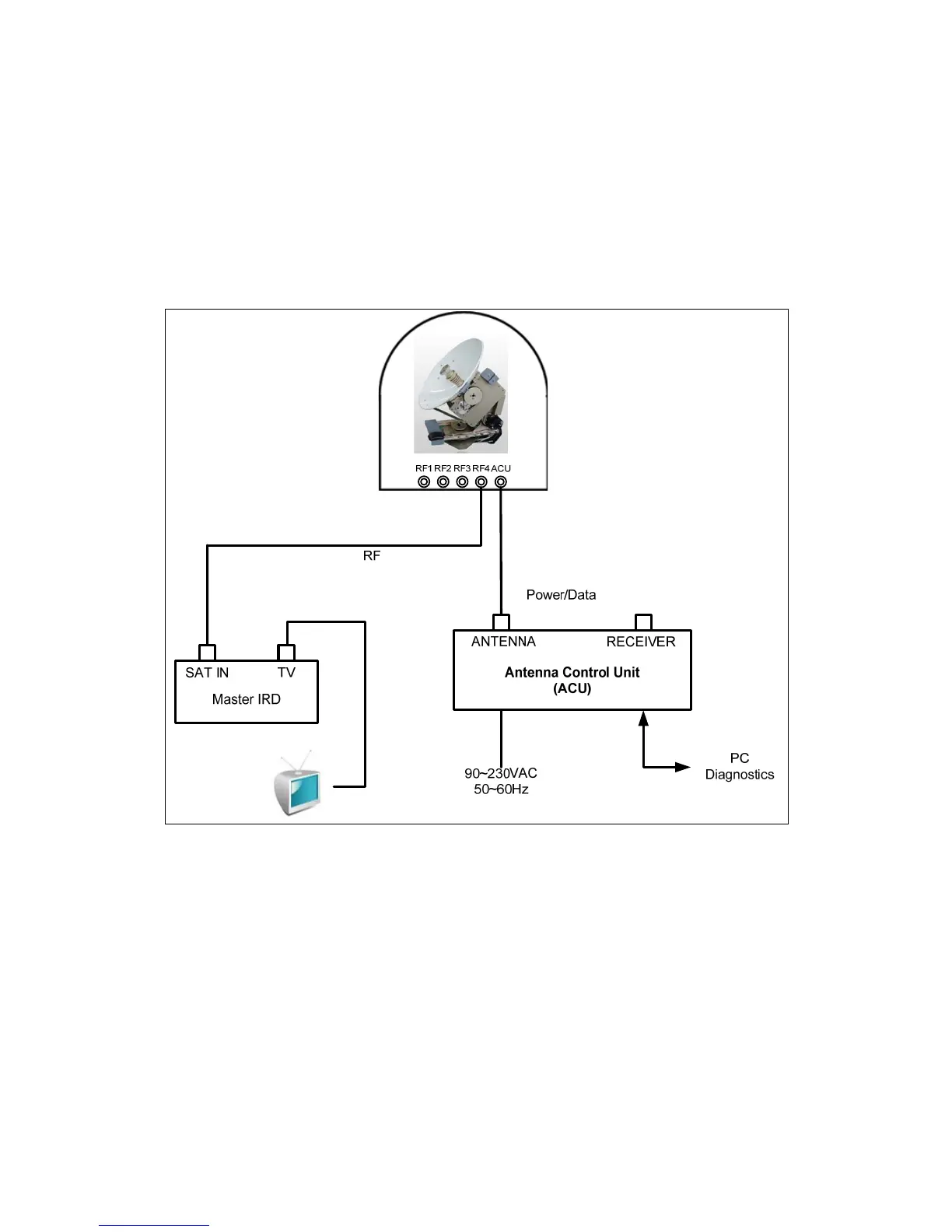
Figure 2-12 One Satellite TV Receiver Installation
Connecting one satellite TV receiver for satellite pairs with auto switching
(Only use the ‘HH’ polarity of the satellite)
If you want to use two satellites with one satellite TV receiver, you can use automatic
satellite switching using the DiSEqC. This versatility gives you the capability of
receiving audio and video programming from two satellites. One satellite TV receiver
for two satellites is also a simple mode of cable installation. Two coaxial cables should
be connected between the antenna unit and the ACU, as shown in Figure 2-13. And,


 To Next Page