43
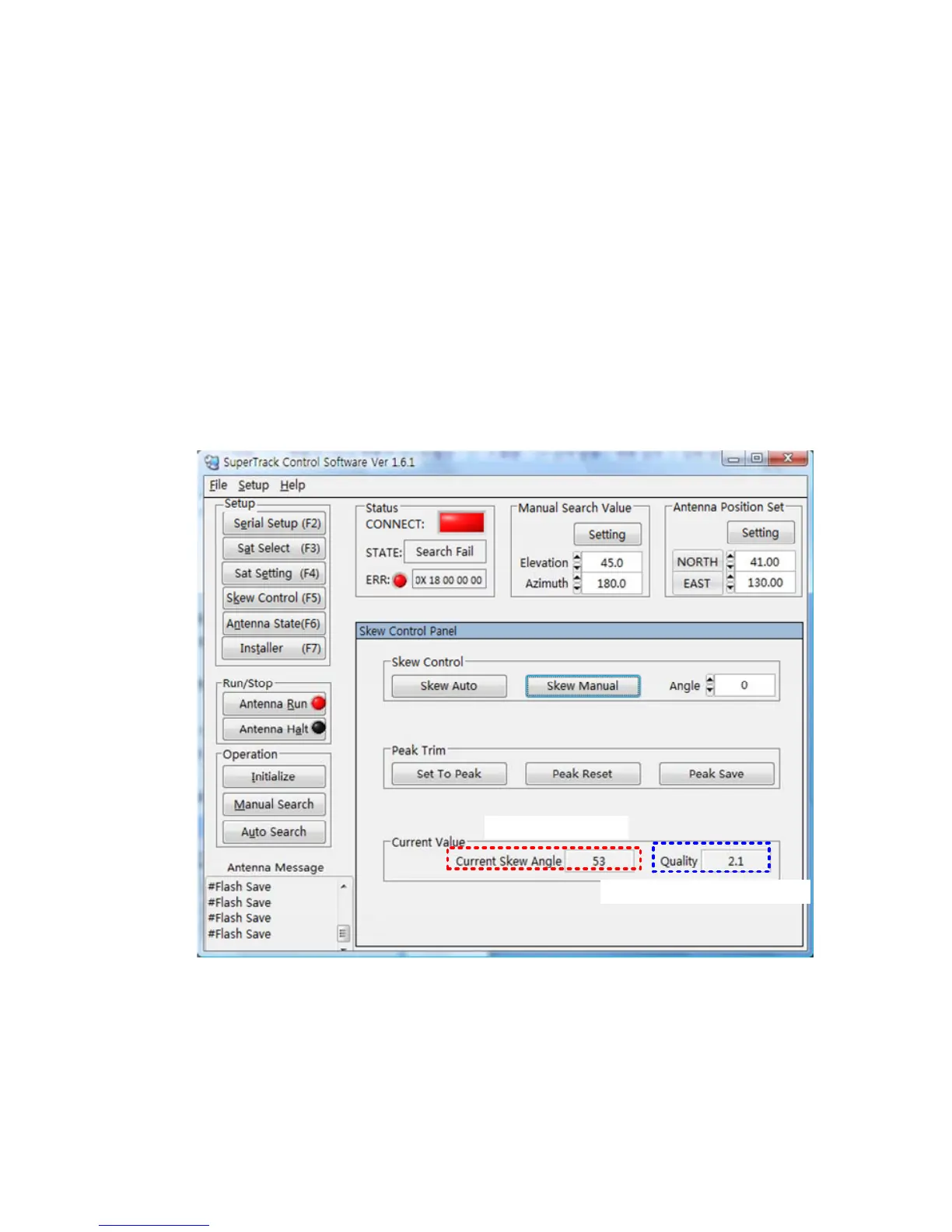
Set the peak trim
The skew angle is automatically calculated by the PCU, but sometimes the satellite
has an offset skew angle. In such a case, you have to set the peak to track a higher
quality of carrier. Refer to the steps outlined below and to Figure 4-6.
a. Change the skew angle using the skew manual mode after selecting the
desired satellite whose skew is offset.
b. Look at Quality, then search for higher quality while changing the skew angle.
c. Click ‘Set To Peak’, after searching for higher quality.
d. Click “Peak Save’ to save the changed peak.
e. Then, the S3’s skew will move to the changed skew angle upon selecting this
satellite.
Current Skew Angle
Current Signal Level(Quality)
Figure 4-6 Setting the Peak Trim
NOTE: If you want reset the peak, click ‘Peak Reset’ and then click ‘Peak Save’,
whereupon all peaks will be reset to the default skew angle.


 To Next Page