26
Program Satellite
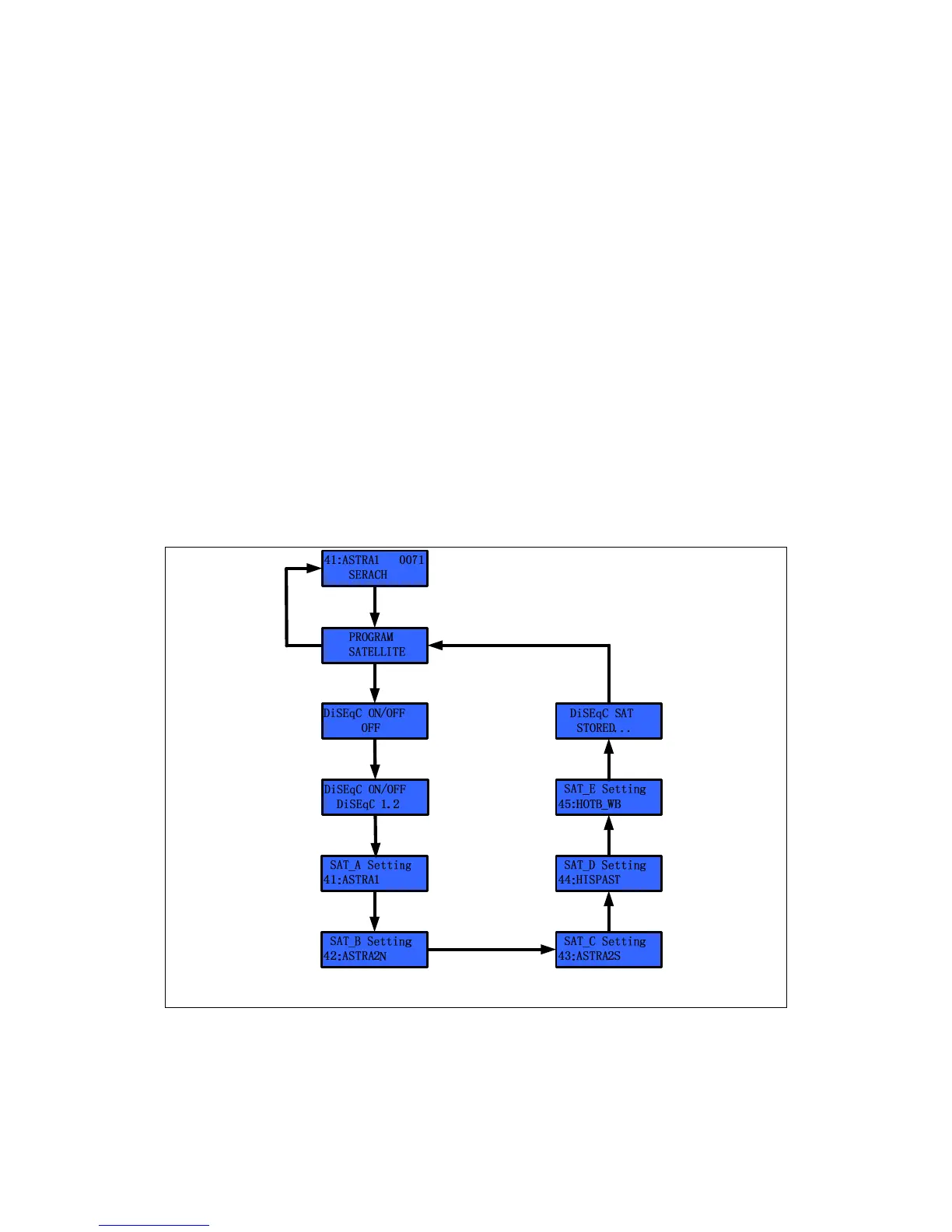
The user can select up to 5 desired satellites on KA-70 ACU. The user has to
select the DiSEqC mode from among either DiSEqC off or the DiSEqC 1.2 or 22
KHz tones before selecting the satellites.
If DiSEqC off is selected, the user can change the desired satellite using the
▶
(Next) button. After selecting the satellites from A to E, the KA-70 ACU changes
the satellite when the user presses the
▶
(Next) button.
In the case of 22 KHz, firstly, the ACU commands the antenna to search for the
‘SAT_A’ and then, if the ACU receives the 22 KHz tone via the ‘receiver’ port of the
AUC back panel, the ACU commands the antenna to search for ‘SAT_B’. But this
function requires the 22 KHz tone from the satellite TV receiver.
NOTE
: If DiSEqC 1.2 or 22 KHz tone is selected, the DiSEqC LED will turn on.
Also, the satellite cannot be changed using the ‘
▶
(Next)’ button.
Press ‘MENU’& hold 2~3 seconds
Select the ‘Program Satellite’ by’▲’ or ‘▼’
Press ‘MENU’
Press ‘MENU’
& hold 2~3 seconds
Select DiSEqC Mode
by’▲’ or ‘▼’
Select Satellite by’▲’ or ‘▼’
Press ‘MENU’ or ‘▶’
Select Satellite by’▲’ or ‘▼’
Press ‘MENU’ or ‘▶’
Press ‘MENU’
Select Satellite by’▲’ or ‘▼’
Press ‘MENU’ or ‘▶’
Select Satellite by’▲’ or ‘▼’
Press ‘MENU’ or ‘▶’
Press ‘MENU’
Figure 3-10 Program Satellite Setting Step


 To Next Page