39
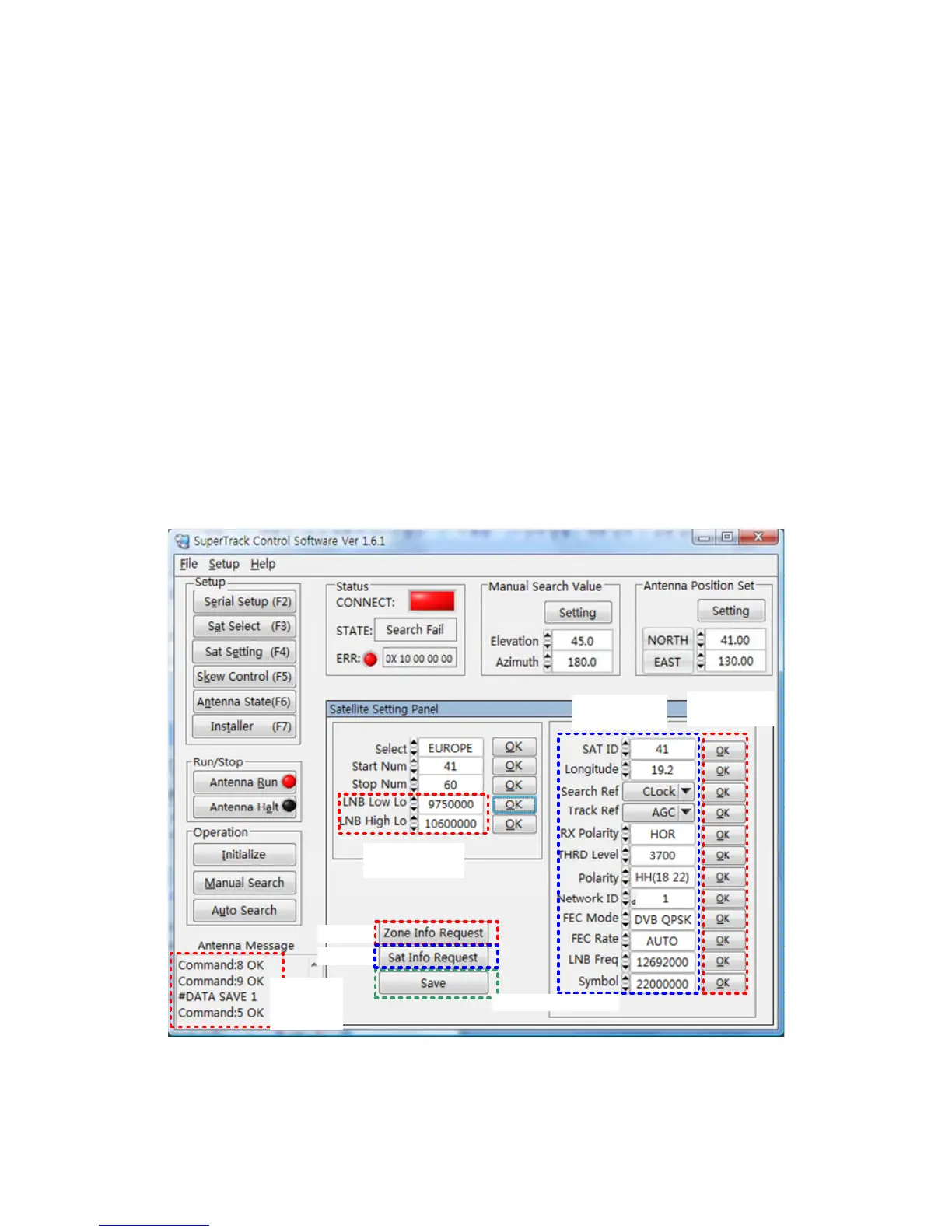
Edit the Satellite Parameters
If you select the user-settable satellite or if the desired satellite’s parameters are
incorrect, you can change the selected satellite’s parameters. Refer to the steps
outlined below and to Figure 4-4.
a. Click ‘Sat Setting’ (F4) or press F4 after selecting the desired satellite.
b. Click ‘Zone Info Request’ and ‘Sat Info Request’ to update from the PCU. Then,
the target satellite’s parameters and the LNB local frequency will be uploaded
to the satellite setting panel from the PCU.
c. If you want to change the LNB local frequency, input the new local frequency
and click the ‘OK’ button to upload to the PCU.
d. Change the satellite’s parameters and click each ‘OK’ button to upload to the
PCU. (If you do not click after changing the parameters, the changed
parameters will not be uploaded to the PCU.)
e. Press ‘Save’ to save the changed parameters.
1.Click
2.LNB Local
Frequency
3. Satellite
Parameters
4. ‘OK’
Buttons
5. Click to Save
2.Click
Antenna
Return
Message
Figure 4-4 Edit the Satellite’s Parameters


 To Next Page