20
8.
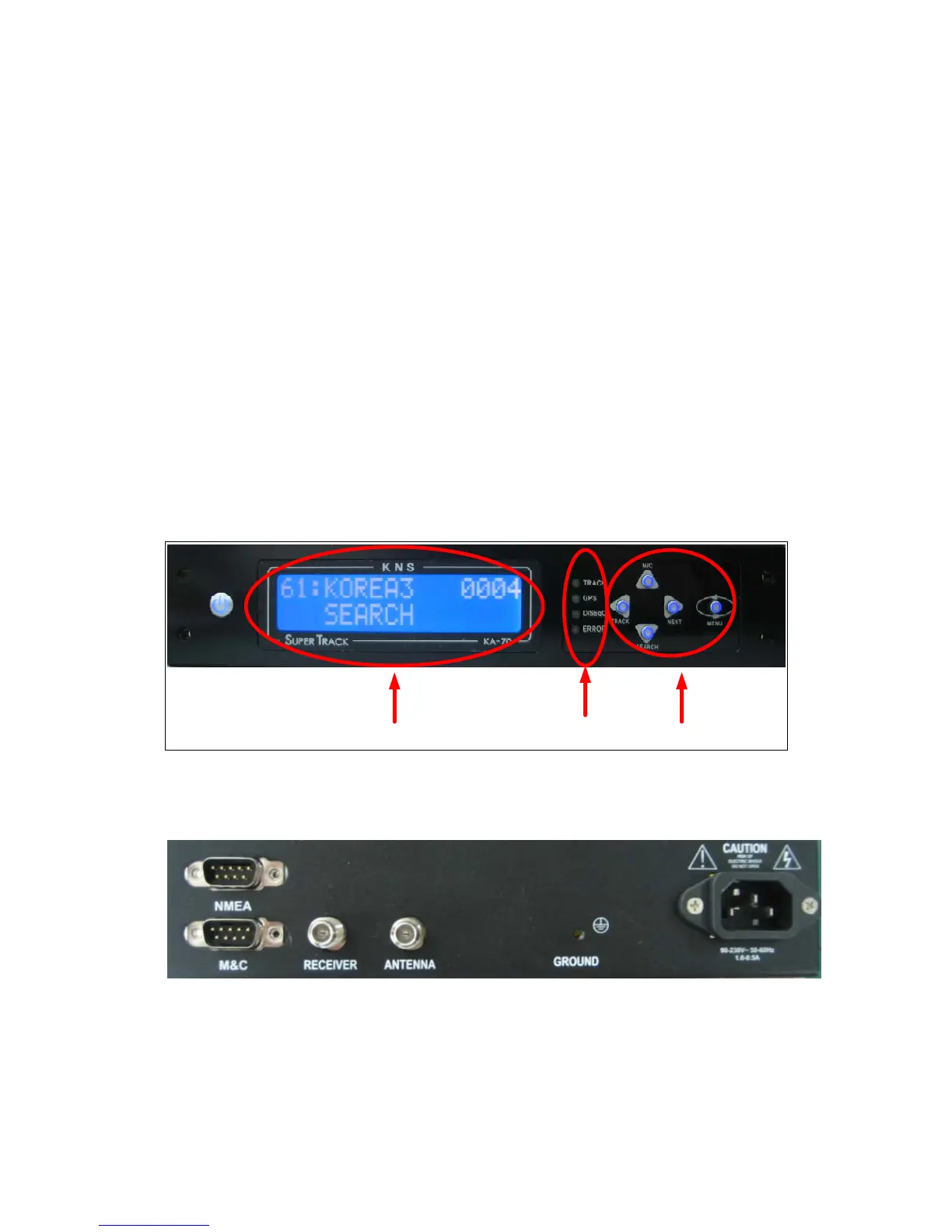
GPS LED
–
Blinking
indicates that the antenna has distinguished the GSP but that
the GPS data is invalid.
ON
indicates that the antenna is receiving valid GPS data.
OFF
indicates that the GPS antenna is not installed or is malfunctioning.
9.
DiSEqC LED
–
ON
indicates that the DiSEqC option is enabled to switch satellites
automatically. The ACU supports European the DiSEqC 1.2, 22KHz
tone.
OFF
indicates that the DiSEqC option is disabled. Press the NEXT
button to select the next satellite manually.
10
. ERROR LED
–
ON
indicates that one or more discrete system errors have occurred.
(Refer to Error Code)
OFF
indicates that no errors have occurred.
LCD BUTTON
LED
Figure 3-1 Antenna Control Unit Front Panel
Figure 3-2 Antenna Control Unit Back Panel



 To Next Page