29
c. Reset
After replacing the PCU board or the skew assembly, you have to re-adjust the
skew zero position. Otherwise, the SuperTrack S3 cannot search for the desired
satellite. Also, correction of the skew angle is important because the signal level
is influenced by the skew angle.
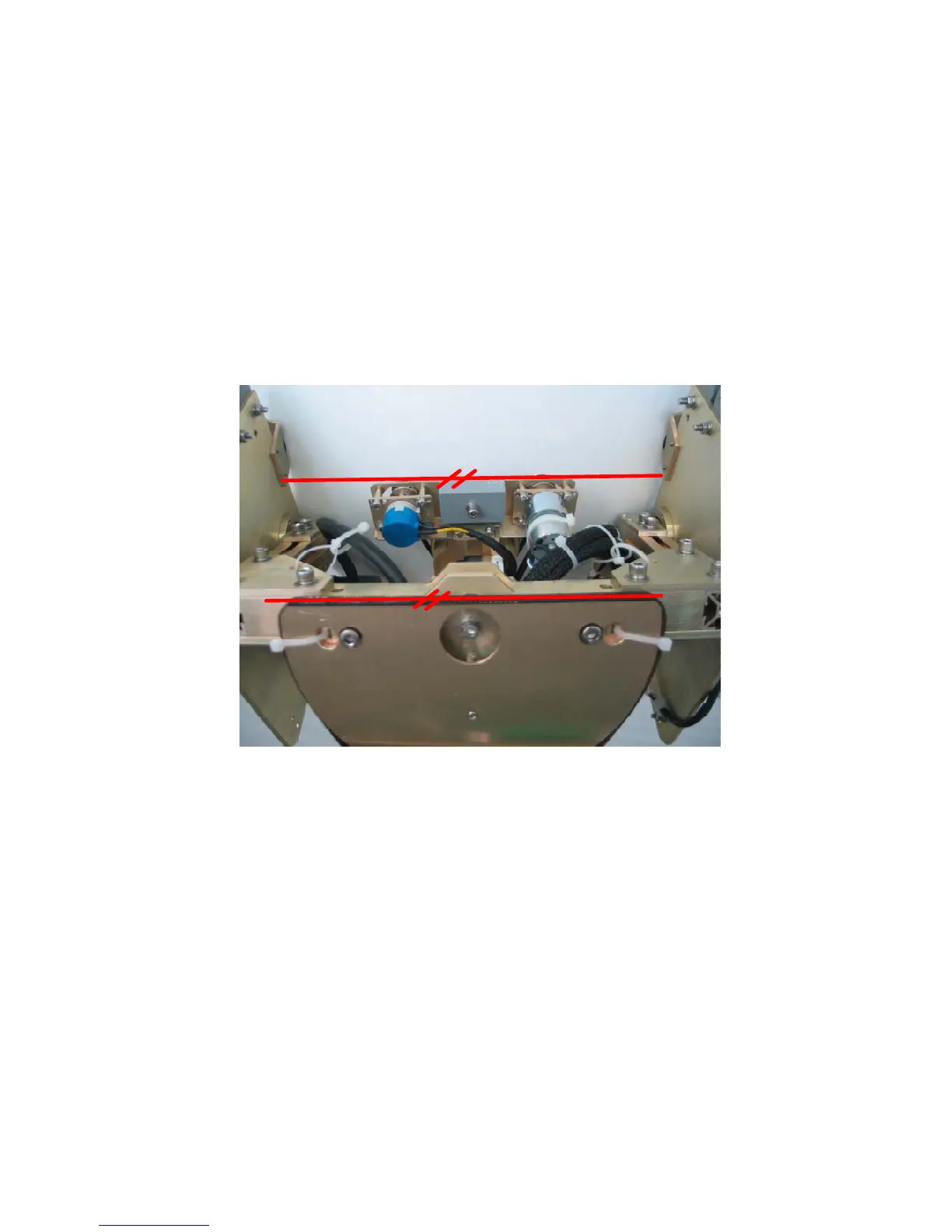
If ‘RESET’ is selected and ‘MENU’ is pressed at the desired skew angle, the
skew angle will be set to ‘0’ degrees. The skew angle affects signal strength, so
we recommend that the user should correct the skew ‘0’ degrees position, as
shown in Figure 3-13 below.
Figure 3-13 Skew ‘0’ degrees
d. Save
If you want to save the changed ‘0’ degrees position, press ‘MENU’ after selecting
the ‘SAVE’ mode.
e. Exit
If you want to escape, press ‘MENU’ after selecting the ‘EXIT’ mode.


 To Next Page