CVS-128/128B Chapter 1 Basic Operation
0093112802-06 1-15
5 Press the [MENU] key to close the menu.
The icons of functions preset are displayed
at the upper right side on the menu.
Other than the above operation method. When
keep pressing the [F1] key or [F2] key for few
second, the key set menu is displayed.
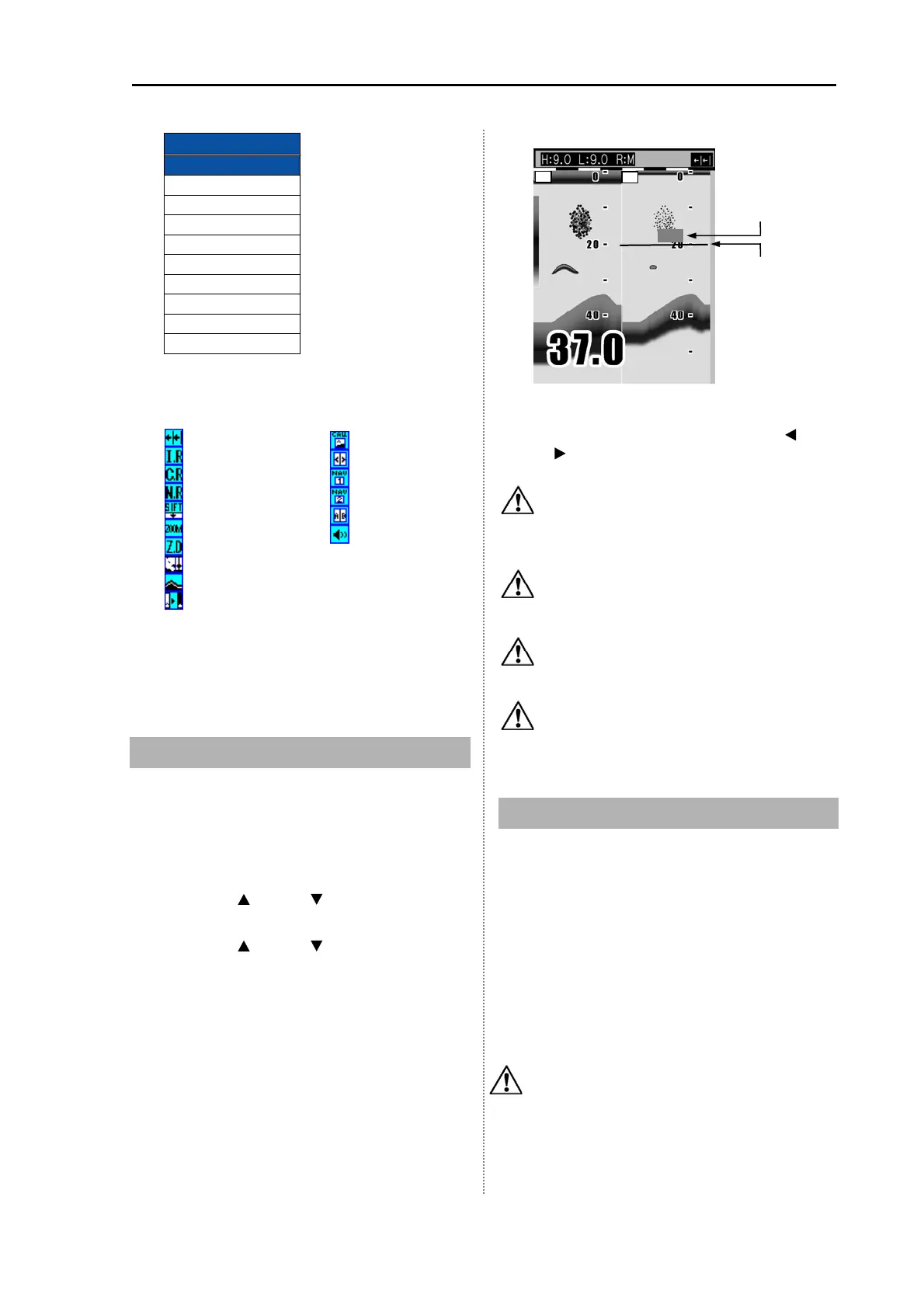
1.11 Operation of VRM
The VRM (movable marker) shown by the green
line can be moved up and down.
It is convenient to measure the depth by aligning
with the target such as school of fish.
1 Press the [ ] key or [ ] key. The movable
marker (straight line) is displayed.
2 Press the [ ] key or [ ] key. The movable
marker moves up and down.
The movable marker and the numerical of
marker depth are simultaneously
highlighted.
When displaying dual images, if the [
] key
or [
] key is pressed, the movable marker
moves to the neighboring image.
Caution: When several seconds pass
after finishing the VRM operation, the
numerical of marker depth becomes
normal display.
Caution: If VRM is moved to the top of
the display, the VRM can be
disappeared.
Caution: VRM can be operated by turning
[GAIN (LF) Knob] at the high frequency
screen.
Caution: VRM can be operated by turning
[GAIN (HF) Knob] at the low frequency
screen.
1.12 Display of fish information
When transducer TD-501C is connected, specific
response can be displayed as [Fish symbol].
For detection of fish information, 2 frequencies,
200 kHz and 50 kHz are used.
Only in case echo comes up in both frequencies,
the detection can be made.
By [Symbol info], the magnitude and the value of
depth of the response can be displayed.
Caution: Fish information is to display the
specific responses in an easy way to
watch. Displays of [Fish symbol] do not
always mean that there is fish there.
F1 key set
Image Speed
IR
Color Rejection
Noise Rejection
scope
Shift
Zoom Range
Zoom Start
Background Colo
White line
Movable marke
Marker Depth
2
.
L
H
Image speed
IR
Color rejection
Noise rejection
Shift
Zoom Range
Zoom Start
scope
White Line
Background colo
Image recall
Image swap
NAV1
NAV2
Disp width
←
←
←
←
←
←
Sona-tone
←
←
←
←
←
←
←
←
←
←



 To Next Page