CVS-128/128B Chapter 5 Installation
0093112802-06 5-5
Flush-mount Installation
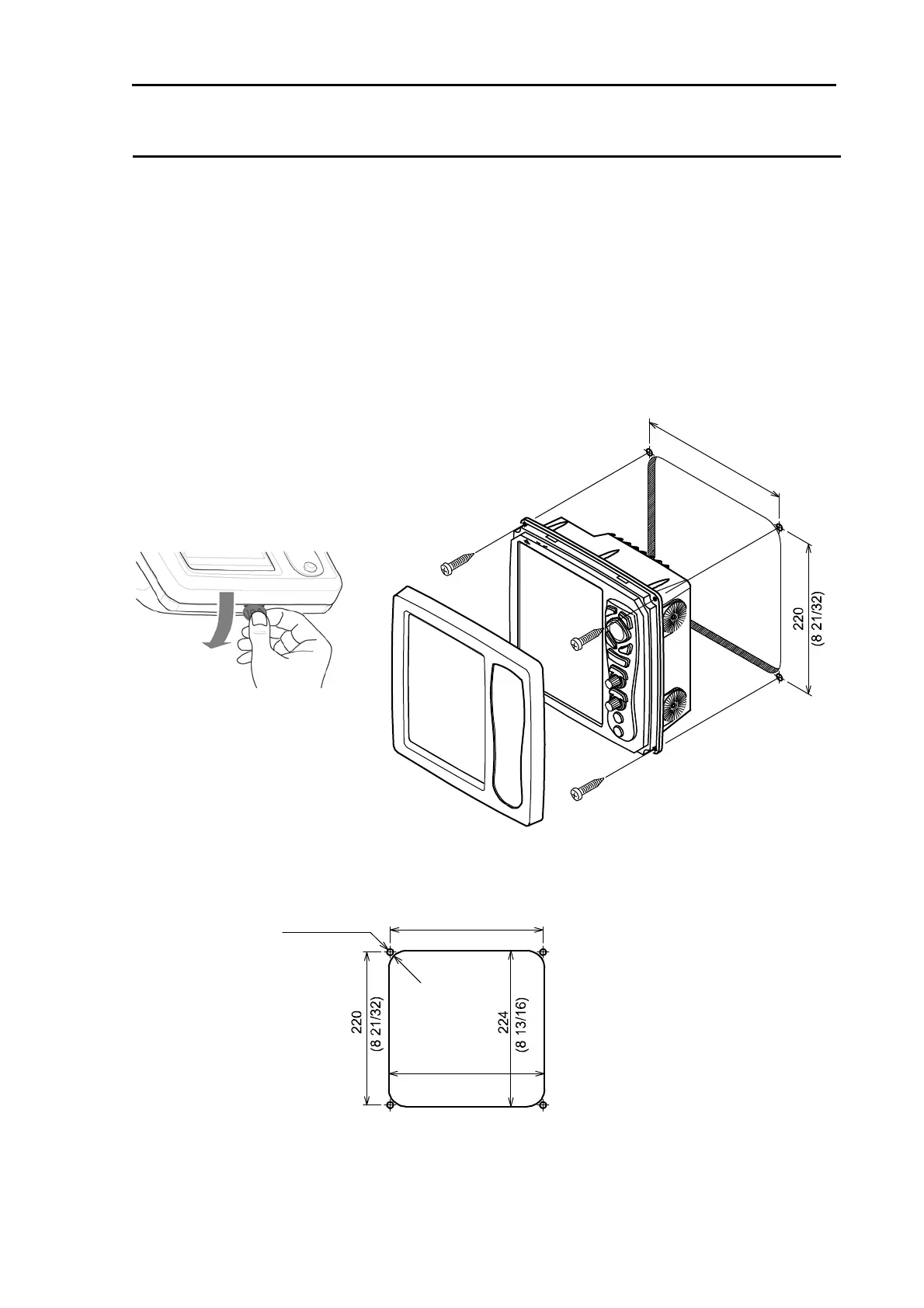
(1) Make a square hole at the location to be installed. (See Fig. 5.5.)
(2) Turn counter-clockwise the knob bolt fixing the display unit to the mounting bracket to loosen it,
push the unit to the left side and pull the unit upward. The mounting bracket and knob bolt are not
used.
(3) Confirm that the unit matches with the square holes. If not matched, correct the square hole.
(4) Remove the front frame of the display unit, pulling it toward you. (See Fig. 5.4.)
(5) Connect the connectors for power and transducer to the unit respectively.
(6) Install the display unit in the installing location (square hole) and fix it with four tapping screws
(4mm) (M4 or pan-head). (Prepare 4mm screws suitable for thickness of installing location.)
(7) Install the front frame removed in step (4).
Unit: mm (inch)
4-4mm (4-5/32)
Hole for screw
Threading
hole
R25 (63/
64)
220
(8 21/32)
(8 13/16)
224
Fig. 5.4 Flush-mount Instsllation
Fig. 5.5 Work of fiush-mount instsllation hole
Threading hole
Unit:mm (inch)
2
2
0
(
8
2
1
/
3
2
)



 To Next Page