CVS-128/128B Chapter 5 Installation
0093112802-06 5-3
5.2 Installation of CVS-128/128B Display unit
CVS-128/128B Display unit can be installed either on desk-top or flush-mounted.
Install in the following procedure.
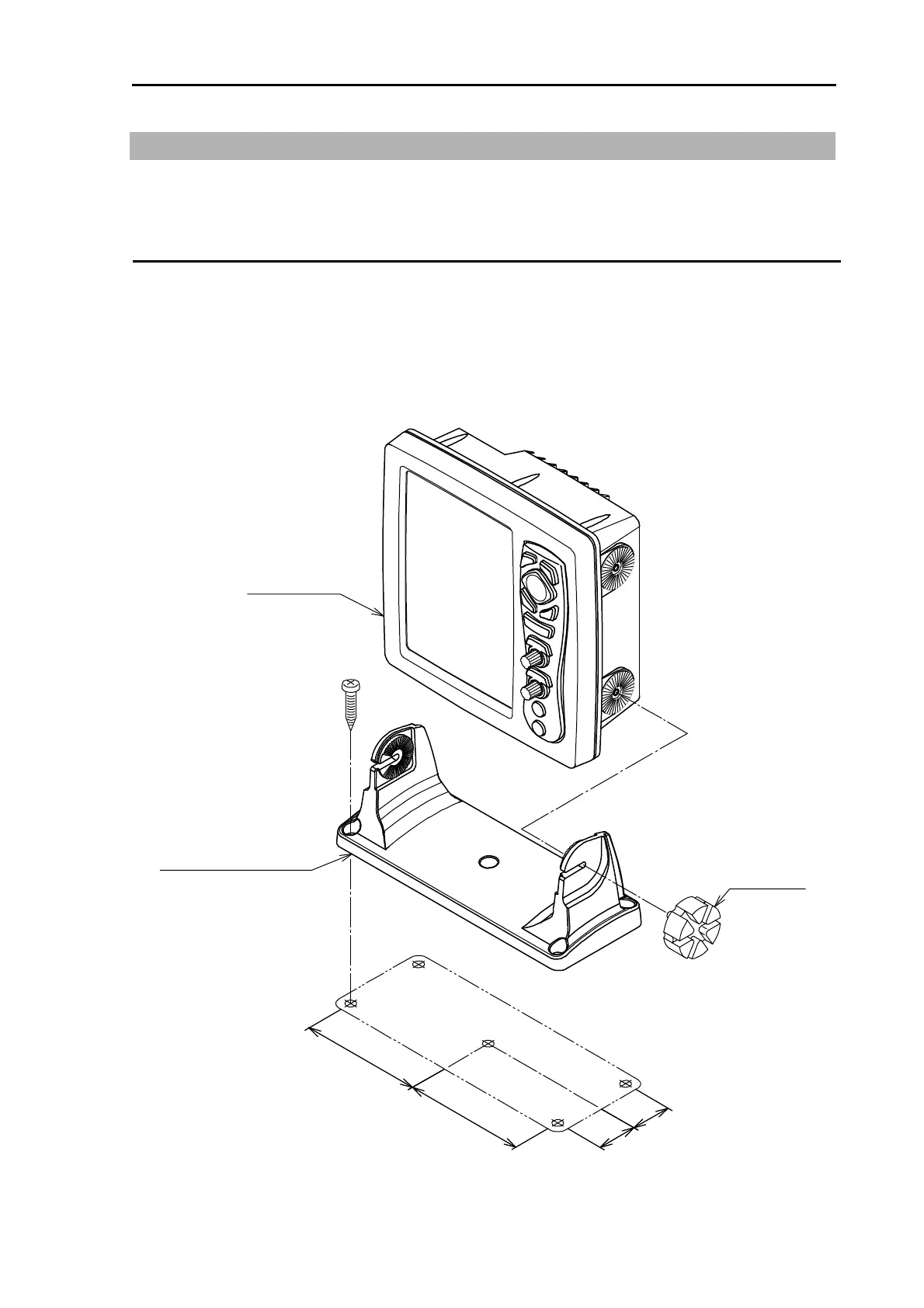
Desk-top Installation
(1) Remove two knob bolts fixing the display unit to the bracket.
(2) Remove the display unit from the bracket and place it on the stable flat place.
(3) Place the bracket on the position where the display unit will be installed and fix the bracket with five
5 mm screws.
(4) Place the display unit on the installation bracket and fix the display unit with two knob bolts
removed in step 1.
Display unit
Installation bracket
Knob bolts
Unit: mm (inch)
4
1
4
1
(
1
3
9
/
6
4
)
(
1
3
9
/
6
4
)
1
2
5
1
2
5
(4
5
9
/
6
4
)
(
4
5
9
/
6
4
)
Fig. 5.2 Desk-top installation



 To Next Page